0:04
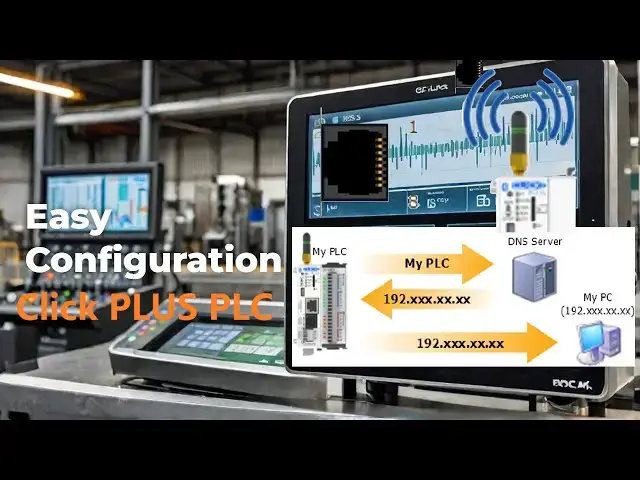
Assign a static IP to click plus PLC
0:06
easily. You know the drill. Another
0:08
project, another piece of hardware. This
0:10
time it was a click plus PLC. We had
0:13
previously assembled the hardware using
0:14
the Automation Direct website to ensure
0:16
that all of the components were
0:18
accounted for. Before it could
0:20
orchestrate a single solenoid or read an
0:22
encoder pulse, it needed an identity on
0:24
the network. Without a proper IP
0:27
address, it was just a rather expensive
0:28
paper weight. So, I prepped my battle
0:31
station. The laptop was open. The
0:32
familiar click PLC software was already
0:35
loaded and a hot mug of coffee was at
0:37
hand. Let's get this done. Detailed
0:40
information contained in this video can
0:42
be found at acccca.ca.
0:44
A link has been put in the description
0:46
below. If you haven't watched the other
0:48
videos yet, links in the description
0:50
below will direct you to video one.
0:52
There will also be links to the
0:54
remaining videos in this series.
0:56
The IP configuration protocol, a
1:01
Step one, initial linkup.
1:04
First order of business, a direct shot.
1:07
I ran a standard Ethernet cable straight
1:08
from my router to the Click Plus PLC.
1:11
Port one of the Click PLC defaults to
1:13
DHCP. Dynamic host configuration
1:15
protocol. Automates the assignment of IP
1:18
addresses and other network
1:19
configuration parameters to devices on
1:21
the network. It's the simplest way to
1:23
establish that initial communication,
1:25
especially with a factory default
1:29
Step two, discovery and access.
1:32
Fired up the Click Plus programming
1:34
software. The startup window
1:36
automatically displays.
1:40
The software feels intuitive. It knows
1:42
that when I start this software, we will
1:44
do one of three things. Start a new
1:46
project, open an existing project, or
1:48
connect to the PLC. Select connect to
1:50
PLC. The connect toclick PLC window will
1:52
be displayed. This displays the PLC name
1:55
that we assigned previously. The
1:56
software automatically initiated a
1:58
network scan. Within seconds, the PLC's
2:01
default IP address, typically in the 192
2:04
168.1x range, such as 192.168.1.26,
2:10
populated the list. Confirmation of
2:12
physical connectivity achieved. We also
2:14
see the firmware and physical MAC
2:16
address of the controller. IP addresses
2:19
come in different classes.
2:21
The standard default class is C.
2:26
The subnet mask is an essential setting
2:28
on the network. All devices must have
2:31
the same mask setting to communicate.
2:34
Let's make sure we write this down to
2:35
ensure that the class and subnet mask
2:36
for our static fixed IP address will
2:39
work. Select connect to establish
2:41
communication with our click plus PLC.
2:43
Select read the project from the PLC
2:45
from the connect dialogue window.
3:02
We can see that we are connected to the
3:04
PLC along the bottom status bar of the
3:06
Click PLC programming software. We are
3:09
currently in run mode and our previously
3:11
created quick sample program is running.
3:18
Step three, assigning a static IP. The
3:24
Now for the main part, establishing a
3:26
static IP address, relying on DHCP in an
3:29
industrial control environment is asking
3:30
for trouble down the line. Network
3:33
administrators can sometimes use
3:34
reserved IP addresses based on the MAC
3:36
address of the device. I like to set
3:39
this to a static IP address anyway. On
3:41
the default home tab, select compport
3:43
setup under the CPU icon. This
3:45
communication port setup window gives me
3:47
the entire list of communication
3:49
options. Select port one setup. This is
3:52
the Ethernet port with which we are
3:54
currently communicating as indicated on
3:56
the bottom status line of the click PLC
3:58
programming software. The compport setup
4:01
details window is now displayed. Wow,
4:05
Under the port, I can select any of the
4:08
communication ports to set up. Let's
4:10
enter the network parameters for port 1
4:12
IP address. I punched in 192.1168.1130.
4:19
This was chosen to fit neatly within the
4:21
existing plant network's designated
4:23
subnet for automation devices avoiding
4:25
any potential conflicts. Subnet mask
4:28
standard 255.255.255.0.
4:32
This defines the local network segment.
4:35
Gateway IP address 192 to 16811.
4:40
This is the network's router or layer 3
4:42
switch allowing the PLC to communicate
4:44
beyond its immediate subnet if
4:46
necessary, EEG, to an HMI on a different
4:48
segment or a Scattera server.
4:51
DNS server address 8.8.8.8.
4:55
This domain name server address will
4:56
translate names into IP addresses. An
4:59
example is accustomation.ca.
5:03
Alternative DNS server address 8.8
5:05
8.4.4. This can improve browsing speed
5:08
and enhance security. I double check the
5:10
entries. Looks solid. Select okay.
5:14
Step four, committing the configuration.
5:18
With the network parameters confirmed, I
5:20
clicked write project on the home tab.
5:22
The software initiated the transfer,
5:24
writing the new IP configuration
5:26
directly to the PLC's nonvolatile
5:28
memory. The software automatically
5:31
recognizes that we need to save the
5:32
program under the same name we used last
5:37
The select network settings window will
5:39
now be displayed as we have changed the
5:41
settings. We can verify these settings
5:43
again and then select use project file
5:47
The right project into PLC window will
5:49
be displayed. Select okay. We are
5:52
executing a runtime edit. This means
5:54
that the PLC continues to run the
5:56
program while the new program is being
5:57
loaded. It then starts executing the new
6:00
loaded program. This is done without
6:02
pausing the PLC scan. Select proceed
6:07
A transfer completed will appear in the
6:08
output window. Good. If you are enjoying
6:11
this video, please hit the like button
6:13
below. Keeping up with all the latest
6:15
automation innovations can be difficult,
6:17
so hit the subscribe button. Remember to
6:20
hit the bell beside your subscription to
6:22
receive the notifications.
6:26
Since changing the network settings that
6:28
we were already using for communication,
6:30
the software will error and return an
6:34
A warning message will be displayed
6:36
indicating that the programming session
6:37
to the PLC was disconnected. We can
6:40
choose to work offline or select
6:46
Step five, verifying connectivity.
6:50
Our connect to click PLC window will be
6:52
displayed again. Wow, this programming
6:55
software is very intuitive.
6:57
We can see our new set IP address.
7:03
in the click software. I return to
7:04
setup.com port setup.
7:14
This time instead of port one, I
7:16
selected the WLAN setup. The wireless
7:18
local area network ports are displayed
7:20
in the compport setup details window.
7:23
Select the enable wireless LAN option.
7:25
This allows us to enter the static IP
7:27
address of 192.168.1.230.
7:30
Now I quickly enter the SSID name of a
7:34
Wi-Fi network that will enable devices
7:35
to connect to it along with the
8:05
Once again, we save and then transfer
8:07
the program to the Click Plus PLC. Our
8:09
WLAN light on the Click Plus CPU comes
8:21
We are currently connected through port
8:23
one. I select the disconnect option on
8:25
the home tab. Selecting yes when asked
8:27
if I want to disconnect from the PLC now
8:30
shows our bottom line status as offline.
8:32
Selecting connect again will bring up
8:34
the connect to click PLC. This time we
8:37
can now see our two options for
8:42
Select our Wi-Fi option and then select
8:44
connect. Our bottom status line will
8:46
show our new connection. Success. The
8:48
PLC was now officially an integrated
8:50
component of the network ready for
8:52
programming and operational deployment.
8:58
This foundational step, while seemingly
9:00
simple, is absolutely critical.
9:02
Get the IP right and the rest of the
9:04
integration flows smoothly. Get it wrong
9:07
and you'll be troubleshooting network
9:08
issues before you even write your first
9:10
rung of logic. Onto the next phase.
9:14
Learn more about how to design, build,
9:16
and program your own click PLC system
9:18
with confidence by clicking here. Click
9:20
here to see how you can learn PLC
9:22
programming using the machine simulator
9:24
by Nerkch. This will provide machine
9:26
scenes that you can program.