Up next in 10


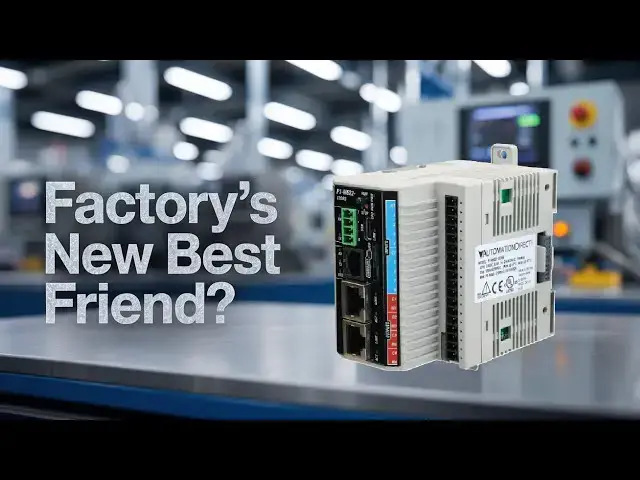
Master the P1-M622-16DR Mini PLC! Stop struggling with oversized controllers - discover how this compact powerhouse transforms small automation projects.
📖 FULL WRITTEN TUTORIAL + DOWNLOADS
https://accautomation.ca/p1-m622-16dr-mini-plc-is-this-your-factorys-new-best-friend/
⏱️ TIMESTAMPS
0:00 - Introduction - Industrial Control Panel Trends
0:24 - P1-M622-16DR Overview & Key Features
1:07 - What Makes the Mini Series Different
2:15 - Technical Specifications & Power Requirements
3:40 - Communication Capabilities & MQTT Support
4:56 - Proper Wiring Practices & Terminal Blocks
5:25 - Why Use Ferrules - Professional Wiring Tips
7:00 - Application Examples & Where It Fits
8:14 - Getting Started with Productivity Suite Software
9:00 - Tag-Based Programming & Documentation
9:37 - Wrap Up & Future Tutorials
📚 WHAT YOU'LL LEARN
✅ Complete technical specifications and IO capabilities of the P1-M622-16DR Mini PLC
✅ Professional wiring practices using ferrules for reliable industrial connections
✅ Built-in communication protocols including MQTT, Modbus TCP, and Ethernet/IP
✅ How to scale from 16 points to 512 IO points using expansion modules
✅ Tag-based programming advantages over traditional register-based systems
🔗 MORE RESOURCES
▶ Series: https://accautomation.ca/series/
▶ PLC Beginners Guide: https://accautomation.ca/programming/plc-beginners-guide/
▶ Free eBooks: https://accautomation.ca (subscribe for download)
🛒 RECOMMENDED HARDWARE
▶ Training Kits: https://accautomation.ca/series/
💬 Questions? Drop a comment below.
🔔 New tutorials every Monday — Subscribe and hit the bell!
#PLC #HMI #IndustrialAutomation #LadderLogic #AutomationDirect #PLCProgramming #ACCAutomation
Show More Show Less View Video Transcript
0:05
Did you know that the average industrial
0:06
control panel has shrunk by nearly 40%
0:09
over the past two decades? Yet, the
0:11
demand for functionality has tripled.
0:13
That stat alone tells you everything
0:15
about where automation is headed. The
0:17
days of massive control cabinets taking
0:19
up half your floor space are fading
0:21
fast. Enter the Productivity 1000 mini
0:24
PLC series from Automation Direct and
0:26
specifically the P1 M162
0:30
16DR. The compact powerhouse that packs
0:32
serious capability into a surprisingly
0:34
small footprint. I get questions all the
0:37
time from folks just getting into
0:38
automation. What PLC should I start
0:40
with? Or I need something for a small
0:43
machine but don't want to outgrow it in
0:44
6 months. The P1 M62216DR
0:47
might be the answer to both questions.
0:49
Let me walk you through why. Detailed
0:51
information contained in this video can
0:53
be found at accccclautomation.ca.
0:56
A link has been put in the description
0:58
below. The website offers extensive
1:00
links, references, and coding samples,
1:02
making it a one-stop shop for all your
1:04
automation queries.
1:07
What makes the P1 M6226DR
1:10
different? The Productivity A000
1:12
miniseries represents something
1:14
relatively new in the automation world.
1:16
An actual standalone PLC with built-in
1:18
IO. Unlike the traditional Productivity
1:21
Thousand system, which lets you purchase
1:22
the CPU and IO modules separately, the
1:24
miniseries combines everything into a
1:26
single compact unit. Think of it as the
1:29
Swiss Army knife approach to
1:30
programmable controllers. The P1
1:32
M62216DR
1:34
comes with eight discrete DC inputs and
1:36
eight relay outputs right out of the
1:38
box. That's 16 DR in the part number. It
1:41
tells you exactly what you're getting.
1:43
16 points total DC inputs and relay
1:45
outputs. Automation Direct's naming
1:48
conventions actually make sense once you
1:50
crack the code. But here's where it gets
1:52
interesting. Despite its compact size,
1:54
this little controller runs on the same
1:56
productivity suite software as its
1:58
larger siblings, the P2000 and 3000
2:00
series. That means you're not learning a
2:03
light version of the programming
2:05
environment. Every instruction, every
2:07
function, every communication protocol
2:09
you master on this unit transfers
2:11
directly if you ever scale up to bigger
2:13
systems.
2:15
Technical specifications worth knowing.
2:18
Let's talk numbers because that's what
2:20
matters when you're specking out a
2:21
control system. The P1 M622 16DR
2:26
operates on 24VT DC power with a
2:28
tolerance of plus or minus 2% drawing
2:31
approximately 5 watts from the CPU
2:33
alone. Add about 1.25 watts for each
2:36
additional expansion module you stack
2:37
onto the system. The input side accepts
2:39
a 12 to 24volt DC signal with a
2:42
comfortable operating range from 10.2 2
2:44
to 26.4 volt DC. Input impedance sits at
2:48
3 kiloohms and your on voltage threshold
2:50
is anything above 9 vs DC while off
2:52
registers below 4.5 volts DC. Response
2:56
times clock in at 2 milliseconds maximum
2:59
with 1 millisecond being typical. Plenty
3:01
fast for most discrete control
3:02
applications. The relay outputs handle
3:05
both AC and DC loads making them
3:07
incredibly versatile. Need to switch a
3:08
24volt DC solenoid valve? Done. and have
3:11
a legacy 120 volt AC pilot light you
3:14
need to control? Not a problem. This
3:16
flexibility means you won't need
3:17
external interposing relays for mixed
3:19
voltage systems. Memory-wise, you're
3:21
looking at 50 megabits of user memory,
3:24
including your program data, and
3:25
documentation.
3:27
That's right, documentation. The
3:29
productivity suite lets you embed notes,
3:30
descriptions, and comments directly in
3:32
the project file. And it all lives in
3:34
the CPU. No more hunting for that binder
3:37
of printouts from 3 years ago.
3:40
communication capabilities that punch
3:42
above their weight.
3:45
Here's where the P1 M622 bus 16DR really
3:48
shines. Five built-in communication
3:50
ports come standard on this controller.
3:51
The USBC port supports programming,
3:53
online monitoring, and firmware updates
3:55
at 480 megabits per second. Gone are the
3:58
proprietary programming cables of the
3:59
old days. The 10/00 megabits per second
4:02
Ethernet port supports programming
4:04
Modbus TCP with up to 32 clients and 16
4:07
server connections. Ethernet IP scanning
4:09
and adapting custom UDP/TCP
4:12
protocols and MQTTs for IoT
4:15
applications. The dedicated remote IO
4:18
port connects to GS series variable
4:20
frequency drives. The PS AMC motion
4:23
controller, Protosx Field IO systems,
4:25
and P1 Rex remote IO bases. RS232 and
4:30
RS485 serial ports round things out for
4:32
legacy Modbus RTU and ASI protocol
4:35
devices. that MQTTs support deserves
4:37
special attention. If you're thinking
4:39
about connecting your control system to
4:41
cloud platforms, this controller speaks
4:43
that language natively. No additional
4:46
modules, no complex gateway
4:47
configurations. You configure your
4:49
broker connection, define your topics,
4:51
and start publishing data. It's
4:53
genuinely that straightforward.
4:56
Wiring practices that will save you
4:57
headaches.
4:59
Now, let's talk about something that
5:01
separates the professionals from the
5:02
hobbyists. Proper wiring practices. The
5:06
P1 M62216DR
5:08
uses an 18 position removable terminal
5:11
block for field wiring. Terminal blocks
5:13
accept wire sizes from 30 to 16 gauge
5:15
wire for solid conductors or 28 to 16
5:18
gauge wire for stranded wire. Strip
5:21
length should be approximately 6 to 7
5:22
mm. Here's my recommendation for
5:24
everyone new to industrial wiring. Use
5:26
fererals always without exception.
5:29
Fererals are small metal sleeves that
5:31
crimp onto the stripped end of stranded
5:33
wire. Why bother? Three reasons that
5:35
matter in the real world. First,
5:37
fererals prevent strand separation. When
5:39
you insert bare stranded wire into a
5:41
screw terminal and tighten it down,
5:43
individual strands can escape and
5:45
potentially contact adjacent terminals.
5:48
On a 3.5 mm pitch terminal block like
5:51
this one, you don't have much room for
5:52
error. A single stray strand bridging
5:54
between terminals can cause erratic
5:56
operation, blown outputs, or worse,
5:58
equipment damage. Fererals keep
6:00
everything contained in a neat uniform
6:02
package. Second, fererals reduce
6:04
connection resistance. When a stranded
6:06
wire gets clamped by a screw terminal,
6:08
only some strands make solid contact,
6:10
others get crushed or displaced over
6:13
time through vibration and thermal
6:14
cycling. This leads to increased
6:16
resistance, heat buildup, and eventual
6:17
failure. A properly crimped fereral
6:20
distributes the clamping force evenly
6:22
across all strands, creating a gas-tight
6:24
connection that stays reliable for
6:25
years. Third, fererals make maintenance
6:28
faster. When troubleshooting at 2 a.m.,
6:30
because a line is down, the last thing
6:31
you want is fighting with bird nested
6:33
wire ends. Fuels let you insert and
6:36
remove wires cleanly every time. For
6:38
this controller, use DIN46228
6:40
part 4 compliant fuels sized for your
6:43
wire gauge. A good crimping tool with
6:45
proper die sets isn't optional. It's
6:47
essential. The cheap ratcheting crimpers
6:49
from the hardware store won't cut it.
6:51
Invest in quality tools, manufactured
6:53
tools. Reliability is the key when
6:55
making this investment. Your future self
6:57
will thank you.
6:59
Where does this controller fit? The P1
7:03
M622216DR
7:05
occupies a sweet spot in the market.
7:06
It's more capable than a simple relay
7:08
logic system, but doesn't require the
7:10
investment of a full-blown modular PLC
7:12
platform. Consider applications like
7:14
small packaging machines where you need
7:16
to coordinate a handful of pneumatic
7:18
cylinders, monitor some photo eyes, and
7:20
communicate with an HMI or a water
7:23
treatment lift station with a few pumps,
7:24
level sensors, and escape a connection
7:26
requirement. Material handling systems
7:29
with conveyor sections, diverters, and
7:31
barcode scanner interfaces work
7:33
beautifully. Test fixtures in
7:35
manufacturing that need to sequence
7:36
through a procedure and log results to a
7:38
database are a perfect fit for the
7:40
capability set. The expansion capability
7:42
means you're not boxed in either. Stack
7:44
up to four additional IO modules onto
7:46
the mini PLC for a maximum of 80
7:49
discrete IO points or 40 analog channels
7:51
locally. If you need even more, the
7:53
remote IO port supports up to 512
7:56
additional points through P1RX expansion
7:58
modules. That's a serious amount of IO
8:00
from what starts as a palm size
8:02
controller. If you are enjoying this
8:03
video, please hit the like button below.
8:05
Keeping up with all the latest
8:07
automation innovations can be difficult,
8:09
so hit the subscribe button. Remember to
8:11
hit the bell beside your subscription to
8:13
receive the notifications.
8:16
Getting started.
8:18
The Productivity Suite programming
8:19
software is free to download from
8:21
Automation Direct's website. No license
8:23
keys, no dongles, no subscription fees.
8:26
Download it today and start
8:27
familiarizing yourself with the
8:28
environment before your hardware even
8:30
arrives. The built-in simulator lets you
8:33
write and test programs without physical
8:35
hardware. Perfect for learning or
8:36
validating logic before deployment. When
8:39
you're ready to program the actual
8:41
controller, connect via USBC or
8:43
Ethernet, transfer your project, and
8:45
flip the run switch. Tag based
8:47
addressing means you're working with
8:48
meaningful names like conveyor start and
8:50
part present sensor instead of cryptic
8:52
register numbers. This makes programs
8:55
self-documenting and dramatically easier
8:57
to troubleshoot 6 months down the road
8:58
when you've forgotten what register M247
9:01
was supposed to do. The P1 M62216DR
9:05
represents what modern industrial
9:07
control should be. Powerful enough for
9:09
real applications, accessible enough for
9:11
newcomers, and priced reasonably enough
9:12
that you can actually justify it on a
9:14
project budget. Whether you're
9:16
automating your first machine or adding
9:18
a compact controller to an existing
9:20
system, this mini PLC deserves serious
9:22
consideration. What projects are you
9:25
working on that might benefit from this
9:27
type of controller? Drop a comment below
9:29
or reach out through the contact page.
9:31
I'm always interested to hear what real
9:33
world problems people are solving with
9:34
these tools. Watch for upcoming
9:36
tutorials covering the productivity
9:37
thousand minisseries programming
9:39
examples and communication setup guides.
9:42
To build digital twins of machinery,
9:44
test control logic, and learn automation
9:46
without expensive hardware, use machine
9:48
simulator. This is an all-in-one
9:50
industrial automation software that
9:52
creates realistic 3D virtual
9:54
environments for designing, simulating,
9:55
and programming mechanical systems and
9:57
PLC's. To learn more about the machine
10:00
simulator and digital twins, click here.
10:02
Click here to view the entire series on
10:03
the Productivity 1000. Remember that the
10:06
whole Productivity series of PLC's uses
10:08
the same software. This means you only
10:10
need to learn one platform, making it
10:12
easier to configure, program, and
10:13
maintain different models. This
10:15
consistency streamlines training,
10:16
reduces setup time, and ensures a
10:18
smoother transition when upgrading or
10:20
expanding your automation systems.
Industrial Materials & Equipment
Jobs & Education
Engineering & Technology
Factory Automation