Up next in 10

React js File Viewer Example to Display Multiple Image,PDF,PPTX,DOCX & HTML Files From URL
Dec 22, 2025

Buy the full source code of application here
https://buy.stripe.com/14keYe7Jf2Ws2Zi1z3
Show More Show Less View Video Transcript
0:06
Uh hello friends, today in this tutorial
0:07
I'll be showing you that how to display
0:11
multiple files inside your ReactJS
0:14
application. And this will be advanced
0:16
file viewer library for ReactJS. So
0:19
inside your ReactJS application skies,
0:21
so sometimes you need to display
0:23
different files, extensions such as uh
0:26
images, uh PPT files, uh Excel files, uh
0:30
HTML files, all these files you need to
0:33
display. So we will be looking at how we
0:35
can display these files multiple times.
0:38
So you can just see here uh we have
0:40
these files here. So this is the image
0:43
file that we are displaying here. This
0:45
is the first image file. So this is JPG
0:47
file and uh you can see that this is the
0:50
document here. So this is the image file
0:52
that we are displaying inside your
0:54
ReactJS application and there is a next
0:57
button available to us. We can go to the
0:59
previous file here which is this excel
1:02
file. So now you can see this is a excel
1:04
file that we are displaying and if I go
1:06
to the previous image this is again a
1:08
image. So in this way guys you can
1:10
display multiple files. So this is a
1:12
document dox file word document that we
1:15
are displaying here. So various kinds of
1:18
documents you can display you various
1:20
kinds of files you can display inside
1:22
your reactjs application and for
1:24
building this application guys we are
1:26
using a advanced library which is called
1:30
as react doc viewer. So basically if you
1:34
search for this library the very first
1:36
link which comes in react talk viewer
1:39
this is a library that we are using for
1:41
this application you will see that this
1:42
is a very good package 7,000 weekly
1:45
downloads are there so simple command is
1:47
there simply you need to npmi react doc
1:50
viewer simply install this package so
1:53
you can just see it supports various
1:55
formats here you will see it supports
1:57
bmp docs html also it supports jpg png
2:02
PDF files also it supports it also
2:05
supports PPT files uh text files Excel
2:09
files so all the major file types it
2:11
supports and you will be able to display
2:13
it from the URL or you can download it
2:16
inside your local machine and then
2:18
display it so it's a very flexible
2:20
library inside your ReactJS application
2:23
you will be able to display the
2:26
libraries
2:28
uh the file types so if you're watching
2:30
it for the very first time guys then
2:32
please hit the like button, subscribe
2:34
the channel as well. So you can just see
2:37
here how flexible this library is. So
2:41
in order to install this library, it is
2:43
very simple guys. You need to simply
2:47
uh install this. So we will just uh
2:50
install this. You will see that this is
2:54
a simple command which is there npmi
2:56
react doc viewer. So simply you need to
2:59
install this and uh after that you need
3:02
to provide the URI property. Inside this
3:05
you will provide the address of the PDF
3:07
document or any sort of image file that
3:09
is hosted on the internet or you can
3:11
just require it from the local file
3:13
system and then display it. So inside
3:16
your functional component so let's start
3:18
building this application guys. So I
3:20
have uh built this you can see this is
3:23
hosted on code sandbox. So we will try
3:25
to replicate it inside our local
3:27
machine. So I have given all the source
3:29
code in the video description. This is
3:31
my blog post. I have written
3:33
step-by-step instruction. If you want to
3:35
you can download all the source code by
3:38
going to the video description link. So
3:41
ReactJS file viewer example. So you can
3:44
just see you can display various file
3:46
types and all the source code is given.
3:48
So just go to the video description link
3:50
to download all the source code. So
3:52
let's get started guys. So now just go
3:55
to your command line and uh just go to
3:58
the projects directory and make a new
4:01
directory. So we will react viewer. I
4:04
will make a new directory.
4:09
So inside this guys you need to create a
4:12
new react project by this command which
4:15
is npx create react app and uh react
4:18
file viewer. I will call this. So it
4:21
will create this project inside this
4:23
directory. So it is creating a new react
4:25
app. You will see that it will just take
4:28
some time to install all the
4:30
dependencies. So in the meantime, I can
4:33
just uh display this widgets that how
4:36
many people are watching the stream.
4:39
So if you're watching it for the very
4:42
first time guys, we are building a
4:43
ReactJS file viewer inside the browser
4:47
where you can display different file
4:49
types.
4:52
So now it is just creating the ReactJS
4:55
project. So just wait.
5:06
So once it completes I can uh
5:10
install the library and uh get on with
5:14
the job. So it is just completing the
5:17
process. So just wait once it is
5:20
installing these packages we will try to
5:24
install the library.
5:26
So if you're watching it for the very
5:27
first time guys then please hit the like
5:29
button subscribe the channel as well.
5:40
So now if I see uh it is just doing this
5:44
process.
5:45
So now you can see it is installed. So
5:48
now we need to go to the project
5:50
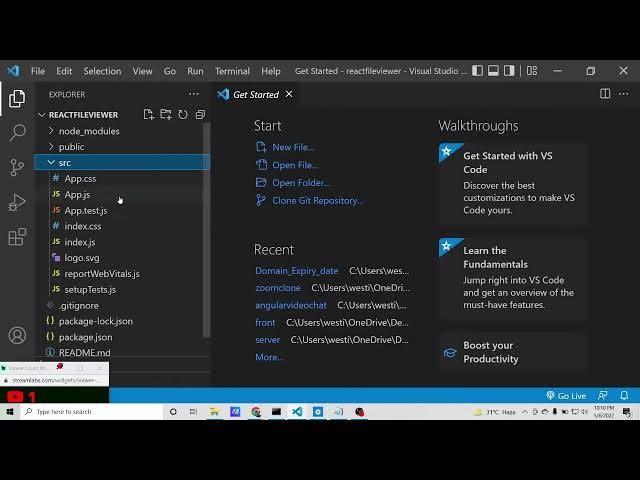
directory which is react file viewer
5:54
and I need to open this inside visual
5:56
studio code text editor. So this is you
5:58
can see this is our brand new ReactJS
6:00
project. I haven't done anything to it.
6:03
So it's a brand new project and uh the
6:06
very first thing guys we need to do we
6:07
need to install this library which is
6:09
very simple. If you see here
6:12
uh this is the package you need to
6:14
install.
6:16
If you see
6:22
uh this is a package simply copy this
6:24
command
6:27
paste it npmi react doc viewer.
6:41
So it is installed this package. Now we
6:44
we can simply run this uh include this
6:47
library. So for including it guys it is
6:49
very simple. Go to app do.js wherever
6:52
you are building this simply delete all
6:54
this code. We don't need this. Instead
6:57
also delete this.
7:01
And uh in order to do first of all guys
7:04
uh it is very simple. Let me tell you
7:07
how to use this library. Uh first of all
7:10
we need to import this library. So we
7:13
need to import the doc viewer
7:18
uh from it is automatically required it
7:22
from react doc viewer simply you need to
7:24
require it and the second library you
7:26
need to include is this in curly
7:28
brackets which is doc viewer renderer
7:33
that's it so after that guys we can
7:36
simply uh display
7:38
uh documents from the URL so just
7:41
declare a docs array. So inside this
7:43
array guys, you will have a set of
7:46
objects.
7:48
Each object correspond to a URI
7:50
property. URI property. So here you need
7:53
to provide the address where the image
7:55
is located on the internet. So make sure
7:58
that this image belongs to you because
8:00
uh course error will come if you don't
8:03
have it. So if you just provide random
8:06
image course error will come. So make
8:08
sure that you are providing images which
8:10
are hosted on your website only. So
8:15
so you can use mure images website
8:19
these are course free images. So s3 e
8:25
so this is a URL you will see that so
8:30
so these are course free images so you
8:34
don't will will get error so you can use
8:37
safely these images and display it
8:39
inside your application
8:42
so after providing the URI property guys
8:44
this is the address of the image that
8:46
you want to display it inside your
8:47
application the next thing is very
8:50
simple you need to include include this
8:52
component which is doc viewer
8:55
and this takes the property which is
8:56
plug-in renderers and we need to pass
8:59
our object which is doc viewer renderers
9:03
which we have included you will see that
9:05
at the very top.
9:09
So close this and also you need to
9:12
provide the documents property which is
9:14
located
9:16
documents. So this is a array here. So
9:18
we need to pass docs. That's it. So
9:22
after doing this guys, we can safely run
9:24
our application. If you say npm run
9:27
start.
9:31
So this will start our ReactJS
9:33
application. So it is just starting it.
9:35
So just wait.
9:38
So now basically you will see that guys
9:39
it will display this image
9:42
hopefully.
9:50
So it is just starting the development
9:52
server. So for the very first time it
9:55
takes some time. So it has started the
9:58
server. You will see that.
10:09
So it is saying that invalid hook call.
10:11
Hooks can also be called inside.
10:19
Uh let me see guys what is the error
10:22
here.
10:28
Oh I think we need to display uh we need
10:31
to declare it.
10:37
This example is given here. There you
10:38
will see that.
11:04
So here you just simply need to go to
11:06
mj.com. So this is the website where you
11:09
can use uh free images and display it.
11:13
Simply search for JPG and uh various
11:17
JPGs image will come. Simply copy image
11:20
address if you want to display it and
11:22
change the URI property to this.
11:30
So now if you see here inside this
11:33
application
11:36
I don't think so why it is not
11:38
displaying this because uh
11:50
in this it is successfully displaying
11:53
it. You will see that if I show you
11:57
index.js JS.
12:07
So if I see here,
12:15
so in this you will see it is displaying
12:17
this document. In this displaying it is
12:20
Excel file. It is also displaying it. So
12:22
basically you can download images inside
12:24
your root directory. This is
12:26
screenshot.png. png. So basically if you
12:29
want to display it you will simply
12:31
require this image
12:35
by using required statement.
13:16
So three people are watching the stream
13:17
guys. So we are display we are creating
13:20
this application advanced file viewer
13:22
where you can display various uh
13:24
extension types files inside your
13:26
reactjs application. For this
13:28
application, we are using this library
13:30
which is react doc viewer. You can also
13:33
test inside your PC. Uh how to use this?
13:37
So I am using this inside code sandbox.
13:41
I I don't know in my PC it is this
13:44
library is not working. You can test it
13:46
inside your own PC if it is working or
13:48
not. But uh it should definitely work
13:51
because but in my PC it is not working.
14:00
screenshot
14:02
dot.png.
14:17
So it is saying that screenshot.png
14:20
cannot be found.
14:36
text document. It can find.
14:47
So now you can see it is displaying this
14:50
text uh dox file and excel file inside
14:54
the browser. So you can see that
14:59
the library is pretty simple. You just
15:01
need to
15:03
just pass a URI property and just pass
15:06
the address of the file that you need to
15:08
display. So it supports various
15:10
extensions. So it also supports PDF file
15:14
also. So you can also download a sample
15:17
PDF file if you want to display it.
15:23
So simply you can download this PDF file
15:25
if you want to display it inside your
15:27
ReactJS application
15:33
simply then uh you can upload this.
15:40
All the source code will be there inside
15:42
video description. Please hit the like
15:44
button, subscribe the channel as well.
15:52
Free media tool website purchase.
15:54
So you can purchase that website the
15:57
rate is given you will see 1,000 rupees
16:01
in INR. So if you open this free media
16:05
tools.com I have given that option to
16:08
purchase the code. You will see that
16:10
1,000 Indian rupees. So if you click
16:12
this button you will be redirected to
16:14
the page
16:17
here you can download just purchase this
16:20
code here free media tools full source
16:22
code you can enter your credit card
16:24
details and you can safely purchase it
16:27
using stripe
16:29
so there is no uh you can instantly
16:33
purchase it so there is not a question
16:38
yeah I know that so you can safely
16:40
purchase it so it is not issue.
16:47
So I will tell you guys it is very much
16:49
simple. In order to do this process if
16:53
you see you need to
17:05
so five people are watching the stream
17:07
guys. So here we are
17:14
displaying various image types using
17:16
this file viewer uh document viewer for
17:19
react. So it's a advanced library where
17:21
you can display every extension image
17:23
files, jpg files, doc files, word
17:26
document files, HTML files, JPEG files,
17:29
PDF files, all these extension files you
17:32
can display. This is the library that we
17:34
have to install. So this is a very
17:36
simple command npmi react doc viewer. So
17:40
the usage is very simple. I have shown
17:42
you just install this. Put a URI
17:45
property and put the
17:49
uh address of this image. But you can
17:52
also download it.
17:55
Uh instead you can also do this like
17:58
this URI property and you can make use
18:01
of the required statement and then you
18:03
can require various files which is logo.
18:07
SVG which are present inside the
18:10
directory
18:15
like this. You can uh require it from
18:18
the URL or you can require it from the
18:20
local directory. So this will display
18:22
this like this. I have shown you. You
18:25
can see that
18:27
this will display these images right
18:29
here inside a advanced viewer that React
18:31
has like this.
18:34
You can see that
18:37
uh previous next buttons will will also
18:39
be there. So here we can upload this
18:41
image PDF file.
18:46
So this is the sample file. We can
18:49
upload.
18:53
So we can move this inside this
18:56
directory sample.pdf.
18:59
And here we can require this
19:06
which is sample PDF.
19:18
So basically if you refresh it guys this
19:20
application.
19:22
So now this will also display that PDF
19:24
file which is required here. I have just
19:26
downloaded it.
19:29
So this is a sample PDF file guys. you
19:31
now you can see it is displaying it all
19:33
the two pages this is the first page
19:35
this is the second page you can go to
19:37
the second page like this so it's a very
19:39
powerful powerful library where you can
19:42
display every extension image file jpg
19:46
file doc file ppt file also so you can
19:49
see that this is a doc file this is a
19:53
excel file you will see that in the
19:56
application itself so it's a very
19:58
powerful library.
20:12
So if you have any sort of doubt guys
20:14
regarding this application, you can ask
20:16
in the comment section. S Python
20:18
complete support.
20:24
You can see that
20:40
So in this way guys you can download any
20:42
sort of file. It has supported all the
20:46
uh file types. You can just see here
20:48
BMP, doc, docs. So you can try every
20:52
image file type that you want to display
20:54
inside your ReactJS application. It's a
20:57
very powerful library that I as I
20:59
already told you. If if you want the
21:01
full source code, I have given in the
21:03
video description. You can go to the
21:05
video description. Simply go to
21:07
description and download all the source
21:09
code. Please hit the like button,
21:11
subscribe the channel and I will be
21:14
seeing you in the next video.