Up next in 10

Build a React.js TikTok Video Streaming UI Clone Web App in Browser Using Redux in TypeScript
Mar 5, 2026

Buy the full source code of application here:
https://procodestore.com/index.php/product/build-a-react-js-tiktok-video-streaming-ui-clone-web-app-in-browser-using-redux-in-typescript/
Show More Show Less View Video Transcript
0:00
Uh hello guys, in this video I'll show
0:02
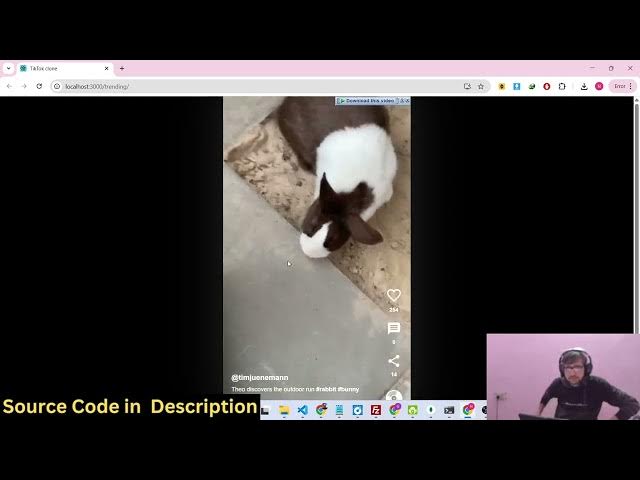
you I built out a Tik Tok UI clone
0:04
inside ReactJS.
0:07
So the interface looks something like
0:08
this. We are running this application
0:10
locally right here. So we have quite a
0:12
number of videos right here which are
0:13
playing. You can see that it also looks
0:16
good on mobile phone as well. So you can
0:18
it's completely responsive here. So this
0:21
looks something like this on mobile
0:22
phone. You will see that these are three
0:26
videos that I have.
0:29
You have the play button, pause button,
0:30
you can play the video. So we also have
0:33
buttons for liking the video,
0:35
commenting, sharing, everything is
0:37
there. So
0:40
you can see that using your mouse you
0:43
can actually
0:46
swipe away to different videos right
0:48
here. So this is the full directory
0:50
structure. It's coded right directly in
0:52
ReactJS. Each and every component is
0:53
divided into its appropriate TypeScript
0:55
file. So if you're interested in
0:57
purchasing it, the link is given in the
0:59
description. You can directly purchase
1:01
the source code. After you purchase it,
1:03
all the source code will be downloaded
1:05
from Google Drive. So it's actually
1:07
using the latest version of React and we
1:09
are also using React Redux for this as
1:12
well for building this application.
1:15
And it's very simple to run this. So go
1:18
to the terminal simply type the command
1:20
npm run start. So this will start the
1:23
application
1:25
at localhost 3000. So
1:30
it's it's just a UI clone. Uh it is not
1:34
saving this information in any database.
1:36
So it's just a UI clone of Tik Tok. So
1:39
it has a similar UI structure of
1:41
displaying videos, playing videos. We
1:44
have these controls for liking, sharing,
1:46
sharing the video.
1:48
So it's completely responsive as you can
1:50
just see
1:52
on desktop, mobile devices, tablet.
1:55
So it will save you a lot of time if
1:58
you're looking forward for building out
2:00
your own Tik Tok clones. So you can
2:01
actually purchase the source code and
2:04
get started. Each and every component is
2:06
divided into its appropriate TypeScript
2:09
file. So the videos are stored inside
2:11
this right here. You can upload more
2:14
videos.
2:15
So these are three static videos which
2:17
are there inside the public videos
2:19
folder. So you can add more videos
2:22
or you can also store these videos in
2:24
database as well. Plus you can integrate
2:27
the authentication system as well. So
2:29
the possibilities are endless. You can
2:31
actually integrate this. It's a React
2:34
project. So it's also very easy for you
2:36
to run this and deploy this as well. And
2:40
if you still face any issues in running
2:41
and deploying the application, you can
2:43
mail me. I will help you. So you can
2:46
just see right here.
2:52
So these are vertical videos which are
2:54
playing right here. So
2:59
So we have all these controls which are
3:01
there. So it's displaying the title. It
3:03
is playing the video and you can swipe
3:06
for getting to different videos.
3:23
So this is the overall project.
3:33
So if you're interested in this, the
3:35
link is given in the description.