Up next in 10

Build a React.js FFMPEG WASM to Build Audio Splitter or Cutter Timeline Editor in Browser Using TS
Mar 3, 2026

Buy the full source code of application here:
https://procodestore.com/index.php/product/build-a-react-js-ffmpeg-wasm-to-build-audio-splitter-or-cutter-timeline-editor-in-browser-using-ts/
Show More Show Less View Video Transcript
0:02
Uh hello guys. Uh in this live stream I
0:05
will show you I built out an audio
0:07
editor similar to this where you can
0:10
actually cut your audio files directly
0:12
in the browser. This project is
0:14
developed in ReactJS. So you can just
0:16
see inside the browser. This is the demo
0:18
of the application. We are running this
0:22
uh local host. So this is actually the
0:24
full directory structure of the project.
0:26
It's entirely built inside ReactJS. I
0:29
have given the link. You can directly
0:32
purchase the full source code of this
0:34
project. After purchasing it, you will
0:37
get the source code from Google Drive
0:39
automatically.
0:41
Uh let me show you the actual demo of
0:43
the application. So this is actually the
0:45
directory structure. Every component is
0:47
divided into its appropriate TypeScript
0:49
file here. It's fully customizable. We
0:52
are using the latest version of react
0:54
and we are using ffmpg web assembly
0:56
library to actually build out this audio
0:59
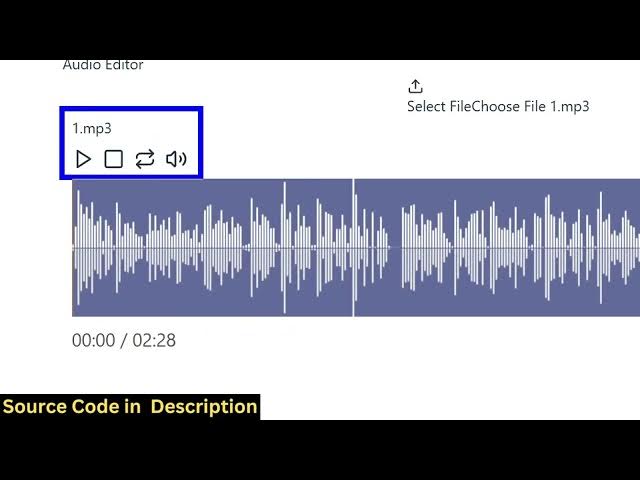
editor with timeline. So once you load
1:01
this application you basically the
1:04
interface looks something like this. You
1:06
first of all select an audio file.
1:09
So I select this MP3 audio file and it
1:12
actually construct this timeline. So
1:14
here you can actually play pause
1:17
everything. So this is you can see all
1:19
these buttons are there. Uh hello guys
1:22
if you're looking forward through
1:23
convert to paste your button here. So
1:26
you can take any audio for example your
1:29
audio file or a song anything. And now
1:32
if you want to cut this you basically
1:34
select the portion that you want to cut
1:37
using your mouse simply select and now
1:40
it will be highlighted and you have
1:42
these buttons available for you. So you
1:44
can basically cut this audio file from
1:47
here this portion and just click on cut
1:50
and as soon as you click the cut button
1:54
fmpp will do the processing directly in
1:56
the browser and now the output file is
1:58
automatically created. So these 21
2:00
seconds is automatically cut here and
2:03
now you can play the
2:04
>> automatically and you also have the
2:06
option to click read. You also have
2:08
>> so in this easy way you can cut an audio
2:10
file directly in browser. It's an audio
2:12
editor and then you can click the
2:14
download button to actually download
2:16
that output file that has cut and you
2:19
can then play this. So it's a
2:21
fullyfledged
2:22
>> and you also have the audio editor
2:24
directly in the browser. It will save
2:26
you a lot of time because uh many a
2:28
times you do not want to do audio
2:31
editing directly in the browser. So this
2:33
is a fullyfledged React project. If you
2:36
are interested in this, the link is
2:38
given. You can directly purchase this
2:40
full source code and you can even
2:42
customize it or add additional features
2:44
on top of this project as well. So it's
2:47
fully customizable. Once again, you
2:50
basically select whatever file that you
2:52
want to edit and then it construct this
2:55
nice little timeline where you can
2:57
actually select whichever portion that
2:59
you want to cut
3:01
using your mouse and simply click the
3:04
cut button. uh automatically fMPPG will
3:07
do the processing.
3:09
>> You have the which contain the tail bit.
3:11
>> It also creates this nice little
3:13
waveform as well where you can actually
3:15
play the audio. So for building this
3:17
project as I already told you we are
3:19
using this library fmpg web assembly
3:22
library. It allows you to use FMPG
3:26
directly in the browser. So we are using
3:27
this package directly using ReactJS for
3:31
building this. So if you are interested
3:33
in this you can purchase this source
3:36
code. The link is given in the
3:40
description.