Up next in 10

Build a React.js PDF Editor & Annotator in Browser Using PDF-LIB & Mozilla PDFJS-Dist Library in JSX
Mar 12, 2026

Buy the full source code of application here:
https://procodestore.com/index.php/product/build-a-react-js-pdf-editor-annotator-in-browser-using-pdf-lib-mozilla-pdfjs-dist-library-in-jsx/
Live Demo of App:
https://freemediatools.com/pdfeditor
Show More Show Less View Video Transcript
0:00
Uh hello guys, in this video I'll show
0:02
you I built out a ReactJS PDF editor
0:05
directly in browser. So this is a full
0:08
directory structure of this React
0:09
project and it's actually using these
0:12
libraries PDF lib and PDFJS desk. These
0:16
are two very popular libraries in
0:17
JavaScript to manipulate the PDF files
0:20
directly in browser. It's using the
0:21
ReactJS latest version and we are
0:24
running this project locally. So this is
0:26
the full directory structure. It's fully
0:28
customizable. If you need the source
0:30
code, the link is given in the
0:31
description. You can directly purchase
0:33
it. So I have also deployed this
0:35
application. You can check this at this
0:37
URL freemediatools.com/pdfed
0:40
editor. So check the full description.
0:42
I've given the demo link. So before
0:45
purchasing it, you can actually try out
0:46
this application. So first of all, what
0:48
you will see, you basically select a PDF
0:51
file that you want to edit. So once you
0:54
select the PDF file, the pages will
0:56
render right here. So both the pages in
0:59
this you can all actually read the PDF
1:01
file. We have all the basic controls for
1:04
actually zooming in zooming out and then
1:06
it also have the controls if you want to
1:10
annotate something. So here you can
1:12
provide the stroke width. After that you
1:15
can change the color here accordingly
1:17
what color you want
1:22
and then you can highlight anything. You
1:24
can just see how easy it is to annotate
1:28
any section. You can after making the
1:32
changes, you click the save button. And
1:35
now you move to the next page. And if
1:37
you want a different color, you actually
1:40
select the color. And now
1:45
just do the stuff once again. And after
1:48
you make the change, every time you need
1:50
to click the save button and then we
1:52
have the download button. So [snorts]
1:54
now to actually download the output
1:56
file. This is a really basic. You can
1:59
just see all the changes are saved and
2:02
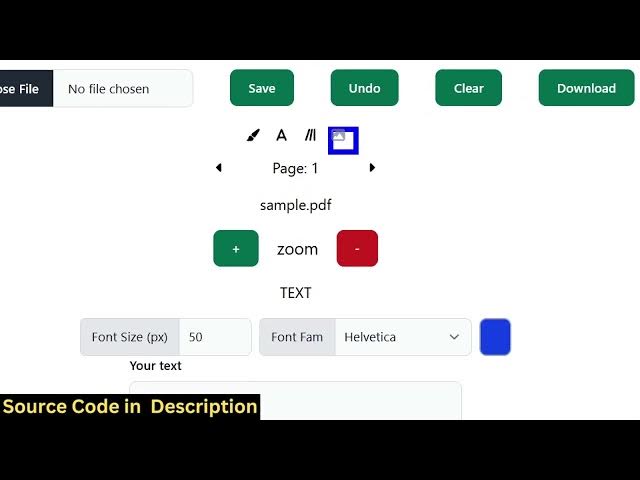
we also have capability to add
2:07
you can also hit this as well. We also
2:10
have ability to add text as well. So you
2:13
basically can have the ability just
2:15
provide the text phone size everything
2:18
and uh the text will be added here. You
2:21
can change the size
2:24
and after that using the mouse you can
2:26
control the position wherever you need
2:28
to add this. Again click save and we
2:32
also have capability to add images. So
2:34
click this
2:36
and once you click this you simply embed
2:39
the image whatever image you want to
2:41
embed.
2:47
So here you can control the size of this
2:50
image
2:54
and just place it. Click on save once
2:56
again. And now click download.
2:59
So everything will be saved here. You
3:01
will see the text, images, annotation,
3:04
everything is created automatically. So
3:06
if you're interested guys, you can check
3:08
out the demo. First of all, the link is
3:10
given in the description. And we are now
3:12
running this project locally as well.
3:14
localhost 3000 because we started this
3:17
project as you can just see on localhost
3:20
once you purchase it you simply npm
3:23
rundev this will start the project at
3:25
localhost 3000 and then if you want to
3:28
deploy this as well you can easily
3:30
deploy this application
3:34
to your custom domain name so it's a
3:35
single page application all the
3:37
processing is directly happening in the
3:39
browser so for building this if you
3:42
don't know these are the libraries that
3:44
we used PDF lip which is a JavaScript
3:48
library for manipulating your PDF files.
3:51
It's an open-source library and then we
3:53
are also using modula PDFJS disc. This
3:59
is again a
4:01
PDF manipulation library package
4:04
4 million weekly download. So we are
4:06
using these two packages as you can just
4:09
see here for building this application
4:12
and in ReactJS. So if you're interested
4:14
guys the link is given
4:16
you can directly purchase it.