Up next in 10

Node.js Express Project to Download Instagram,X/Twitter User Profile Posts in Browser Using JS
Mar 3, 2026

Buy the full source code of application here:
https://procodestore.com/index.php/product/node-js-express-project-to-download-instagramx-twitter-user-profile-posts-in-browser-using-javascript/
Show More Show Less View Video Transcript
0:00
this video. So, in this video, I'll show
0:02
you
0:03
a Node.js Express project that I
0:06
developed inside, basically, which
0:08
allows you to download
0:11
Instagram and X Twitter
0:14
post profile post directly inside the
0:16
browser. So, I'm just running this
0:18
application, as you can see, running it
0:20
locally.
0:22
So, I've already started this
0:24
application, localhost:3000.
0:29
So, as you can see, let me just start
0:32
this application once again. So, it's
0:34
coded inside Node.js Express.
0:37
So,
0:38
I'm just running it locally here.
0:42
So, once I start this application, it
0:44
will start this
0:46
locally here, as you can see, server is
0:49
running at http://localhost:
0:51
3000.
0:59
Um let me just
1:01
change
1:04
the port number.
1:06
So, this is a really awesome
1:08
application, which
1:11
basically can download post from
1:14
Instagram or Twitter. This is actual
1:16
interface of the application. Here, you
1:18
will paste the URL of your Instagram
1:21
profile.
1:23
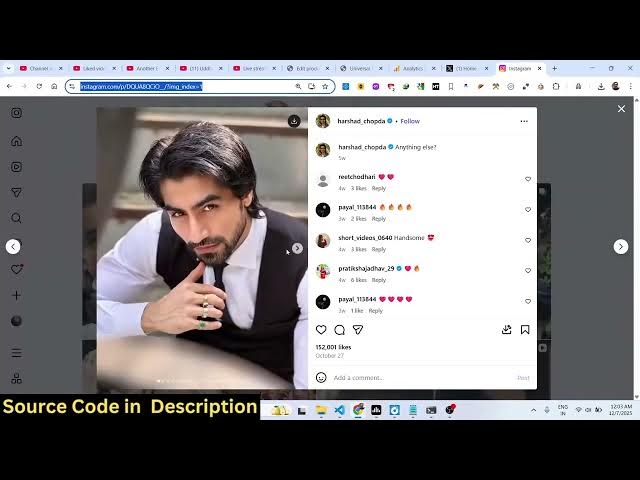
Let's suppose you want to download this
1:25
post. You simply copy the link and
1:27
simply go to this application, simply
1:29
paste it,
1:31
and click on fetch. As soon as you do
1:33
this, all these posts will be there, as
1:36
you can see, it will be displayed.
1:39
And one by one, now you can click the
1:41
download button. So, every image is
1:43
basically, you can see, this is a
1:44
profile information is captured.
1:47
And one by one, all the images are
1:49
captured. You can click the download
1:50
button, and once you click the download
1:52
button, all the images are successfully
1:55
downloaded. So, this is the first image,
1:57
this is the second image. So, as you are
1:58
clicking the download button,
2:01
the images are successfully downloading
2:03
from Instagram. So, you can just see,
2:05
these are the profile
2:07
pictures right here that I'm fetching. I
2:09
coded this entirely in a Node.js
2:11
Express. So, if you need the full source
2:12
code, guys, I've given the link in the
2:14
description. You can directly purchase
2:16
it.
2:17
This will be the full directory
2:18
structure you will get. It's coded
2:20
inside EJS
2:23
Node.js and Express.
2:26
So, this will be the full directory
2:27
structure you will get. It's very easy
2:28
to run this locally, as well. So, we're
2:30
running it locally.
2:32
So, I've given the link in the
2:33
description. This is not limited to only
2:36
images. If you have a Instagram video
2:39
that you want to download, let's
2:40
suppose,
2:42
uh I basically capture this video.
2:46
And now, once again, I plug this. This
2:49
time, this is a Instagram video. So,
2:52
now, what happens, you will see that
2:54
video is actually captured alongside
2:57
with the meta information, such as the
2:58
title, description, everything.
3:01
And now, you can play the video right
3:02
here. And also, we get the download
3:04
button.
3:06
So, once you click the download button,
3:08
you can click the
3:10
you can save this video inside your
3:11
machine. So, you can just see here. So,
3:14
it will save it as a MP4 file.
3:17
So, this is a fully fledged social media
3:19
downloader project. It also supports X,
3:22
as well,
3:23
or called as Twitter.
3:29
Again, you basically
3:31
copy the link,
3:33
and then again, come to the application,
3:35
simply paste it. And once you paste it,
3:37
you will see the image will be displayed
3:40
here,
3:41
alongside with the description. And now,
3:43
you can click the download button
3:45
to capture the image. You can see that.
3:48
This also applies to the video, as well.
3:51
You basically copy video as address, and
3:54
again, you paste it right here in the
3:57
search field.
3:58
Fetch. And once again, this is now a
4:01
video file, which is captured, as you
4:02
can see that. So, it's the video is
4:04
playing from the Twitter feed.
4:06
And you can click the download button to
4:08
download the video inside your local
4:10
machine, which will save it as a MP4
4:13
file. So, really simple script that I'm
4:15
giving you guys.
4:16
Uh the link is given in the description.
4:18
You can directly purchase it. After
4:21
purchasing it, you can easily run this,
4:23
deploy this very easily. So, I coded
4:26
this. This will be the full directory
4:27
structure. You will get the zip file
4:29
from Google Drive automatically. So,
4:32
simply go to the link, and you can
4:34
purchase this full script. I coded this
4:37
from scratch. And if you are interested,
4:40
you can basically capture anything from
4:42
X Twitter, Instagram. You go to the
4:45
profile, and
4:47
simply plug the URL, and then
4:50
automatically plug this inside this
4:53
application. It's very simple to run
4:54
this application, as well.
4:56
So, the link is given, guys, in the
4:58
description. You can definitely check it
5:00
out.