Up next in 10

Build a Next.js FFMPEG WASM Canva Clone Video Trimmer & Cutter Editor in Browser Using TypeScript
Mar 3, 2026

Buy the full source code of application here:
https://procodestore.com/index.php/product/build-a-next-js-ffmpeg-wasm-canva-clone-video-trimmer-cutter-editor-in-browser-using-typescript/
Show More Show Less View Video Transcript
0:00
This video I will show you I built out a
0:02
next year's uh Canva clone video
0:04
timeline editor by which you can
0:06
actually trim and cut your videos
0:08
directly in the browser. So this is the
0:10
actual demo. We are running this project
0:13
locally at localhost 3000. This is the
0:16
actual interface. So here you will
0:18
select your video file that needs to be
0:19
edited.
0:21
So after you select your video file, it
0:24
will construct the timeline. It will
0:26
also render the video inside the canvas.
0:30
So this timeline will makes it easy for
0:33
you to trim the specific part of the
0:35
video. So this is the actual timeline
0:36
that it has created for you. And now you
0:39
can easily select the portion that you
0:41
want to delete by using this timeline.
0:44
So you can just see here this is the
0:47
time period is shown at the bottom side
0:49
as you are moving the timeline. So now
0:51
let's suppose I want to cut this
0:53
portion. I can simply click the trim
0:56
button and automatically using FMPG web
0:59
assembly library cuts the video directly
1:01
in the browser and this is your output
1:03
video file. It also
1:06
which is constructed. Now you can click
1:08
the download button to download the
1:11
output video file which is
1:15
so this is a complete project. Click the
1:17
buy button inside nextJS. If you are
1:20
interested in this you can directly
1:23
purchase it. Uh I've given the link in
1:25
the description of the video. So once
1:27
you purchase it automatically from
1:29
Google Drive, you will be able to
1:31
download the source code. So we are
1:32
using ffmpg web assembly library as you
1:35
can see. We are also using nextjs next
1:40
the latest version
1:42
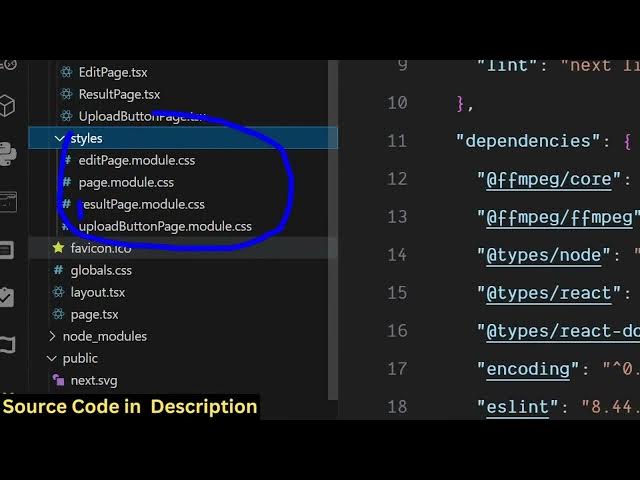
and this is the full directory
1:44
structure. Each component is coded
1:46
inside typescript. So once you get the
1:48
source code, you will able you will be
1:50
able to modify the source code or add
1:52
additional features on top of it this
1:54
project. It's a fantastic project. I
1:57
created this from scratch. Each and
1:59
every file is coded inside Typescript as
2:02
you can see that. So it's really easy to
2:04
run this locally. We running this as you
2:07
can see. Simply need to type the command
2:10
npm run. So this will start this at the
2:14
local development server.
2:18
So right here you basically select your
2:22
input video file. The size can be
2:25
anything.
2:28
So as you select the video file it will
2:31
construct the timeline. So through that
2:34
timeline you will be able to delete or
2:38
trim the video. Likewise select.
2:42
So as you're moving it in the timeline,
2:44
you can see that how easy it is.
2:49
After you select it, click the trim
2:51
button and using FMPG, it will instantly
2:55
trim your video directly in the browser.
2:58
It's a single page application. No back
3:00
end is there. It's a single page
3:02
application
3:04
inside NexJS. It's very easy to you to
3:07
deploy as well once you purchase it.
3:09
It's doesn't have a back end. It's
3:12
running entirely in the browser. All the
3:15
processing is taking place directly in
3:17
the browser. And if you don't know, we
3:19
are using this library fmpg web assembly
3:22
library.
3:23
So this is allow you to use ffmpg
3:26
directly in the browser. It's a web
3:28
assembly library.
3:31
So we are using this. So if you're
3:33
interested guys, the link is given. You
3:35
can directly purchase it.