Up next in 10

Puter.js Open Source Cloud Computer with Free Access to Premium LLM that Can Build Anything
Apr 16, 2026

Buy the full source code of application here:
Watch My Visual Studio Code IDE Setup Video For Fonts,Themes & Extensions
https://youtu.be/Bon8Pm1gbX8
Hi Join the official discord server to resolve doubts here:
https://discord.gg/cRnjhk6nzW
Visit my Online Free Media Tool Website
https://freemediatools.com/
Buy Premium Scripts and Apps Here:
https://procodestore.com/
Show More Show Less View Video Transcript
0:00
Hello guys, in this video I will show
0:03
you a new website which is actually a
0:06
fully open source AI website which
0:08
allows you access
0:10
to all the AI models for completely
0:12
free. So, it's actually kind of a
0:14
virtual computer which actually have
0:17
cloud access to all the AI models.
0:20
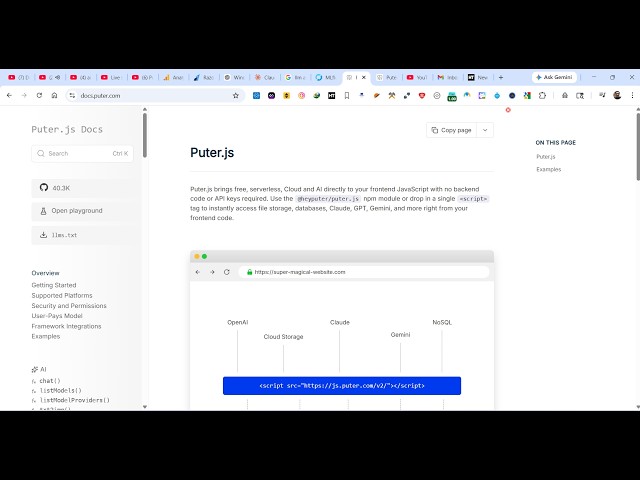
It's called as Pyuter JS. It's a
0:22
JavaScript kind of a framework.
0:24
So, if you go to Google, simply type
0:27
this. The very first website which comes
0:30
So, this is actually essentially a
0:31
framework or SDK you may say.
0:36
If you use it inside your website, it
0:38
directly get access to all the popular
0:41
AI models that you have. So, it's a
0:43
complete open source project as you see.
0:47
It has almost got uh 40,000 GitHub
0:50
stars.
0:52
So, it's completely free. No need to pay
0:54
for this. So,
0:56
as you see that
0:58
the internet computer free open source
1:00
and self-hostable.
1:02
So, now to actually include this inside
1:04
your application, it's quite easy. You
1:06
simply need to include the script app.
1:08
That's all that you need to do. Simply
1:10
go to this website, simply copy the
1:12
script app, and paste it inside your web
1:15
page. After that, it get access to all
1:17
the
1:18
So, also this example is given to you.
1:21
It's a very basic example where they
1:23
included this SDK. You can even side by
1:26
side run this example as well. So, now
1:29
automatically as soon as you do this,
1:32
you can even create a file as well.
1:39
Once you authenticate using your Google
1:41
account,
1:42
you can sign up using your Google
1:44
account as well. So, it will just
1:47
hardly take 2 minutes. So, after you
1:49
sign up,
1:50
uh your AI capabilities will be
1:56
So, now you can see that
1:59
we have asked a question that what is
2:01
life using this model GPT 5.4 Nano give
2:06
given us this answer
2:08
like this. So, with the help of this
2:10
framework, you can build out any sort of
2:12
AI chatbots inside your websites.
2:16
So, various kinds of
2:18
models are there. This is for image
2:21
analysis.
2:22
So, right here, we simply ask a question
2:24
about the image. We provide the URL of
2:27
the image.
2:28
And we ask,
2:30
"What do you see?"
2:31
So, now the AI will actually tell what
2:36
So, now you can see loading. I see a
2:38
realistic stuffed plush animal lying on
2:40
the side. So, as you can see the AI is
2:42
answering the question about the image
2:45
what the AI is seeing.
2:47
So, you can even simply copy this
2:49
example. And
2:51
if you want to create
2:54
locally this project, you can even do
2:56
that as well. Simply
2:59
It's very easy.
3:01
You can even run this.
3:06
So, this actually opens the possibility
3:09
of lot more AI related applications. You
3:12
can actually
3:14
use this SDK
3:16
very simply by simply creating files
3:19
here.
3:21
So, just create a simple index.html
3:23
file. You paste that code.
3:34
So, you paste this code here. So,
3:37
right here we are including the SDK
3:39
right here in the very first line. Then
3:41
we are
3:43
putting this image.
3:45
So, we can run this locally as well. So,
3:48
you can see that.
3:51
Yes, uh
3:58
So, you open this example in the
4:00
browser.
4:01
So, now once again,
4:14
So, you're just activating the
4:16
extensions. Just wait.
4:24
So, this is completely open source. So,
4:26
it's a virtual computer having access to
4:28
all the LLMs AI frameworks. Pyuter JS.
4:31
So, in this easy way you can use this
4:33
library and you start using it
4:36
inside your project.
4:58
So, it's a open playground section right
5:00
here. You can try out any model. For
5:02
example, you can even change this model
5:04
as well
5:06
from GPT.
5:11
You can
5:12
integrate the deep seek model as well
5:15
directly right here as you can see that.
5:19
You can chat with Gemini deep seek
5:22
Claude Sonnet.
5:24
You can see that.
5:26
In this easy way, you can build out AI
5:28
related applications very simply. So,
5:30
now it has opened it at localhost 3
5:33
3,000.
5:34
You just need to log in.
5:37
As user come to the website, they just
5:39
need to log in. And after that, this AI
5:42
will work.
5:43
So, this is actually Pyuter JS.
5:45
Definitely check this website out.
5:47
Pyuter
5:48
It's completely open source.
5:50
It has access to all the AI providers.
5:53
It's a complete framework. You can
5:55
directly include this inside your own
5:58
applications as well to make out
6:00
different AI related applications. So,
6:02
it has all the
6:06
AI models.
6:09
You can extract text from text to video.
6:19
So, a sunrise drone shot flying over a
6:22
corn machine.
6:24
So, the AI can also
6:27
build a video as well. You can see that.
6:30
So, this is a test video built.
6:35
You can chat with
6:37
Claude Sonnet. You can see this is a
6:40
Claude Sonnet model.
6:49
So, definitely check this website out,
6:52
guys. Pyuter JS. It's very easy to
6:54
include.