0:07
Hello everyone, myself Baradwas. In this
0:11
video I will show you overview of
0:15
foundation field bus network from the
0:18
field to the control system.
0:21
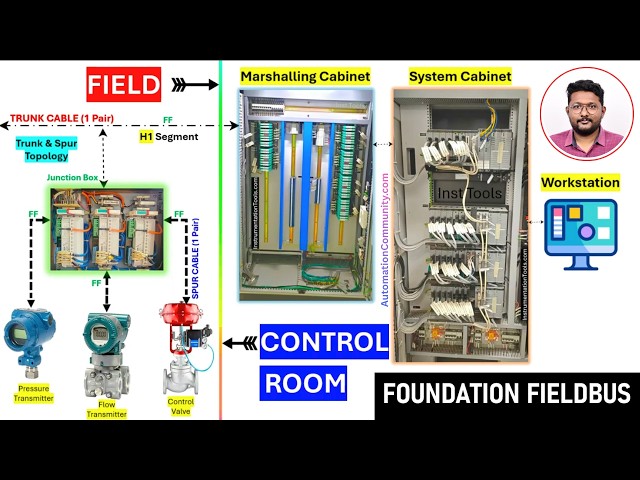
We have FF junction boxes in the field.
0:26
Right? In our video I will consider only
0:30
one FF junction box for easy
0:33
understanding. So this is our foundation
0:36
field bus junction box
0:39
and the field instruments are connected
0:42
to this junction box.
0:45
These are foundation field bus
0:49
Remember that you have to connect only
0:52
FF instruments to this junction box.
0:56
And the cable between the junction box
0:59
and the field instrument is called as
1:02
spur cable. And we have the one trunk
1:05
cable that is the main cable going from
1:08
the junction box to the control system.
1:12
This is called trunk cable. Right? This
1:14
is also one pair cable. Irrespective of
1:18
the number of instruments connected to
1:20
the foundation field bus junction box,
1:23
we will use only one pair cable for
1:26
carrying all these devices information
1:29
from the field to the control system.
1:31
And this is the FF and this is called H1
1:37
And this trunk cable will go to the
1:40
marshalling cabinet. This is installed
1:42
in control room. This trunk and spur
1:46
cable is called as trunk and spur
1:51
Now this trunk cable from the junction
1:54
box it will go to marshalling cabinet
1:57
which is installed in the control room.
2:01
In the marshalling cabinet we have s
2:04
protectors and field bus power hub or
2:11
And from the marshling cabinet again the
2:14
signals will go to the system cabinet.
2:18
In system cabinet we have field bus
2:24
System cabinet houses the electronic
2:27
cards like power supply modules, CPU,
2:32
IO modules, analog input, analog output,
2:36
digital input, digital output, serial
2:40
communication modules and foundation
2:43
field bus modules. The cables from the
2:46
marshalling cabinet field bus power hub
2:49
it will go and connect to the system
2:51
cabinet field bus cards.
2:55
The field bus cards process all these
2:58
foundation field bus related devices
3:00
information and then this information
3:03
will be supplied to the CPU. The CPU
3:07
then process this data and updates to
3:10
the operator screen workstations.
3:15
In your graphics, you can see the field
3:18
instruments parameters. Let's say the
3:21
pressure transmitters value, low
3:23
transmitter value, control walls,
3:25
position feedback or the operator can
3:28
give the uh command from the
3:30
workstation. It will go to the system
3:32
cabinet. The CPU will then send this
3:35
command signal to the field bus card.
3:38
The field bus card will uses this
3:40
communication bus from the uh field bus
3:44
module to the marshalling cabinet and
3:46
then to the junction box and then to the
3:49
field instrument control wall. In this
3:52
case it can give the command. This is
3:55
the overview of the foundation field bus
3:58
network for single junction box. If you
4:02
see here, each junction box will give us
4:05
one pair cable from the field to the
4:08
mastering cabinet. If you have let's say
4:12
50 junction boxes, then you will receive
4:15
50 number of one pair cables from the
4:19
field to the marshalling cabinets.
4:22
Remember, I'm just saying the actual
4:24
requirement of the trunk cable.
4:27
If you have a spare cable, generally
4:29
we'll go with two pair cable for the
4:31
trunk cable. One we will use and the
4:34
second pair is the spare.
4:37
I'm just showing you the actual
4:38
requirement cable here. One pair for
4:40
easy understanding of the topic.
4:44
So this is the war and you know that
4:48
what is the field section the junction
4:51
boxes the field instruments all these
4:54
are installed in the field. This is the
4:56
field section and this is the control
4:59
room section. Marshalling cabinets,
5:02
system cabinets, workstations,
5:04
all these are installed in a control
5:08
So this is the simple overview of a
5:11
field bus network. In the next videos, I
5:14
will explain in detail about the
5:17
marshling cabinet and its components.
5:22
I will explain system cabinet and its
5:26
components, wiring, everything one by
5:31
If you have any questions, share with
5:34
us. Do like our videos, support us.
5:37
Thank you for your support.