Up next in 10

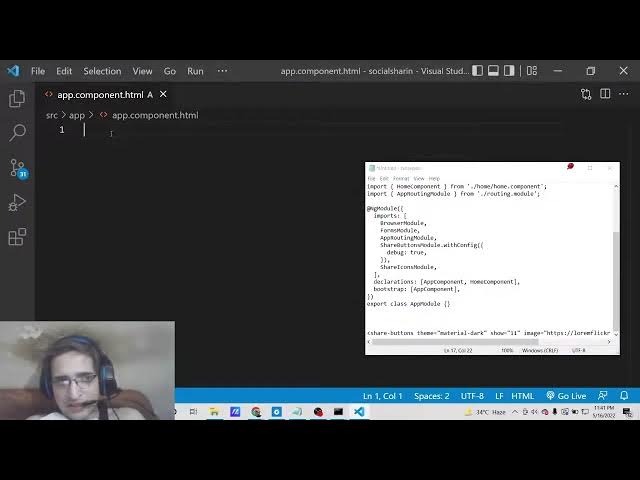
Angular 13 ngx-sharebuttons Example to Embed Material Theme Social Sharing Buttons in TypeScript
Dec 22, 2025

Get the full source code of application here:
https://codingshiksha.com/angular/angular-ngx-sharebuttons-example-to-embed-social-media-sharing-buttons-icons-in-typescript/
Show More Show Less View Video Transcript
0:05
Uh hello friends, today in this tutorial
0:07
I'll be showing you that how to embed
0:09
social media sharing buttons inside your
0:11
angular application. [snorts] So for
0:13
this application we will be using this
0:16
plug-in which is called as ngx share
0:18
buttons. So basically it comes with
0:21
various themes out there. [snorts] So if
0:23
I just show you this is a light theme.
0:26
So basically you will see it has all the
0:28
social networks such as Facebook,
0:29
Twitter, LinkedIn, Pinterest, Reddit,
0:31
Tumblr and all the social networks that
0:34
you know inside the internet, WhatsApp
0:36
also you can also copy the link also. So
0:40
this is a light version of it. You can
0:42
also change it to dark. So if I change
0:44
it to dark, you will see the background
0:47
color is visible more. This is a dark
0:50
version. So basically if you click on
0:53
individual social networks if I click
0:55
Facebook a new pop-up window will appear
0:57
and uh if you want to share this link
0:59
you will be able to share it inside your
1:01
news feed or story inside your Facebook
1:05
profile. Similarly for Twitter also
1:07
simply it will open the Twitter and all
1:10
these social networks. So basically it's
1:12
a very handy plug-in to have inside your
1:15
applications. So whenever you want to
1:17
share your application to social
1:19
networks, this is a plug-in that you can
1:21
use inside your angular applications. So
1:24
basically if you click it more more uh
1:27
social uh networks will be available to
1:30
you. You can also copy the link also and
1:33
paste it. You will see that. So this is
1:36
the plug-in that we are using. So
1:38
basically if you type here ngx dash
1:41
share buttons. So basically this is the
1:44
angular library that we are using in
1:46
this tutorial. So if you see if I click
1:48
on this library
1:51
this is the official documentation about
1:53
this library. So basically it's a
1:55
material based social icons. You will
1:58
see it's a material based icons. It has
2:01
some box shadow around it. So it is
2:03
looking so nice. So in the CSS part. So
2:07
you can see it's a very uh popular
2:09
module. weekly downloads you will see
2:11
11,000 weekly downloads are there. So so
2:15
these much of uh social networks it
2:18
supports Facebook, Twitter, LinkedIn,
2:20
Pinterest, WhatsApp, Messenger, Viber,
2:23
Reddit, Tumblr, Telegram, email, SMS,
2:25
VK, Mix, Sync, Line, Copy, Link, Print.
2:28
So all these buttons will be available
2:30
to you. So you can just read the
2:34
documentation. I have given all the
2:35
source code that I will be using in this
2:37
video tutorial. So if you want to follow
2:40
along you can go to the video
2:41
description link that I have given to
2:44
follow along with the video. So please
2:47
hit the like button subscribe the
2:48
channel as well. So just go to the edit
2:50
option and here you will find out all
2:52
the source code. So simply go to the
2:55
source code of this application and
2:57
download all the source code. So let's
2:59
start building this application from
3:01
scratch guys. So you will see these are
3:02
the social media buttons. So if you
3:04
click individually the Facebook will
3:06
open. So any of the links that you open
3:10
it will be opening. So these are the
3:12
social media sharing buttons. So now to
3:14
build this application it is very easy
3:16
guys. So simply you need to go to the
3:18
projects directory. And here you need to
3:20
make a new directory which will be
3:23
social sharing
3:25
cd into this directory.
3:28
And now you need to make a new angular
3:30
project which is called as social
3:32
sharing. So basically it will ask some
3:35
questions to you that whether you want
3:37
to allow routing or not.
3:40
So we don't need to allow routing. So we
3:43
will say no and we will use CSS. So
3:46
basically this will create this project
3:48
inside this directory which is social
3:50
sharing. So basically if you open this
3:55
inside visual studio code text editor.
3:58
So basically you will find out that uh
4:01
it is still creating the project and it
4:03
has created this app folder. So this is
4:06
a brand new angular project. Nothing is
4:09
there. So first of all you need to
4:11
delete all the code which is present
4:13
inside app.component html file. So
4:16
[snorts] just delete this all this code.
4:18
And right here you need to first of all
4:21
you need to install the module. It is
4:23
very easy. The command is pretty simple
4:25
which is given here npmi ngx share
4:28
buttons. So just go to the command line
4:31
and simply type here npmi
4:34
ngx share buttons.
4:37
So just execute this command here and uh
4:42
it will hardly take uh 5 to 10 seconds
4:44
to install this module. So please hit
4:48
the like button, subscribe the channel
4:49
as well. So now this module
4:53
is installing here. So just wait. Now it
4:56
is successfully installed here. You will
4:58
see that. So now the very first thing
5:00
guys you need to do is that you need to
5:03
add this module inside your application.
5:05
You need to tell Angular that you need
5:07
to use this module. For letting Angular
5:10
know you need to make the modification
5:12
inside this app.module.ts
5:15
file. So just open this file here and
5:18
right here you need to
5:20
write we need to import the module which
5:23
we are using here. So we are using this
5:25
module which is share buttons module. So
5:29
this is present inside uh ngx
5:33
share buttons and slashuttons.
5:39
And the second module we need to use for
5:41
the icons. So basically the icons the
5:43
social media icons that you see share
5:46
icons module. So we need to import this
5:49
from ngx
5:51
share buttons and slash icons. So just
5:56
do this and after that you need to
5:58
import this just add this inside the
6:01
imports array. So right here inside the
6:03
imports array you will be putting a
6:06
comma
6:08
and uh just writing here sharing
6:13
share buttons
6:17
share buttons dot share buttons module
6:19
dot with config. So we will use this
6:22
method and inside this you need to pass
6:25
the property debug to true. So five
6:27
people are watching the stream guys
6:29
please hit the like button subscribe the
6:30
channel as well. So we are building a
6:32
social media sharing kind of
6:34
application. We are embedding the social
6:36
media icons and also we need to add the
6:39
share icons module
6:42
like this. So this is all that you need
6:44
to do inside app domodule.ts file guys.
6:47
So simply you can just uh just close
6:51
this file. We have let the angular know
6:54
that we are using this library. So we
6:56
are imported this share modules share
6:59
buttons module from this ngx share
7:01
buttons/buttons
7:03
and share icons module from ngx share
7:07
button/ icons and then you need to
7:09
import it and you need to add this
7:11
inside the imports array. So we have
7:14
added this. So now simply close this
7:16
file. So now we can simply display the
7:20
social media icons with this in the
7:22
inside this file which is app.component
7:24
component or HTML file. So right here we
7:27
will have this directory which is share
7:30
buttons. So inside the share buttons
7:32
guys basically now if you run this
7:34
application what you will see now to run
7:37
this application it is very easy which
7:39
is ngserve. So this will start the
7:41
angular application at localhost 4200.
7:45
So just wait as it starts this
7:47
application.
7:50
After that I will show you which options
7:52
you can pass here. the different kinds
7:55
of material themes you can pass. So
7:57
basically it is expecting that you need
7:59
to provide some icons here.
8:03
So you need to pass some options here.
8:06
So the theme option you need to pass. So
8:09
you can pass either material dark theme
8:12
or light theme. So we will pass the dark
8:14
theme and also you need to pass the show
8:17
option. How many social media networks
8:19
will be shown at one time. So let me
8:22
show only five.
8:26
So once again run this application.
8:36
So four people are watching the stream
8:38
guys please hit the like button
8:39
subscribe the channel as well. So
8:41
basically one error is coming here
8:43
because we haven't installed phone
8:46
awesome module. So basically if you if I
8:48
show you
8:50
for having this I think you also need to
8:53
install this uh phone tower
8:57
if I show you just go to your command
9:00
prompt and you need to install this
9:02
module to fix this issue which is coming
9:05
here. So just install this which is for
9:11
awesome
9:16
uh
9:19
for awesome
9:23
angular slash. So just put a slash here.
9:29
You can also copy paste the package.json
9:31
file that it this project has. So
9:34
basically all the dependencies that it
9:36
has. So I can just uh copy paste this.
9:41
So these are all the dependencies that
9:43
this project has. So what you can do is
9:46
that simply copy this and uh change
9:48
inside your project. You have this
9:51
package.json.
9:52
So add these dependencies. So simply
9:55
paste it. So once again what you need to
9:57
do is that simply run this command which
9:59
is npmi. So this will update all the
10:03
packages and it and it will install
10:05
these packages which is mentioned inside
10:08
package.json.
10:13
So it is installing this. So just wait.
10:20
So these dependencies are required for
10:22
the icons guys material icons that we
10:25
see. So this is very much necessary. So
10:28
now we can launch this application
10:31
ngserve.
10:32
Let me see if it is launching as well
10:36
because we are locally developing this
10:38
application. So we need to be getting
10:40
all the modules right before we can
10:42
launch this application.
10:44
So the preferred way will be to use any
10:46
sort of third party tool which is third
10:48
party website such as code sandbox or
10:51
stack blitz. But if you are building it
10:53
on the local environment,
10:56
you will see
10:58
it is saying that uh string is not
11:00
assignable to type number. So I think we
11:04
have uh made a mistake here. If I see
11:09
show to
11:11
if I copy this [snorts]
11:36
Uh I think some error is there. Let me
11:40
see what it is.
11:47
So now it is compiled successfully. Uh
11:49
that option was creating that problem.
11:52
So let me restart this application.
11:55
Localhost 4200.
12:04
So I think it is creating some problem
12:06
when you are developing it on the local
12:09
host. You will see that it is not doing
12:12
it. So [snorts]
12:14
what I will be doing is that you can
12:18
just see this uh project and you can
12:23
uh clone this project which is hosted
12:25
here with inside stack blitz.com. So
12:28
basically you can copy this address here
12:31
and they have their own GitHub
12:32
repository. So what you can do is you
12:34
can clone this repository inside your
12:36
local machine. So that way if you have
12:38
any sort of modules that are not
12:40
installed on your machine in that way
12:44
this project will be working. So make
12:47
sure that you clone this project and you
12:49
will be able to embed these icons social
12:51
media icons with the help of which you
12:53
can share your website.
12:55
>> [snorts]
12:55
>> So this is the module guys that I wanted
12:57
to share with you which is ngx share
12:59
buttons. It's a angular module to embed
13:02
social media sharing buttons inside your
13:05
angular application to share something.
13:09
So please hit the like button, subscribe
13:12
the channel as well and I will be seeing
13:14
you in the next video.