0:00
So I had this speaker bar for a few years now but it's time to upgrade this
0:03
with this speaker bar that Cyber Acoustic sent to me. Well actually I already upgraded this but that's fine because I have another monitor that this will be perfect for
0:14
So inside the box we're going to have the quick start guide, a USB-A to USB-C adapter
0:18
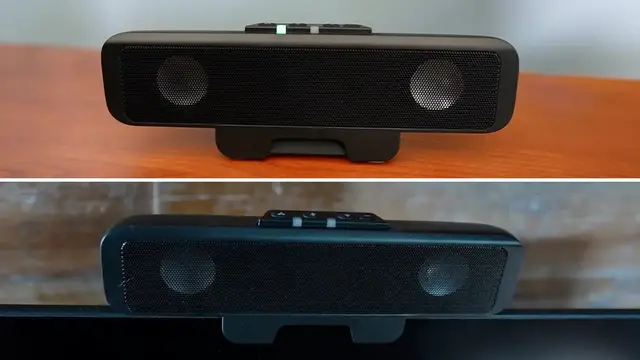
and the speaker bar itself. So right off the bat the first thing I noticed about this is how compact and sleek this looks
0:25
Right at the top we're going to have a few buttons for a mute, plus minus for volume and what appears to be a power button or I'll check that out and then at
0:33
the bottom there's going to be the clip so if we want we can attach it to the bottom or the top of
0:38
the monitor depending on how thick it is or just use it standing like so and on the back side
0:43
there's going to be the cable that's attached so now it's time to test out the sound and right here
0:47
here you can see the speaker's currently not connected and when I fully plug it in you're
0:51
gonna hear it talk and it's also gonna connect so here you could hear please be connected and then
0:58
right there it showed up so again at the top we're gonna have a few buttons this one's gonna be to
1:02
mute the microphone so it's gonna be red so now the mic doesn't work now the mic works again and
1:07
then increase volume and decrease so right now you hear that noise that means that I can go any further so I at the max volume or or I can just lower it and there it is but for now let me go to the max volume I already have a song here so
1:25
when I press this button here it'll act as the play button sort of like on my
1:29
keyboard right over here so I press it And even though this is small this does sound pretty mighty and loud
1:50
Now the last thing to test is going to be the hinge and unfortunately because my monitor
1:53
is going to be very thick I actually can't attach it here this is going to be yeah this
1:58
is a very thick monitor it's like three inches thick so now let me go to my other monitor
2:02
so I can show you how it looks like. And here's how it looks like and because it's small and compact it doesn't take up too much
2:08
space and I still have leeway for the bottom over here. Or if you want, this also can go at the top, just like this
2:17
Now I probably wouldn't do this because my bezels are very small, so I don't want this
2:22
touching the screen. But if you're curious what it looks like on the inside, it does have like a rubber part
2:28
over here on the backside, and that's going to be the thickest one. And there's also some other rubber or foam pieces up here, and these are going to be