Up next in 10



A custom iPhone Shortcut helped curb compulsive scrolling without relying on another screen-time app.
Show More Show Less View Video Transcript
0:00
All right, watch this. Oh, oh, oh, it doesn't work. Can't, can't open it. I took drastic measures to
0:06
help free me from the addiction of social media scrolling. I have found a little known tool in
0:11
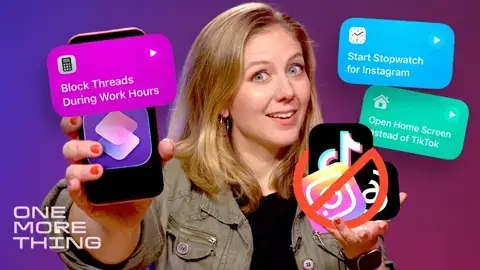
iOS 27 that to me, it's way better than Apple's Screen Time app. It is called Shortcuts. And with
0:17
it, you basically program rules for your phone to follow. The new iOS 27 operating system makes
0:24
Shortcuts so easy that you don't need to know any coding. You just speak what you want into
0:29
the phone and it builds the code for you. I'm going to show you an example. Every time I open
0:35
the Threads app, show me my big to-do list. AI magic commencing. All right, let's see if it works
0:43
Here's Threads. Oh, no social media. Instead, things I have to do. Some say this method is a
0:49
bit medieval and medieval just so happens to be the perfect era for escaping technology. You see
0:56
I fully committed on my quest to escape the shackles of screens
1:00
I took my family to the Renaissance Fair, and along the way, I discovered how shortcuts give me the right balance
1:06
of having a phone to capture the moment, but not let my scrolling spin out of control
1:13
There's no knight in shining armor that will save us from a doomed scrolling future
1:19
but maybe I could be a light for you in these dark ages. I'll explain why I think using shortcuts in this silly way is one of the best hidden features of iOS 27
1:28
It is a feature that I not so sure even Apple best visionaries could foretell customers would use it in this manner If you don know what shortcuts are let me explain the basics You got to think of shortcuts as programming your own automations For example if a person arrives home
1:45
then turn on my lights. If my alarm goes off, then show me a list of items on my calendar today
1:52
Now, this existed before, but I shied away from using shortcuts because it took a little finesse
1:58
to dance around these commands, to program all these different things. But that's not going to hold you back anymore
2:04
There is a new twist in iOS 27 that lets you just use common language
2:09
to speak your wishes into the app like you're some magician conjuring tech spells with incantations
2:16
So I'm beta testing right now an early release of iOS 27 for the iPhone
2:20
It is something that Apple previewed during WWDC back in June. But basically, if you have an iPad or Mac also with Apple Intelligence
2:28
you should be able to use shortcuts this way later in the year
2:32
So in this testing, I discovered that I could keep myself from opening an app
2:37
but to do that, I had to tell it to do something else right after
2:42
So every time I open TikTok, show me the home screen. That's magic
2:46
Permanently blocks. And you may say, why didn't you just delete the app
2:51
But I do need some sort of window into the social media world
2:55
You see, this whole thing is a pickle. Now, pick the box. but perhaps it will work better for you if you just start a little slow
3:04
You don't have to go cold turkey. Make a shortcut automation that includes the time of day rule
3:10
So for example you can say when I open up Instagram during working hours open up the home screen or open up my to list Maybe this is a bit too aggressive for you so take a stab at this instead
3:24
When you open an app, have it open a stopwatch. That way you're still on the app, but in the dynamic island, you are seeing a little timer
3:33
that's just counting up to show you how long you're spending on this app
3:38
and it might gross you out to see this number growing. That's how I started
3:44
And then I just cut myself off completely. I did add in more permissions
3:48
I gave myself a time of day where it was okay to scroll, like on my commute into the city
3:54
All that said, there are ways to get around it. So you know how I block myself from TikTok
3:59
but it flashes on the screen for half a second. If I just tap it just right, if I just
4:04
oh, yep, there you go. See, I was able to fool it and I got back into the app
4:08
Or also, you could just go back into the shortcut app and turn off the shortcut
4:14
But I still like this better than Apple's current screen time app
4:18
That also lets you set limits for apps. But there's this big old button that pops up and you could just ignore the limit or bypass the block
4:25
It's so easy to hit that button without guilt. There are devices that you can purchase to help brick your social apps
4:33
There's one called brick. You have to tap your phone to a square to unlock your app, but that costs around $70
4:41
And I would rather take an actual brick to my device before buying something that cuts me off
4:47
And I get it These apps are rewiring our brains The dopamine rush that they give us it a real thing And right now Meta is in trial regarding this very issue how Instagram and Facebook are designed to be addictive
5:00
Give me YouTube. We know social media is not healthy, but we keep going on our phones
5:07
We are playing with fire. We deal with the dangers because we have real lives
5:12
We have to juggle with staying in touch with the world and being on top of current events
5:17
I hear myself. It seems like I should just delete the app because it feels silly
5:22
It feels like I'm just putting on a costume to hide the problem. But instead, I feel like addressing this by trying out a shortcut while I'm pulling back
5:30
I'm targeting the problem head on. And yes, we should reach out and talk to other humans without reaching for these apps first
5:39
We don't have to be sealed to this fate of being captivated by the apps that rest in the palms of our hand
5:45
We have willpower. Sometimes, though, it just takes a little guide to show us the way before we walk the path ourselves
5:52
My kids were calling me out on how much I was using my phone. They were right
5:57
But here's a tip. A thought to the wonderful temper! Be kind to yourself and just try this crazy shortcut trick on one app at a time to see how it works
6:06
See if you notice that you're living in the moment more. You can also layer it with Apple's Screen Time app until you find the right combo on what keeps you on task
6:14
If you found this useful, come find me here every Friday where we talk about what is new in the world of Apple
6:19
And if there are other shortcuts that you use, tell me about it in the comments. I want to hear about it
6:24
And now I need to tackle another big issue with screen time, and that's navigating parental controls
6:30
so my kids can have it easier than me
Celebrities & Entertainment News