Up next in 10

What is document.getElementByID() Method Explained with Real Example in Browser Using Javascript
Jan 9, 2025

What is document.getElementByID() Method Explained with Real Example in Browser Using Javascript
Show More Show Less View Video Transcript
0:00
uh hello guys welcome to this video so
0:02
in this video we will look at method
0:05
which is widely used inside JavaScript
0:08
which is used to actually take the
0:10
reference of the HTML element which is
0:13
document. get element by ID so I will
0:17
just show an example of this method so
0:20
let's suppose you have an element that
0:22
you want to
0:23
Target this element can be anything it
0:25
can be a paragraph heading
0:28
title so for
0:30
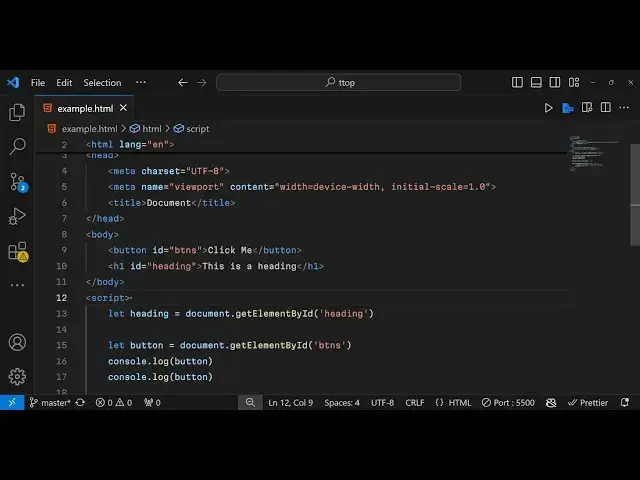
example we take a button right here so
0:33
the label of this button will be click
0:35
me so if you just open this document in
0:39
the
0:39
browser it will actually have this
0:42
button right here you can see this
0:47
button so this button is there so what
0:51
this method does which is document.
0:53
getet element by ID you actually write
0:56
this inside the
0:57
JavaScript so now to take a ref of this
1:01
uh of this HTML in the JavaScript we
1:04
declare this method document dot get
1:08
element by ID this is actual method and
1:12
it actually takes the one single
1:16
argument so it actually takes the ID you
1:18
need to give it an unique identify to
1:21
this HTML element so we give this ID
1:24
right here ID so this ID can be anything
1:28
so we give just ptn so we have given
1:31
this ID here this identifier now what we
1:35
can do is that we can Target this button
1:38
using this ID that we have given using
1:40
this function which is get element by ID
1:43
this is the sole purpose of this method
1:45
to actually Target HTML elements and get
1:47
their reference in JavaScript so now in
1:50
this parenthesis you provide this
1:52
argument the ID that you have given so
1:55
this needs to be the same BTN so if you
2:00
are giving it in capital letters this
2:02
needs to be in capital letters so the
2:03
spelling needs to be the same so after
2:06
getting this reference what you will see
2:09
if you simply print this out console log
2:15
it so what you will find if I open this
2:18
in the browser now and if I inspect
2:20
element go to console you will actually
2:22
see this is printing out the actual
2:25
element which is actual button element
2:28
so what does this meth do it actually
2:31
Tar It Targets this HT HTML button
2:34
element which is present in the HTML it
2:36
allows us to actually Target elements
2:39
using their IDs which we have given so
2:42
IDs must be unique as you all know you
2:44
can't give duplicate IDs to multiple
2:47
elements so we can't have two elements
2:50
having the same ID so this you can't do
2:53
so IDs must be unique and whatever ID
2:55
that you have given right here we can
2:56
Target this using get element by ID this
2:59
is the
3:00
main purpose of this method that we use
3:02
in
3:05
JavaScript so you can see we have got
3:07
this now we can actually attach anything
3:11
after doing this we can attach event
3:13
listen now we can change the property of
3:15
this button by using the style property
3:19
and
3:21
uh we can change the background color of
3:24
this button let's suppose to
3:26
Red so essentially you can do all sort
3:29
of things you will see the background
3:30
color of the button has changed from
3:33
white to Red
3:39
now so you can even attach event listen
3:42
so the thing is very simple uh this
3:45
method document get element by ID this
3:48
actually allows you to get first of all
3:50
the reference of that HTML element using
3:52
the ID that you have given this is
3:55
actually the purpose after that you can
3:57
bind anything after you get the
4:00
reference you can do almost anything
4:02
with this element you can bind listener
4:04
so you will see if I click this button
4:06
this alert window is opening right here
4:12
so the thing is very simple you declare
4:15
an ID whatever ID that youve given to
4:18
this element this element can be
4:19
anything it can be an at heading as well
4:22
so we give an heading I you can give it
4:26
an heading here ID to it
4:34
this is the heading so now if you want
4:36
to Target this element this H1 element
4:38
we need to declare another variable so
4:40
we declare element again we use the same
4:43
function which is
4:45
document dot get element by ID this time
4:49
we provide this uh
4:52
heading and uh after
4:57
that we now have the access here to use
5:01
this so after that we can do all sort of
5:05
things we can manipulate the inner HTML
5:08
of this so what we can
5:11
do we can change this to Let's suppose
5:14
some other
5:16
heading so if you refresh it now you
5:18
will actually
5:20
see the inner HTML will be changed
5:24
from this is a heading to some other
5:27
heading let's suppose I need need to
5:29
change it programmatically whenever I
5:31
click this button I need to change this
5:33
so what I can do I can paste this code
5:35
right in this so now if you hit this
5:39
button that heading will be changed you
5:41
will see dynamically whenever you click
5:43
a button this heading has been
5:47
changed so we are using in both these
5:50
scenarios we're using get element by ID
5:52
to Target elements in HTML using their
5:55
IDs so whatever ID that you given you
5:57
target them using get element by ID
6:00
so this is the main purpose of using
6:01
this method a very simple example and uh
6:06
in this way you can use this
6:09
method and if you also see if that uh
6:14
let's suppose if you have this uh ID
6:17
that you have given ID somewhat
6:19
different this ID doesn't exist now if
6:22
you see I have changed the ID here which
6:24
is btns this ID doesn't exist so if you
6:28
now console log
6:32
it you will actually now you can see
6:36
nothing is working because that ID
6:39
doesn't exist so you will actually see
6:41
null will be returned to you because
6:43
that element doesn't exist
6:46
so this method will return null if it
6:50
doesn't able to find out that ID that
6:52
you have provided so you need to provide
6:55
the same ID that you given in the HTML
6:57
so you need to make this change so just
6:59
make this change btns so now your button
7:03
will be returned to you and now you can
7:05
attach those properties so in this way
7:08
you can use this get element by ID
7:10
function to actually get the reference
7:13
of HTML elements in JavaScript and then
7:16
you can attach any property you can
7:17
change any property dynamically using
7:20
JavaScript so this is actually the main
7:22
purpose of using this method so thank
7:25
you very much for watching this video If
7:27
you like this video then please hit that
7:28
like button subscribe be the channel and
7:30
do check out my website as well free
7:33
mediat tools.com so which actually
7:35
contains thousands of free tools
7:37
regarding audio video and image and I
7:40
will be seeing you in the next video