Up next in 10

Build a React.js eCommerce Shopping Cart Website Clone in Browser Using Tanstack Query & TailwindCSS
Mar 5, 2026

Buy the full source code of application here:
https://procodestore.com/index.php/product/build-a-react-js-ecommerce-shopping-cart-website-clone-in-browser-using-tanstack-query-tailwindcss/
Show More Show Less View Video Transcript
0:00
Uh, hello guys. In this video, I'll show
0:02
you I built out a shopping e-commerce
0:05
shopping cart website clone in React JS.
0:10
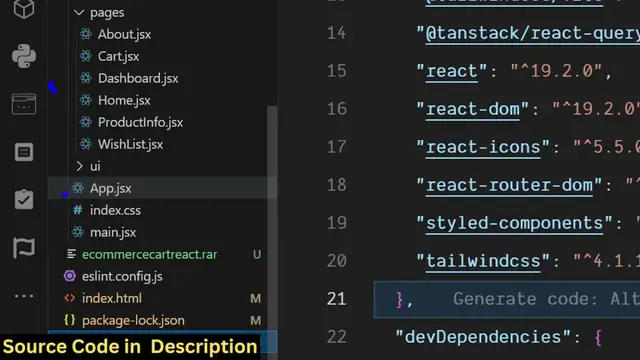
So, actually, this is actually the full
0:12
directory structure. Each and every
0:14
component is coded inside JSX file. It's
0:17
fully customizable. You can add more
0:19
features on top of this project as well.
0:22
So, the link is given. You can directly
0:23
purchase the source code. After
0:25
purchasing it, you will get the zip file
0:27
from Google Drive automatically.
0:29
If I show you the technologies that we
0:30
have used for building this, we have
0:32
used the latest version of React. We
0:34
have also used TanStack React Query,
0:37
which is for handling the state
0:40
of our application.
0:43
So, we have also used Tailwind CSS as as
0:46
well. So, we are running this project
0:48
locally, as you will see. I started this
0:50
project npm run dev.
0:52
So, if I show you the demo right here,
0:54
it's running
0:55
on localhost 5173.
0:59
So, it has authentication as well. As
1:01
soon as you load the application, this
1:02
is the home page. So, here you can
1:04
actually click on sign in.
1:06
And this
1:09
then you will basically see this form
1:10
right here. You can create account here.
1:13
Just fill out your information.
1:18
And then you will be landing to the
1:21
products page. So, essentially, what we
1:23
have done, we have actually used this
1:25
dummy JSON API where we are get getting
1:27
the products.
1:29
So, it's a free fake REST API for
1:31
getting placeholder
1:33
data. It's a free and open-source API.
1:35
So, here we are fetching these products
1:37
and displaying it. So, it's an
1:38
e-commerce cart
1:40
kind of a website.
1:42
But, you can integrate a
1:44
your own products as well. So,
1:46
basically, we have this API folder where
1:48
we are getting this product list.jsx
1:51
file right here. So, we are actually
1:53
getting all these products, displaying
1:55
it. And uh
1:57
you can also create your own products as
1:59
well. You can
2:00
click on add item, just product title,
2:02
description, price,
2:05
and brand, select category. And here,
2:08
you just need to provide the URL of the
2:12
product that you are selling.
2:14
And click on add new product, and your
2:16
product will also get added.
2:18
And now for the cart, it's very easy. As
2:20
soon as you click the add to cart
2:22
button,
2:23
you will see on the left-hand side, the
2:24
cart will be updated. You can see, as
2:27
soon as we are clicking the add to cart
2:28
button,
2:32
So, now you can go to your cart, and you
2:34
will see this is the cart page.
2:36
You can increase the quality quantity as
2:39
well. As soon as you do this, the price
2:40
will automatically update. And then you
2:43
can integrate any sort of functionality,
2:45
the checkout page,
2:46
as soon as the user clicks. So, this is
2:48
essentially it's coded in React JS. So,
2:50
it's a good starting point if you're
2:52
bas- basically building out the
2:54
e-commerce shopping cart kind of a
2:55
website in React JS.
2:57
You can actually purchase this project
3:00
uh
3:00
This will save you a lot of time because
3:02
most of the common functionality I've
3:04
written this from scratch.
3:07
So, you can easily
3:09
uh create more
3:11
on top of this. It's very easy for you
3:14
because it's also have authentication as
3:16
well. So, here the logout screen, edit
3:18
profile.
3:20
You can basically
3:21
do this, and this is your cart here.
3:25
So, it's automatically it's using this
3:27
TanStack Query.
3:30
This is a famous library in React JS to
3:32
handle the state
3:34
such as the data as we are clicking the
3:36
this button, the product is
3:38
automatically
3:40
So, it will stay. As soon as you refresh
3:42
it,
3:44
again, you basically can
3:49
just log in, and after that,
3:53
you will see that. So,
3:56
you can remove,
3:57
add to cart.
4:00
You can see this, add to wish list, add
4:02
to cart.
4:04
This is different products which are
4:06
there.
4:08
For this, we are using this TanStack
4:10
Query library in React JS for building
4:13
this shopping cart e-commerce website
4:15
clone.
4:16
So, it's a mini clone
4:18
uh
4:20
It's a good starting point. Here, you
4:21
can see that we have used Tailwind CSS,
4:23
React, TanStack Query.
4:26
So, if you're interested, guys, in this
4:27
project, the link is given in the
4:29
description.
4:30
You can directly this project the full
4:34
If you click this button, the heart
4:37
button, this will be
4:38
wish list. You will see that. So,
4:41
all the basic functionalities I've
4:43
constructed. And as soon as the product
4:46
proceed to checkout, you can actually
4:47
integrate any payment gateway such as
4:49
PayPal, Paytm, any sort of payment
4:51
gateways that you want to.
4:53
But, this is a very famous uh
4:57
shopping cart
4:58
e-commerce cart kind of a UI that I
5:01
constructed in React JS. So, it has all
5:04
these features. You can add your own
5:05
products as well. We are getting this
5:07
from dummyjson.com
5:09
to actually show these products in this
5:11
way.
5:12
So, the user interface I've constructed.
5:15
So, if you are interested in this, the
5:17
link is given.
5:18
You can directly purchase it. All these
5:20
components are You can see are pre-coded
5:23
in JSX. It's very easy for you to
5:25
customize this and add more features on
5:28
top of this project. Each component has
5:31
its own file. So,
5:33
definitely purchase it. The link is
5:34
given in the description.
5:36
Uh