Up next in 10

Build Remove.bg & Canva Alternative Using React.js & AI Using onnxruntime web & WebGPU Models in JSX
Mar 12, 2026

Buy the full source code of application here:
https://procodestore.com/index.php/product/build-remove-bg-canva-alternative-using-react-js-ai-using-onnxruntime-web-webgpu-models-in-jsx/
Show More Show Less View Video Transcript
0:00
Uh hello guys, in this video I'll show
0:02
you I built out a remove background
0:05
editor for images in ReactJS and it
0:09
actually uses AI models such as ONX
0:12
runtime web and web GPU. So this is
0:16
actually the full directory structure of
0:17
the project. Each and every file is
0:19
customizable. It's coded inside
0:21
Typescript. And if I show you the
0:24
package.json JSON file. We are using ONX
0:26
runtime web AI model directly inside
0:30
this React project. We are also using
0:32
React latest version. So we are running
0:35
this project locally here. And uh if I
0:38
open this, the interface looks something
0:41
like this. We have a drag and drop
0:43
interface. So here you basically select
0:46
whichever images that you want to remove
0:48
the background and it directly runs in
0:50
the browser. It's a single page
0:52
application. So once you select a bunch
0:54
of images for removing the background.
0:59
So it will process each image image by
1:02
image.
1:05
And basically after it completes it will
1:08
show you the output result.
1:11
And for building this we are using this
1:14
AI model ONX runtime web
1:17
which is a very famous model for
1:21
developers to actually directly
1:24
remove the background. So we have
1:26
integrated this module right in this
1:28
project here. It's a very famous module
1:30
as you'll see it's almost got
1:33
4 million weekly downloads.
1:37
And for also building this we are also
1:40
using web GPU which is another AI model.
1:47
So this is actually an API which
1:49
underlies
1:50
it helps in removing the background.
1:56
So you will see the background is
1:58
successfully removed and here you can
2:00
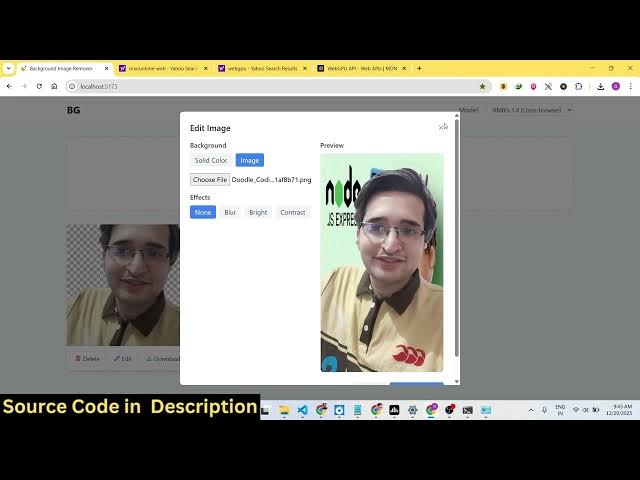
replace you can change the background
2:02
with a customized solid color. You can
2:04
even put a different image as the
2:06
background as well.
2:09
So this will save you a lot of time
2:11
because you no longer need a video image
2:14
editor similar to Canva or any other
2:18
editor. You can directly instead you can
2:20
purchase this script. I've given the
2:22
link in the description. So it's a
2:24
fullyfledged React project. Uh it's
2:27
directly runs in the browser. It doesn't
2:29
have a back end. It's a single page
2:31
application and uh once you purchase it
2:35
you will be able to modify the full
2:38
source code of this and add additional
2:41
features on top of the application. It's
2:44
a single page application
2:47
and you will see both the backgrounds
2:49
have been successfully removed and you
2:51
can just see the quality of the removal
2:53
of the background. It's really crips
2:56
here. You can't
2:59
you can see the background is fully
3:01
removed and after that you can have also
3:04
have the ability to download the output
3:06
image. So you will see the output image
3:09
is successfully
3:11
downloaded. You can just see here the
3:14
output looks really good.
3:19
So these are the models that we are
3:21
using here. You will see you will be
3:22
able to change the model as well. So
3:24
these are the two models
3:26
web GPU remove background model.
3:31
So if you're interested in this
3:33
application guys definitely purchase it.
3:35
The link is given in the description.
3:37
After you purchase it you will get the
3:39
source code from Google Drive
3:41
automatically.
3:42
And if you still face problems, you can
3:44
contact me.