Up next in 10

Build a React.js Client Side FFMPEG WASM Audio Timeline Editor in Browser Using Wavesurfer.js in TS
Mar 5, 2026

Buy the full source code of application here:
https://procodestore.com/index.php/product/build-a-react-js-client-side-ffmpeg-wasm-audio-timeline-editor-in-browser-using-wavesurfer-js-in-ts/
Show More Show Less View Video Transcript
0:00
Uh hello guys, welcome to this video. So
0:02
in this video I'll show you I built out
0:04
a ReactJS clientside audio editor with
0:08
timeline. So using web surfer.js
0:11
library. So this is actually the user
0:13
interface of the react application. We
0:15
are running it on localhost. So right
0:17
here you can simply drag and drop your
0:20
audio file whatever audio file you want
0:23
to process.
0:30
>> [snorts]
0:30
>> So as I select the MP3 file here, it
0:33
will actually
0:35
construct the full timeline of the audio
0:38
file that you can see right here. So you
0:40
will be able to trim out the specific
0:42
part that you don't want using your
0:44
mouse. So just drag the mouse and right
0:47
here you can simply play the audio file
0:49
first of all. So let me turn on the
0:51
audio here to just see premium PDF
0:55
editor I built here from scratch. So you
0:58
can see here using your mouse you can
1:01
simply
1:04
highlight this specific portion. So if
1:06
you don't want this specific portion you
1:08
can play. I think you can sign your
1:10
digital.
1:13
So if you don't want this portion you
1:15
can click transfer.
1:17
if you only want this. So it will
1:19
actually cut this specific portion and
1:21
uh it will apply the FMPPG web assembly
1:25
library to actually process the audio
1:28
and your processed audio will be
1:31
successfully trimmed out and downloaded.
1:33
So you can now play the MP3 file right
1:35
here. So it will only specifically cut
1:37
that specific part of the audio. Click
1:39
[snorts] on that you will see that and
1:42
you can even I think those 45 seconds.
1:45
So using your mouse you can highlight
1:47
the specific portion to cut the actual
1:49
audio files. So this is actually a full
1:52
client side react application for
1:55
cutting your and trimming your audio
1:56
file. So if you're interested in this
1:59
project the link is given in the
2:01
description. You can directly purchase
2:02
the full source code and after
2:05
purchasing it you will get the source
2:07
code from Google drive automatically. So
2:09
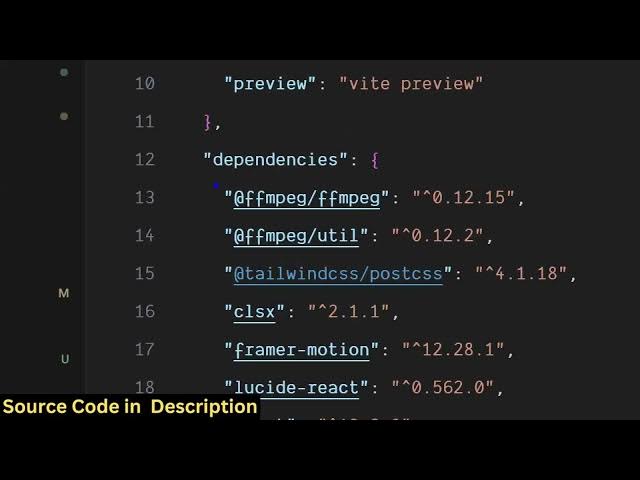
as you can see we are using the latest
2:11
version of react
2:14
and we are also using framer motion
2:16
tailwind CSS and also ffmpg web assembly
2:19
library and it's fully customizable. You
2:22
can add more features and actually see
2:25
once you purchase how I coded this. So
2:27
it's really easy to deploy and run this
2:30
application. We are running it on
2:32
command line. Command is simple npm
2:34
rundev. So this will start the local
2:36
development server.
2:39
So the application will look something
2:41
like this. So it's fully responsive as
2:45
well. So it's easy for you to deploy
2:47
this. So the user will simply come, they
2:50
can upload wave, MP3 or M4A file. So as
2:55
it selects the MP3 file, it will
2:58
construct.
2:59
>> Uh hello friends. Today in this
3:02
this timeline that you see right here uh
3:05
using this timeline you can control what
3:07
specific part that you don't want in the
3:09
audio.
3:11
So this will save you a lot of deploy it
3:13
on the browser itself because many times
3:15
you do want to remove the specific
3:17
portion like background noise that you
3:19
don't want in the audio. So using this
3:22
tool [snorts] you can actually save a
3:24
lot of time without requiring any extra
3:28
software. you can actually
3:31
do this task. So it's really fast as
3:33
well. So once it completes automatically
3:36
the file will be downloaded. So you'll
3:38
see that. So once you click the trim
3:40
option transform.
3:43
So the user interface is quite simple.
3:46
So
3:48
using your mouse you can actually play
3:50
the specific portion.
3:55
And coming to the libraries section, we
3:57
are using two libraries here. First to
3:59
construct this timeline that you see. So
4:02
this timeline is constructed through
4:04
this library which is waves surfer.js.
4:08
So it's an a opensource uh JavaScript
4:11
library for constructing this visual
4:15
visualization waveform of the audio
4:17
file. And for processing the audio we
4:20
are using ffmppg web assembly library
4:23
which is again a open-source library
4:26
which allows you to use ffmppg directly
4:29
in the browser.
4:31
So
4:33
once you purchase it it's
4:36
you can do this unlimited number of
4:38
time. So directly all the processing
4:41
directly happens in the browser. So it's
4:43
100% client side. So no server side code
4:46
is there. It's really fast. It directly
4:50
executes it directly in the user
4:53
browser.
4:55
Uh it doesn't take a lot of time. So as
4:57
the user select an audio file, it
5:00
instantly construct the timeline of the
5:03
audio file. Uh hello and using your
5:06
mouse, you can actually safely trim out
5:09
the unnecessary portion of the audio.
5:12
Click the transform option. It will
5:15
start the ffmppg processing.
5:19
So you can just see here it's encoding
5:22
and once it completes you will get this
5:25
window to download the necessary
5:28
[snorts]
5:29
output file. So this is the actual
5:32
project.
5:34
So if you're interested the link is
5:36
given and if you still face any problem
5:38
after purchase you can contact me. I
5:41
will definitely help you in running and
5:43
deploying the application.
5:45
And uh you can just see right here
5:48
these are all the components which are
5:50
there. So it's not a very big project
5:53
but still it does it does contain a lot
5:55
of code I
5:58
uh I written a single line of code every
6:01
line of code from scratch. So if you're
6:04
looking forward for
6:07
purchasing it the link is given. So we
6:09
have also used Tailwind CSS for user
6:11
interface as well as you can see
6:14
and beat we are using the local
6:17
development server for building out this
6:19
project.
6:22
So these are setup commands. If you want
6:24
to build this project you will run this
6:26
this command. So this will build this
6:28
entire project and you can easily deploy
6:31
this as well to a custom domain.