Up next in 10

Angular 13 Project to Build Speech to Text Web App Using Web Speech Recognition API in TypeScript
Dec 22, 2025

Buy the Full Source code of Application here:
https://procodestore.com/index.php/product/angular-13-project-to-build-speech-to-text-web-app-using-web-speech-recognition-api-in-typescript/
Show More Show Less View Video Transcript
0:06
Uh hello friends today in this tutorial
0:08
I will be showing you that how to build
0:10
uh speech to text kind of application
0:12
inside Angular 13. [snorts] So using uh
0:16
web speech recognition API which is an
0:19
API which is available to all the
0:22
browsers such as Google Chrome, Firefox
0:24
etc. So basically there are two buttons
0:26
out there. Once I click the start
0:28
button, it will grant the permissions of
0:30
my microphone and it will capture all
0:33
the data which I speak and it will
0:35
convert into text. And let me just uh
0:39
click the start button. And now you can
0:40
see that whatever I'm speaking right now
0:44
it is capturing it in it is displaying
0:46
it.
0:48
So it's a very awesome application. So
0:51
we are not using any sort of third party
0:53
library.
0:55
So you can see how it is capturing all
0:58
this data but I'm speaking right now.
1:02
So this application can be used in many
1:05
aspects. You can uh just build out your
1:09
blog post. If you have a website and if
1:12
you hate writing then you can simply
1:14
convert your speech into text
1:17
automatically your blog post will be
1:20
written. So this is a very awesome
1:22
application. And you can just see here
1:25
and whenever you want to stop your
1:27
recognition simply click the stop
1:29
button. So now you can see
1:33
I am not recording my microphone. So it
1:35
has stopped. So one once again if you
1:39
want to start it you can click the start
1:41
button and once again it will record.
1:45
You can see that you can see the
1:46
precision guys. So whatever I'm speaking
1:49
right now, it is correctly interpreting
1:52
it and it is displaying the text.
1:54
So it is very correct in capturing the
1:58
your voice.
2:00
So we will be building it from scratch
2:02
guys. So all the source code will be
2:04
there inside video description. So I
2:05
have written a complete blog post on my
2:07
tutorial uh blog post coding section. So
2:10
the link will be there inside video
2:12
description. So you can go to the blog
2:15
post by going to the video description
2:18
link and copy paste all the source code.
2:20
Let me show you how it is built right
2:22
now. So let me delete this all the
2:25
source code and start from scratch.
2:34
Uh let me delete this.
2:40
[snorts]
2:44
So I will show you from scratch how it
2:46
is built and uh
2:56
so first of all guys uh
2:59
it is saying that voice recognition
3:02
service is not defined.
3:05
So you can quickly import it. You can
3:08
see I have imported that. So now the
3:10
error is gone. So we [snorts] are
3:12
importing this service. So we are
3:13
writing all this code inside a separate
3:15
service which we have deployed here. You
3:17
can see that.
3:19
So inside the HTML guys we will require
3:21
two buttons. [snorts] So we will write
3:23
the HTML here for this application.
3:28
So let me just zoom in so that you can
3:31
see here properly what is happening. So
3:33
inside this guys we will attach a style
3:37
attribute to it. We will give it a
3:39
margin of 100 pixel
3:42
and then we will give it a H1 heading.
3:46
So this will be simply voice recognition
3:51
in angular 13.
3:56
So in the right hand side guys you will
3:57
see that it is updating it. You will see
3:59
your heading here in angular 13. After
4:02
this H1 heading, we will want two
4:05
buttons.
4:09
So the first button will be simply to
4:12
start
4:14
and the second button will be to stop.
4:23
So you will give it a style attribute to
4:26
it.
4:28
Margin property of 10 pixel.
4:32
And similarly give it to the stop button
4:35
as well. So whenever you click these
4:38
buttons guys we will bind a on click
4:40
event handler.
4:42
So when you click the start button we
4:45
will call this method which is start
4:47
service
4:49
and similarly when you click the stop
4:51
button we will call stop service method.
4:56
So these methods we will make. So now
4:59
you will see there are two buttons out
5:00
there start and stop.
5:03
So this is complete and uh also whenever
5:07
you speak something this uh text will be
5:10
showed inside a paragraph. So this will
5:13
be coming through service.ext.
5:17
That's it. So now we need to go to this
5:21
uh file guys. So here we will be
5:23
importing
5:26
this file. So we have imported this
5:28
service here which we will be writing
5:30
this code here. So inside this service
5:32
what we need to do is that we need to
5:34
declare a text variable which will be of
5:37
type string
5:40
and we will have a constructor and
5:42
inside that constructor we will pass
5:44
this service
5:47
which we are importing
5:50
which is voice recognition service.
5:53
So inside this constructor we will
5:54
initialize the init method of this
5:58
service
6:01
and we will as ng on init.
6:06
This will be avoid this will be empty
6:10
and whenever you click this button which
6:12
is start service we will define this
6:15
method here. So we will call the service
6:18
this dot service dot start and whenever
6:22
we have binded these methods guys you
6:23
will see that start service. So whenever
6:25
you click this button this method will
6:27
be executed. So this will call the
6:29
actual service
6:34
start method and similarly uh we have
6:37
the stop service.
6:40
So we here we will call this dotservice
6:42
dots stop. So now we need to go to our
6:46
service guys. So wherever we are
6:48
defining these methods. So simply go to
6:50
that file.
6:52
So [snorts] inside this service guys
6:54
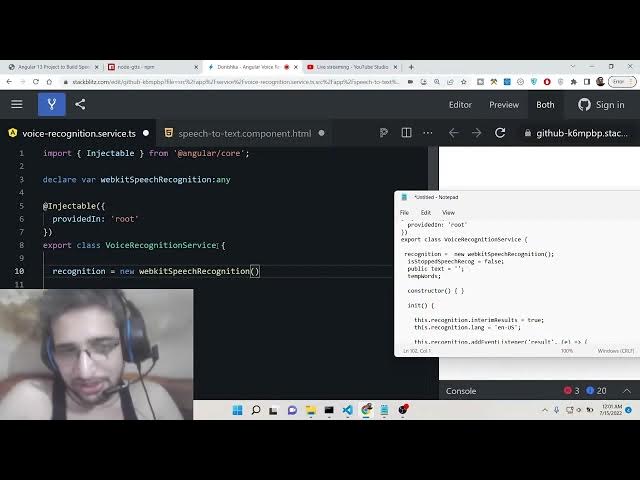
first of all we will declare a variable
6:56
which will be of the type webkit speech
7:00
recognition.
7:02
So this is the name of the variable
7:04
which is of type any.
7:09
And here we will declare another
7:12
variable which will be recognition
7:14
and this will be equal to new webkit
7:18
speech recognition. So this is the
7:21
actual business logic guys. So this
7:23
webkit speech recognition API is
7:25
available in all the browsers if you
7:27
just s search here web speech
7:31
recognition API.
7:34
So it is available to all the browsers.
7:36
So this is built in inside the browser
7:40
in order to listen to your microphone.
7:42
So so this is exactly what we are using
7:46
right here in this tutorial in order to
7:48
make this application.
7:50
One other variable we will make is a
7:52
stop speech recognition. So basically to
7:57
check if the stop button is pressed or
8:00
not. Then we will have the text whatever
8:04
is the transcript and the temporary
8:08
words. This will be like this. So now we
8:11
will have the constructor which will be
8:13
empty.
8:15
So inside this we will first of all make
8:18
the init method guys. So initialize of
8:20
the service. So inside this we will
8:23
initialize our interim
8:27
results to be true.
8:30
this dotrecognition dot language. So
8:33
here you can set your language
8:36
I will set English US stands for United
8:38
States.
8:40
So this dot recognition dot add event
8:44
listener.
8:45
So we will add a listener here.
8:50
So whenever results come we will display
8:53
it inside this e parameter. So now to
8:56
display it we will make a transcript
8:58
variable.
9:00
We will use array from e dot results
9:06
and then we will use the map method to
9:09
extract the result. R result zero
9:15
again map again result.
9:18
This code you need to write guys in
9:20
order to extract whatever that you speak
9:22
inside from your microphone.
9:25
So we are just extracting the transcript
9:28
and this is just the logic behind this.
9:32
So this dot temp words is equal to
9:36
transcript.
9:38
So we can console log it also if you
9:41
want to transcript. So that's it. This
9:44
completes this method guys
9:46
initialization method. So now we need to
9:49
write our start method. So when you
9:50
press the start button
9:52
we need to set this is stop recognition
9:55
to false
9:58
and here we will start our recognition
10:01
there contains this method of start.
10:05
So then we will have uh
10:09
a another event listener.
10:12
So inside this event listener so
10:14
whenever the end is there whenever you
10:18
press the stop button this function will
10:20
execute. So here inside this we will
10:22
check inside this if condition that if
10:26
stopped speech recognition is true then
10:29
we can simply call the we can stop this
10:33
recognition because you have pressed the
10:35
stop button in the else. If you haven't
10:39
pressed the stop button then we can
10:40
simply concatenate
10:45
whatever you have spoken and then we can
10:47
simply
10:49
start once again. That's it.
10:52
So we need to write this method that's
10:54
why you are seeing this error. So you
10:57
can simply uh
11:01
let me write this. So
11:04
just make this method word concat.
11:10
So this is a method that we are making.
11:13
So this it will just concatenate the
11:16
text. So whatever is previously there we
11:18
will just concatenate the next new text
11:22
which is spoken by the user.
11:25
And uh this dot temp words plus
11:30
dot
11:32
and this dot tempwords again we will set
11:35
it to empty. That's it.
11:38
And uh now we need to write our stop
11:40
method as well. So whenever user click
11:43
the stop button we need to stop the
11:47
microphone. So now to stop it first of
11:50
all we will set this variable of is a
11:52
stop to true
11:55
and this dot word concatenate we will
11:58
once again call and then this
12:01
recognition dots stop
12:04
that's it so this completes our service
12:06
guys so now we can test our application
12:08
let me just zoom out
12:12
so now once again if I click the start
12:14
button guys you will see that
12:22
you can see hover onto it. You will see
12:24
it is uh using your camera or
12:25
microphone.
12:28
Hello. Hello. You can see I think
12:30
something is wrong here because it is
12:33
showing undefined here.
12:36
Uh let me see. I have made a mistake
12:39
here.
12:41
Let me once again this is
12:46
let me once again copy paste. You have
12:48
this source code guys. So you can go to
12:50
the video description link and copy
12:52
paste the source code. Sometimes error
12:55
can take place.
13:24
>> [snorts]
13:24
>> I think guys the internet is not
13:26
working. Internet is working. Let me the
13:30
source code is given guys. So this is
13:32
the source code that you want to copy
13:33
paste here. I have written. So the blog
13:36
post is there with you. So you can copy
13:38
paste all the source code. Please hit
13:40
the like button, subscribe the channel
13:42
and I will be seeing you in the next
13:44
video.
13:47
Some questions are also there sir. I
13:49
think you should build it in react as
13:51
everybody nowadays are keen to learn
13:53
react. I have made those videos Dash.
13:56
You can check
13:58
both speech to text and text to speech
14:01
and for react. So it is already
14:03
published 2 days ago. You can check it
14:06
is there on the channel.