Up next in 10

Angular 13 ngx-otp-input Example to Receive One Time Password & Fill it inside TextBox in TypeScript
Dec 22, 2025

Get the full source code of application here:
https://codingshiksha.com/angular/angular-ngx-otp-input-example-to-receive-one-time-password-fill-it-inside-textbox-in-typescript/
Show More Show Less View Video Transcript
0:07
Uh hello friends today in this tutorial
0:09
I will be telling you that how to
0:11
receive OTP code inside your angular
0:13
application. So OTP stands for once on
0:16
one time password. So I will be showing
0:19
you that how to implement
0:22
inside your angular application using a
0:24
special dependency called as ngx OTP
0:28
input. So it's a very special dependency
0:31
which allows you to receive and fill out
0:33
uh OTP codes which are received inside
0:35
your application. Many a times you need
0:37
to verify your inputs.
0:40
In that case you will need to receive
0:42
and fill out these OTP codes. So this is
0:45
a dependency which is NGXOTP input. A
0:49
very special uh demo is also there. So
0:52
this will be the demo we will be
0:53
building here. You will see that this
0:55
can be of any uh limit. It can be
0:59
three-digit or OTP, six digit OTP. You
1:03
can configure this inside your
1:04
application. So when I reload this
1:07
application, it will uh just uh ask the
1:10
OTP. So you need to fill out the OTP. So
1:13
you can just
1:16
uh depending upon your application, just
1:18
uh compare the OTP with the correct OTP.
1:21
If the OTP is correct then you can
1:24
display a correct message. If the OTP is
1:26
not correct then you can display alert
1:28
message alerting the user that your OTP
1:30
is not correct. So this is the basic
1:33
library which allows you to fill out OTP
1:36
codes inside your angular application.
1:39
So this is the ngx OTP input. This is
1:42
the name of the library. So fairly it is
1:45
a new library. It has got 788 weekly
1:48
downloads. So you can just see here. So
1:50
let's start building this application
1:52
from scratch. So for this we need to
1:54
first of all create a new project here
1:56
inside our directory. So we need to make
1:58
new project here which is OTP input.
2:03
I will cd into this and here I will
2:05
create a new project which is OTP. So
2:08
this will create a new project inside
2:10
this directory angular project. So now
2:12
it will ask for routing. So I will say
2:14
no and CSS will be there. So now this
2:17
will install the packages. So it will
2:19
take some time depending upon your
2:21
internet speed and computer speed. So it
2:24
is just installing these packages.
2:28
So if you're watching it for the very
2:30
first time then please hit the like
2:31
button, subscribe the channel as well.
2:34
So this is a very special library. If
2:37
you just search for it
2:40
NGO NGXOTP input, this is the library
2:43
that we are talking about. So simply
2:47
this is the library which allows you to
2:49
fill out OTP codes once one time
2:52
password verification.
2:57
So now it has successfully installed it.
2:59
So we can simply go into the directory
3:03
and open this inside Visual Studio
3:04
Codeex editor. So the very first thing
3:07
we will do is we will install this
3:08
dependency which is ngxotp input.
3:12
So n it will install this dependency. So
3:16
just wait. So just add the force
3:19
parameter which allows you to install
3:22
inside another angular version. So just
3:25
to fix the compat compatibility issues.
3:28
So now we have successfully installed
3:30
it. Now to use this dependency it is
3:32
very easy. We can start this application
3:34
ngsurf.
3:37
So now first of all what we need to do
3:39
is that go to the app folder. Go to app
3:41
domodule.ts file. And here you need to
3:45
include this dependency
3:47
right here at the very top. If you see
3:53
right here, we will write the import
3:55
statement.
3:57
And for this guys, you will also need
3:59
the built-in forms module which is there
4:01
inside
4:04
angular. So it will be imported from at
4:06
the rate angular forms. And also we will
4:10
now import this ngx
4:13
OTP input module
4:16
which will be imported from ngxp input.
4:20
So now inside your imports array you
4:22
need to add the forms module and also
4:24
the ngxotp input module. So now you can
4:29
close this file. This is now over here.
4:32
So simply close it. So now you need to
4:34
go to app.component.html.
4:37
So right here you need to write some
4:38
markup.
4:40
So for the markup it is very easy. We
4:43
have this tag which is ngxotp input. So
4:47
inside this tags these take some options
4:49
here. So the first options it takes is
4:52
the config parameter. So the config
4:54
parameter which will be equal to OTP
4:59
input config. So this needs we will
5:03
declare all these properties in the
5:05
TypeScript file and also there is the
5:08
event handler whenever the user has
5:11
finished entering the OTP code. So this
5:14
event handler will fire which is OTP
5:17
change. So here you can write any sort
5:19
of custom function which is handle OTP
5:22
change and here we will pass the event
5:24
object holding the OTP code that the
5:27
user has written. And also the third
5:30
property is the fill property. So
5:33
whenever the user is filling the OTP
5:35
code, this event will fire. So handle
5:39
fill event, this is the name of the
5:42
function and here we will pass the
5:44
event.
5:45
So these are the three properties it
5:48
takes guys. So you can see whenever user
5:50
has done entering the OTP code and then
5:54
whenever the user is failing the OTP
5:56
code. So now we need to go to app
5:58
do.component.ts file just writing this
6:02
logic.
6:04
So right here at the very top we need to
6:07
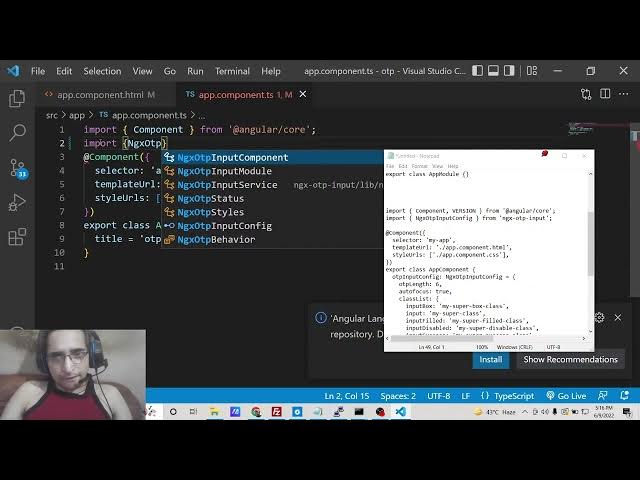
import our
6:10
OTP ngxp input config.
6:17
ngx
6:19
OTP
6:22
input
6:24
config. So this will be imported from
6:27
ngxp input. So now we need to declare
6:32
this which is OTP input config.
6:38
So we are declaring the same here we are
6:40
declared this. You can see that OTP
6:42
input config. So we are providing these
6:44
properties here. So this needs to be
6:46
same.
6:48
The spelling needs to be same. And this
6:51
will be of the type ngxp input config.
6:55
So this will be a object holding the
6:57
various options. So this is the first
7:00
option it takes is the how much is the
7:02
character limit of the OTP. So here I
7:05
can provide six characters. You can just
7:06
change it to anything three-digit OTP
7:10
you want to receive or fourdigit. It is
7:12
totally up to your application logic.
7:15
Then we have the autofocus.
7:17
So when the application loads for the
7:19
very first time, it will automatically
7:22
focus on the input field. It's a boolean
7:24
value either true or false. I will put
7:27
as true. Class list you can attach
7:30
various CSS classes to it just to make
7:32
this uh look prettier. So input box and
7:37
we will attach the special class which
7:39
is my super box class. This is not
7:42
mandatory but you can do it to make it
7:45
look
7:46
good. You can also attach your own
7:49
classes in CSS. It is totally up to you
7:52
how you need to
7:54
do this.
7:57
But this package comes with its own
8:00
classes. So it becomes very much easy or
8:03
handy to
8:05
attach these classes on these events. So
8:08
when the input field becomes disabled,
8:11
this class will be attached to it. And
8:14
when it is success input success when
8:17
the code is correct then this class my
8:21
super success class
8:25
and when there is the error this class
8:27
will be attached my super
8:30
error class.
8:33
And now we can uh just write these two
8:36
methods guys which we have initialized
8:39
inside this HTML file.
8:44
So right here handle
8:46
OTP change.
8:49
So inside this guys we will have the
8:52
value coming from the event. This will
8:56
be the value in array like structure.
9:08
The function will be void
9:11
and we can console log the value which
9:14
is value here.
9:16
And also when we are filling the values
9:19
handle fill event
9:21
this also will be a string value
9:26
we can console log the value. That's it.
9:31
So this is now complete guys. Now we can
9:33
test out this application.
9:35
So it is saying that handle OTP change
9:39
event.
10:06
Uh let me remove this for now
10:11
and
10:13
start this. You can see compiled
10:14
successfully. So if I now open this
10:17
localhost 4200.
10:22
So now you can see that guys we have got
10:24
this sixdigit
10:26
OTP. Here we can fill out
10:30
and uh this is very handy and uh you can
10:33
change this OTP length to let's suppose
10:35
three.
10:37
So now this will change automatically to
10:39
three-digit OTP. You can see that. So it
10:43
is very handy. This comes with its own
10:45
styling. You can see all these classes
10:47
are attached to it. So
10:52
these two handle OTP change. I think it
10:56
is this error is coming due to the fact
10:58
that uh this is the latest version of
11:00
angular
11:03
and uh
11:08
you will see that
11:12
if I copy this and try to search it on
11:15
stack overflow I think hopefully this
11:18
will give me the Sir
11:36
argument.
11:38
What is that? Argument of type
11:44
event is not assignable to parameter.
11:47
Let me search for this. And uh I think
11:50
hopefully some guy has answered this. So
12:13
Oh, I think this needs to be changed to
12:15
any. So just change this to any
12:22
because inside when we are calling it we
12:24
are not passing any sort of string or
12:27
integer. We are just passing it
12:29
generically.
12:30
So that's why we need to write any here.
12:33
Hopefully this will solve this problem.
12:36
If I once again you can see compile
12:38
successfully. So now if I reload this
12:42
application and try to open this
12:44
application localhost.
12:50
So you can see
12:53
if I check the console here you will see
12:56
this value will be printed out. You will
12:57
see that on the console
13:00
4 5 6 7 8 9. So based upon your logic
13:03
inside your application you can compare
13:06
the OTP which you have sent. It is very
13:08
easy by a simple if condition. So when
13:11
the you can simply say if value is not
13:15
equal to
13:19
1 2 3 you can just compare this.
13:32
Uh
13:35
I think you can change convert
13:39
string to integer in angular.
13:43
So there is some kind of method.
14:00
What you can do is that uh parent
14:13
parent you can use this method to
14:16
convert a uh string to integer and
14:19
simply you can here compare this with uh
14:21
let's suppose if it is not equal to 1 to
14:23
3 in that case you will simply say Sorry
14:29
1 2 3 4 5 6 it's a sixdigit OTP. So you
14:33
will see your OTP is correct.
14:38
Else scenario you will simply say your
14:41
OTP is not correct.
14:50
So now if you now fill out this some
14:54
other KTP here
14:58
you will see that
15:08
I think uh how to show alert in Angular.
15:14
I think we need to show this inside
15:21
some kind of this logic you can do. It
15:24
is totally up to you how you want to
15:26
process it. In this video, I just wanted
15:28
to show you about this specific library
15:30
which is OTP input. So, thanks very much
15:33
guys for watching this video. If you
15:35
like this video, then please hit the
15:36
like button, subscribe the channel and I
15:39
will be seeing you in the next video.
15:41
Until then, thank you very much.