Up next in 10

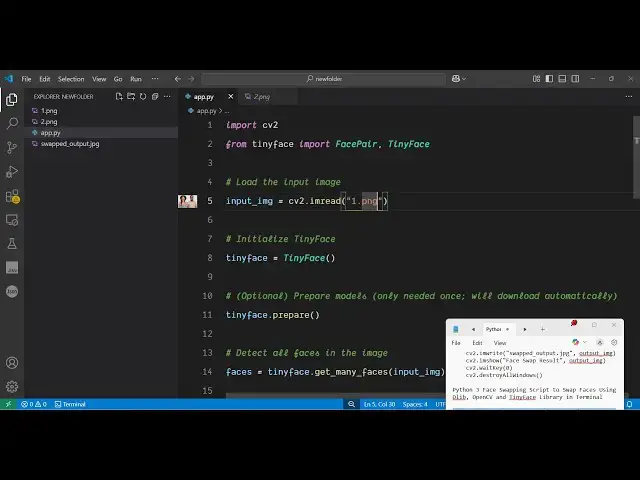
Python 3 Face Swapping Script to Swap Faces Using Dlib, OpenCV and TinyFace Library in Terminal
Jun 3, 2025

Get the full source code of application here:
https://gist.github.com/gauti123456/3f98db5a4905a59de1bafd85f82118d6
Show More Show Less View Video Transcript
0:00
uh hello guys welcome to this video uh
0:03
so in this uh video I will show you a
0:06
Python script which I have written right
0:08
here which will actually swap the faces
0:12
inside the images so we will take a very
0:15
simple example in a single image you can
0:17
see there are two persons out there this
0:20
is a first person this is a second
0:22
person so what I will do i will swap the
0:25
faces here with when I run this Python
0:27
script this face will be this and this
0:30
will be
0:31
this so we actually are taking this
0:34
image for example so let me provide this
0:36
image and once I run the script
0:41
here so now to run the script here we
0:44
just need to
0:45
open the integrated
0:49
terminal so let me just open the command
0:52
line here and simply type python app py
0:56
so what it will do it will actually take
0:59
this input image and it will
1:01
swap both the faces inside this image it
1:04
will take some time here 5 to 6 seconds
1:07
and you will see it will create a brand
1:09
new image
1:10
file where the faces will be
1:15
swapped and for this we are using an
1:18
open-source Python package you can see
1:21
inside this you can see the faces have
1:24
been successfully
1:27
swapped and it has created a brand new
1:30
file here
1:33
swapped so this was the original image
1:36
you will
1:38
see and this is actually the swapped
1:44
image so we can take another example
1:46
here let's suppose I take this image
1:49
again there are two faces out there you
1:52
can try this with any image let's
1:54
suppose I do this for this image once
1:57
again I repeat the process i run this
1:59
simple script so once again it will take
2:02
uh 5 to 10 seconds and then it will swap
2:04
the faces and save it as a new image
2:12
so recently I found out this open-source
2:15
Python library which does does this
2:17
process you can
2:19
see the faces have been swapped so it's
2:22
a cool little script guys i will show
2:24
you uh the full script is given in the
2:27
description of this video and
2:29
uh if you go to this website here Python
2:33
packages just search for this package
2:35
which is tiny face this is actually the
2:38
package the face swapping tool library
2:42
the command is simple you actually
2:44
install this package first of all after
2:46
installing it just create a simple app
2:50
py file let me just show you how to do
2:52
this and also we also need the open cv
2:56
package as well so simply install this
2:58
package as well pip install open cv-
3:02
python so these are the two packages
3:04
which is needed for this application and
3:07
now just create a simple app py
3:10
file after that we require the necessary
3:13
packages open cv and this tiny face
3:19
package we import this uh face pair and
3:26
tiny
3:27
face after that we will load the input
3:30
image so we basically provide the path
3:34
here so input CV contains this function
3:37
image read and we will pass this file
3:41
which is present in the same
3:44
directory and then we initialize it tiny
3:48
face using this
3:50
constructor and then we will simply call
3:53
this function tiny face dot
3:55
prepare so it will load the necessary
3:58
models which are needed for the face
4:01
swiping and now we will detect how many
4:04
faces are there inside the image so for
4:06
this we will call this function get many
4:09
faces and provide the path here to this
4:13
input
4:14
image after that we will calculate how
4:17
many faces are there inside this image
4:19
so inside this if condition if the
4:21
number of faces is greater than zero is
4:24
less than
4:25
two then we will simply say that not
4:28
enough faces found so image should at
4:32
least have two faces so that the image
4:35
swapping can work so here we are simply
4:37
comparing it if the faces are less than
4:40
two then we can print this message or
4:43
else in if the faces are there then we
4:46
will swap them so face pairs the empty
4:50
array and then we will simply say
4:53
face
4:54
pairs and uh we'll append
4:58
this and for this we will use this face
5:03
pair and for this we will pass the
5:05
reference here which will be the first
5:09
phase face is zero and
5:12
destination so where you need to swap
5:14
them so destination will be the other
5:17
face so we are simply doing the face
5:20
swapping here by calling this function
5:22
face pair we are reference this is a
5:26
destination again we need to repeat this
5:30
process faces pairs again call and then
5:35
again
5:37
here we need to say faces one and
5:42
destination here is
5:46
faces zero so this will actually does do
5:50
the face swapping for you after
5:53
performing now we need to perform the
5:56
face swap so this output image will be
5:58
equal to tiny face this is actually the
6:00
module it contains this function swap
6:03
faces if you see and here we will pro
6:06
provide the input
6:09
image and then the face pairs that we
6:16
got so like this
6:18
uh and then we just need to show the
6:21
actual output image in
6:23
the window so for that we can use input
6:27
C open CV so this will show the output
6:30
image to us it will create a new file
6:33
and then show it so this is the overall
6:36
script here and if I try to run this you
6:39
will actually
6:41
see it will now actually read this input
6:44
file detect the number of faces and then
6:46
swap it
6:53
so the all the script guys is given in
6:56
the description of this video so if you
7:00
want the full
7:02
script the link is given in the
7:04
description so just make sure you
7:06
replace the correct path here 1 dot
7:26
png so it will load this it will take
7:30
around 5 to 10 seconds for the face
7:32
swapping process to complete so just
7:34
wait and then after it completes it will
7:37
show the image to you in the window you
7:39
can see that with this help of this
7:42
library the most important thing is that
7:45
it's completely free to use and with
7:48
this you can make a face swapping
7:49
application as well web application
7:52
using this package of
7:53
Python so this is a pack I showed you
7:56
the full
7:57
script so thank you very much for
7:59
watching this
8:01
video and also check out my website free
8:05
media tools.com which contains thousands
8:08
of tools