Up next in 10

How to Deploy Angular 19 Project to Netlify With Domain Online For Free For Beginners
Mar 3, 2025

Get the full source code of application here:
Watch My Visual Studio Code IDE Setup Video For Fonts,Themes & Extensions
https://youtu.be/Bon8Pm1gbX8
Hi Join the official discord server to resolve doubts here:
https://discord.gg/cRnjhk6nzW
Visit my Online Free Media Tool Website
https://freemediatools.com/
Buy Premium Scripts and Apps Here:
https://procodestore.com/
Show More Show Less View Video Transcript
0:00
[Music]
0:00
uh hello guys welcome to this video so
0:02
in this video I'll show you how to
0:04
deploy a angular application inside
0:08
netlify.com netlify is a platform where
0:11
you can deploy front end and backend
0:13
applications so I've have created a
0:15
simple account login with your GitHub
0:17
account and you can see in this video at
0:22
the end I will show you how to deploy
0:25
your angular application so something
0:29
like this so angular 19 is the latest
0:31
version so netlify gives you this random
0:34
url. netlify app so this is our angular
0:37
application so I will start it from
0:40
scratch so let me just delete this side
0:42
from
0:45
here so simply I name this and simply
0:49
delete and I will start from scratch so
0:52
you can see now I have deleted this
0:55
website so here first of all what we
0:57
need to do WR here
1:01
this is our simple application angular
1:04
application as you
1:07
see so what I will do I will start it
1:11
from scratch let me just create a very
1:14
simple angular application let me delete
1:20
it so there is a command here which you
1:22
can simply
1:24
say uh npm create vat use this V develop
1:30
[Music]
1:33
environment dash
1:36
dash
1:38
template angular so this is actually the
1:40
command we are using V command here npm
1:44
create V at theate latest then project
1:47
name then dh- template angular so this
1:49
will ask you which version which
1:52
framework you want to use so you'll
1:53
select here from the drop down which is
1:55
angular
2:00
so now it will create a simple angular
2:02
19
2:05
application just select here from CSS do
2:08
you want to enable server site rendering
2:10
I will say no now it is simply creating
2:13
a simple angular project so just wait
2:15
for the process to finish so this will
2:19
hardly take 15 seconds and then we will
2:22
open it inside vs
2:28
code so
2:30
nlii is a great platform guys so which
2:34
offers the fle free plan you can try
2:36
this for 7 days for completely free and
2:39
also it has a free plan as
2:41
well so you don't need to create any
2:45
paid accounts so you can directly use it
2:47
for totally free so now it has
2:49
initialized the angular project so we
2:51
simply need to go to the directory of
2:54
the
2:58
project and open it in inside vs code so
3:01
this is our angular project so if I open
3:05
it inside
3:07
uh start this by NG Ser so this will
3:11
start this local development server on
3:13
Local Host
3:15
4200 so let me just test it out if it is
3:18
working so if I open Here Local Host
3:26
4200 so this is actually the homepage
3:29
which something looks like this now we
3:31
need to deploy this so for deployment
3:33
purposes we need to first of all build
3:35
this application by the command which is
3:38
npm run build so this will actually
3:41
build your application it will create a
3:44
dis directory at the left hand
3:46
side so it's very easy just run this
3:50
command and this will create this disc
3:52
folder and it will inside it will create
3:56
this browser folder and right here you
3:58
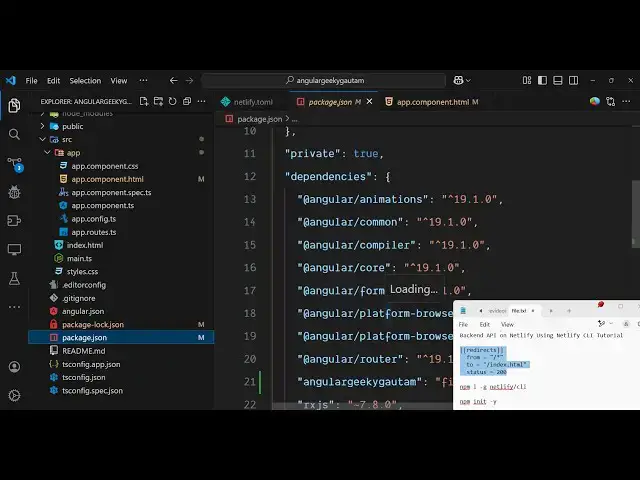
need to Define a file here
4:01
netlify do
4:04
TL so just Define this file here this is
4:07
necessary guys for providing the route
4:10
here so inside this you specifically
4:13
write this code here which I'm writing
4:16
here
4:17
redirect
4:18
redirects and then you simply provide
4:22
the path here
4:24
from and then the two
4:27
destination SL index
4:30
HTML so here you providing all the
4:33
routes which are
4:35
there just red them to index. HTML and
4:39
then the status will be 200 so this file
4:42
is really mandatory you do need to add
4:45
this file guys after you build your
4:46
project just create netlify TL file and
4:49
just paste this code and then now you
4:54
simply go to your netlify dashboard and
4:57
uh inside your dashboard you simply
4:59
upload this full file here so go to
5:03
your
5:08
directory uh
5:12
angular so we have this disc directory
5:15
inside this we have this browser
5:17
directory and simply paste this browser
5:20
directory all the files simply click
5:22
upload and this will actually deploy
5:25
your application angular
5:27
application so deployment is success
5:29
sucessfully we'll see that so we get
5:31
this nice little notification so if you
5:35
try to open this application now it
5:37
gives you this unique URL if you open
5:40
this you will see your application is
5:43
successfully
5:44
deployed do nety so this is the URL that
5:47
it gives and also you can change this
5:50
URL simply go to site configuration and
5:53
simply click on change site name and you
5:56
can replace it with your own customized
5:59
name name click on save so it will
6:02
change
6:04
it with a custom
6:11
name so you can see that so now let's
6:14
suppose if I make any sort of change
6:21
so so if let's suppose you make any sort
6:24
of change
6:25
here I delete everything and just
6:28
replace it by hello world so just make
6:32
sure that you
6:34
redeploy simply run the command npm run
6:37
build so this will again create your
6:40
project again create
6:43
this so again you need to create that
6:45
directory netlify
6:48
DOL and just paste this
6:55
code and again you come to the dashboard
6:59
and go go to
7:02
deploys and WR here select your Lo
7:06
folder which is the browser folder
7:08
simply upload this and this will update
7:12
your angular application so just refresh
7:17
it and you will see Hello
7:21
World so in this way guys you can easily
7:24
deploy your angular 19 application if I
7:27
show you we are using the latest version
7:29
of Ang which is 19 at the time of
7:32
recording this video so in this easy way
7:35
you can deploy it to netlify very simply
7:39
so thank you very much for watching this
7:40
video and also check out my website as
7:43
well freem mediat tools.com uh which
7:46
contains thousands of tools regarding
7:48
audio video and image and I will be
7:51
seeing you in the next video