Up next in 10

Build a PDF Invoice Generator in Browser Using jsPDF & Html2Canvas Using HTML & JavaScript
Jun 25, 2025

Buy the full source code of the application here:
https://procodestore.com/index.php/product/build-a-pdf-invoice-generator-in-browser-using-jspdf-html2canvas-using-html-javascript/
Official Website:
https://freemediatools.com
Show More Show Less View Video Transcript
0:02
uh hello guys welcome to this live
0:04
stream so in this live stream I will
0:06
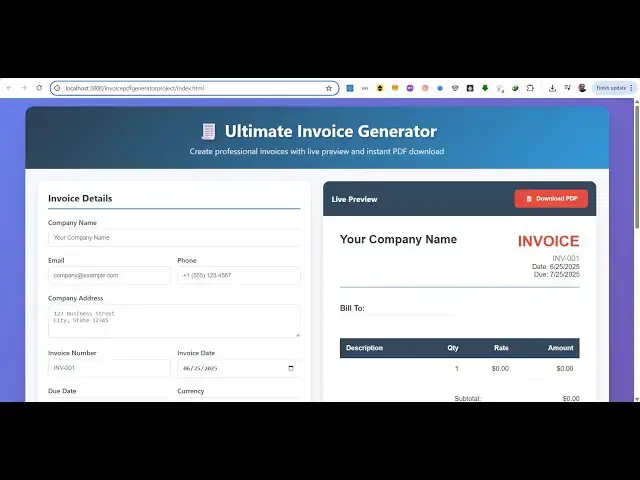
show you a PDF invoice generator kind of
0:09
a tool that I deployed on my website
0:11
freemediatools.com
0:12
it works entirely in the browser it is
0:15
useful for generating your PDF invoices
0:18
if you are working for a company or if
0:19
you own a company this tool will very
0:22
much helpful for you you can generate
0:24
PDF invoices right in the browser itself
0:27
with live preview this is a tool that I
0:29
deployed on free
0:30
mediatools.com/invoicepdf
0:32
generator so once you land on this tool
0:35
right here you will see this interface
0:37
here side by side you will see the live
0:40
preview you can give your company name
0:42
let's suppose I say free media tools so
0:45
as you can see I'm writing the company
0:47
name it is reflecting directly right
0:49
here and then if I write my email
0:53
address
0:55
it is also reflecting back then you will
0:58
enter your phone number
1:03
and then you enter your address
1:07
so you can see right on the right hand
1:11
side it is reflecting back all these
1:13
changes then you will give your invoice
1:15
number you can date picker you can
1:17
select the invoice date the due date as
1:20
well you can control that currencies in
1:22
the drop-down you can see we have all
1:24
these currencies which are there and
1:27
then you can give
1:30
the client information such as the
1:33
client name their email address
1:41
their phone number everything
1:46
i'm just filling out the details here
1:48
just to show you and then we have uh the
1:52
invoice items that the user has
1:54
purchased you can just give it a rate
1:56
the amount will automatically be can
2:00
have multiple items in the invoice you
2:02
can see that this is similar you can
2:06
give the price and automatically can put
2:08
it discount as well the tax everything
2:11
additional notes
2:13
and now the invoice is ready you have
2:15
the download PDF button so click and as
2:18
soon as you do this your invoice is
2:20
downloaded and in this easy way you can
2:22
generate invoice PDF document so this
2:24
tool I developed entirely in the browser
2:27
uh using HTML and JavaScript if you need
2:30
the full source code of this project the
2:32
link is given in the description
2:34
automatically
2:35
from Google Drive after the payment is
2:37
done you will get this zip file which
2:39
will contain the single index html file
2:43
so this is the overall source code of
2:45
this project it's almost 784 lines of
2:48
code so once you get the source code you
2:50
will be able to modify it or add
2:52
additional features as well
2:54
and as you can see we are using the
2:56
JSPDF library which is an open-source
2:59
JavaScript library for generating PDF
3:01
documents and also we are using HTML to
3:04
canvas which is a screenshot library
3:08
so once you get the source code you can
3:09
easily run this locally as well so now
3:12
we are running it on locally so again
3:14
you will repeat the process you can see
3:17
everything you can do this
3:22
you can fill out your invoice details
3:24
properly but I'm just showing you
3:27
how fast the process is to generate the
3:31
PDF invoice directly in the browser this
3:33
is a tool
3:35
and then after that we have the download
3:37
here
3:40
your PDF invoice is successfully
3:42
generated so if you like this tool guys
3:44
before purchasing it definitely try this
3:47
on the check out page also I've given
3:48
the D link on this demo page so you can
3:52
try out the demo application if you like
3:54
it then you can directly purchase the
3:55
source code of this application you will
3:57
get automatically
4:00
so JSPDF if you don't know it's a
4:04
open-source PDF generation library we
4:06
have used this and also we have used
4:08
HTML to canvas which is a screenshot
4:11
library inside JavaScript it is used to
4:14
take screenshots directly inside browser
4:17
so we are using these two packages for
4:20
building this directly in the browser
4:22
itself it's a single static page
4:25
application as you can see it's also
4:28
good looks good on the mobile device as
4:30
well so
4:32
you can easily rank this on Google as
4:34
well if you purchase it definitely first
4:36
of all you will know how I built this
4:39
it's a single index.html file so it's
4:42
very easy to deploy this as well
4:45
so definitely purchase it if you like it
4:48
and uh thank you very much for watching
4:50
this video and I will be seeing you in
4:53
the next live stream