Up next in 10



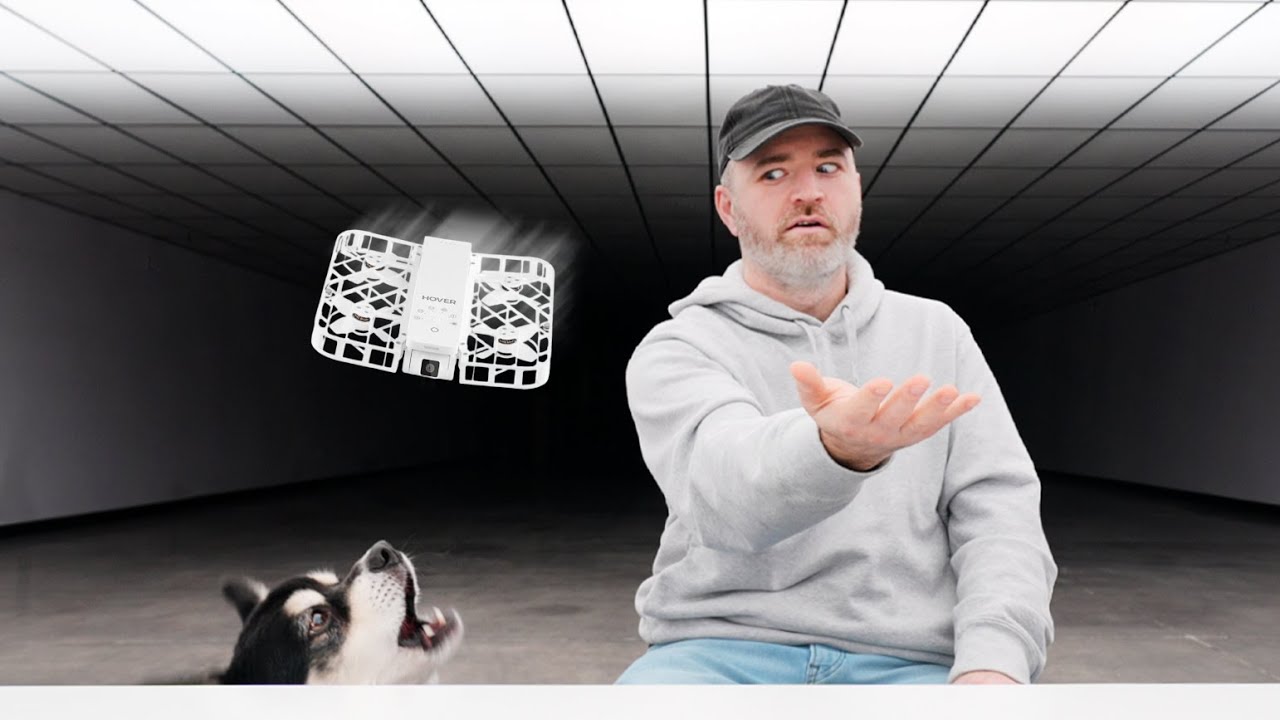
Introducing the HOVERAir X1, a revolutionary flying camera. With its user-friendly design, first-time users can capture amazing aerial views. Shop at the official website: https://bit.ly/3uhPJHp Shop at Amazon USA: https://bit.ly/46jgGYm Shop at Amazon CA: https://bit.ly/3QZcvwu Shop at Amazon AU: https://bit.ly/3SHFgPB #hoverairx1 #myhoverx1 #hovercamerax1 Thanks to Hover for partnering on this video. FOLLOW ME IN THESE PLACES FOR UPDATES Twitter - http://twitter.com/unboxtherapy Facebook - http://facebook.com/lewis.hilsenteger Instagram - http://instagram.com/unboxtherapy
Show More Show Less View Video Transcript
0:00
So this is pretty cool
0:01
This is the Hover Air. It is a tiny little drone. I remember looking at the first version of this
0:07
and just being amazed at how they were able to shrink these components into such a small package
0:12
Now you're looking at it here and you're saying, okay, well, what is it? Is it some little toy
0:16
No, it's an actual camera drone. This will shoot footage. It has the capability of following you
0:22
And then the entire thing folds up into a package that can practically fit in your pocket
0:26
It comes in two colors, so white or black, and it has removable batteries so you can keep them charged up
0:32
Obviously, one of the headaches with any type of drone is battery life. So to have the capability to just pop in a fresh battery when you're out
0:39
that's a convenient thing to do. So there's an app that goes along with this and it goes beyond just following you
0:45
Maybe you're rolling on a skateboard and it's kind of hovering behind you
0:49
It can also do a 360 around you and it can return to you
0:53
if you send it to do a shot out front of you. It'll come back and sort of land in your hand
0:57
and it's so small and light that there's very few restrictions when it comes to flying this
1:02
That can be another headache with a lot of the other drones that are out there
1:06
You may need certain clearances in order to fly those, depending on where you're located
1:10
So we have a little bit of paperwork here. For your first flight, please fly outdoor
1:15
They're like, start outside first. There's fewer obstacles. I remember last time, it's fairly durable
1:20
It's all covered up. Bumpers all the way around, and just look how tiny that thing is
1:24
And light, by the way, not just tiny. Maybe like a smartphone
1:28
Yeah. And look at the scale. Like this is the new Pixel 8 Pro. And here you have the hover drone
1:34
Look at that. So there's a few controls on there. You have a power switch. You can see the little camera front facing
1:39
And it's sort of suspended there with some shock absorption in order to likely stabilize your footage
1:46
You've got a mode switch above the power switch. Also in the package, you've got a little, that's a soft little carrying case
1:53
Check it out. And then type C to type A cable. Let's keep going and discover what we've got
1:59
So if we open up the battery charging hub, oh wow, these come in different colors as well
2:04
white or black to match your actual drone. And this is just a type C connector so you could use this cable or an existing type C cable that you have And your battery is just gonna slide in here Just like that
2:18
What I like is you have a dedicated indicator so you know which battery is fully charged
2:24
No, it's a good fit and I just realized something, you have a USB-C port here as well
2:28
If you don't pick up the battery charging hub, you'll just charge directly here into the drone itself
2:33
Oh, I should also mention we have the remainder of our important sensors below
2:37
This thing is so light. Okay, so application. Let's take a look. So check it out
2:42
Here are some of the different styles of shots that the drone can pull off
2:46
This like sort of pull away shot where it starts low to the ground
2:50
and then backs up slowly. And then this bird's eye view shot, which is straight above
2:55
and doing this sort of slow rotation. And here's the follow me functionality
2:59
So these are things that we're definitely gonna test, but like look at how stable it looks
3:04
Massive stabilization with your quad propeller setup. And because it's relatively intelligent
3:10
you worry a little bit less about it. It's capable of returning to you and landing on your hand
3:15
You would not want to do that with some heavier drones that are out there. What's cool about this too
3:19
is it kind of gets you into drones. It's like a gateway drone. You may be new to drones
3:23
and you want to see if it's something you're going to use and you want to see if it's something you'll travel with
3:27
And this is a great way to start. Possibly become an enthusiast. I mean, look how happy this guy is
3:31
By yourself. Like he's got no camera person with him. He's in Italy. Look at the sandals and the smile
3:37
Check this out. Look at this. This guy is up on the mountain. You can't get that shot
3:41
You're not chucking your smartphone up there. And even a 360 camera can't achieve this
3:45
So it's a cool little tool. Now, obviously, it's going to be designed for outdoor use
3:50
Low light's going to be a whole different story. But that's kind of where you would typically want to use this anyways
3:55
And you can see all types of samples here in the app. Anyway, if we click over to hover here, we can go ahead and activate and connect this
4:02
Let me power it on. So the green light on the front indicates that it is now powered
4:06
I'm gonna tap to activate and connect. Hello. Current mode, hover. Finds it, ready to connect
4:15
Activate, wow. Before starting your flight, pick up your hover, complete eight small tasks
4:20
Okay status light is green yes Short press the power button Please hold out your hand and place it one foot below the device And wait for the device to land on your palm Continue Snapshot
4:45
Wow. That was insane. But it was also cool. So it can get the shot and then I place my hand underneath and boom it lands right on it. Quite responsive. First demo and some obstacles here even some that you guys can't see
5:07
But it's so tiny and cute you're not really intimidated by it. I mean maybe the dogs are. Once you've been still for three seconds, Hover will take a photo of you. Cool
5:21
Yeah, so it kind of will like take continuous selfies so long as you stay in that position
5:27
This is just a low res preview by the way. Download for high quality resolution
5:30
There we go. Whoa, check it out. I think outdoors will be even better when you got lots of light going on
5:35
So it looks like it's stores locally and then you do the transfer. It will create previews that are smaller file size
5:42
and then you can download the clips that you actually like So you can go ahead and edit them, post them
5:46
do whatever you want with them. And here are some of the different modes that are built into it for the behavior of the drone
5:52
The hover mode, which we just showcased, it's kind of sitting in front of you
5:56
It can take a shot of you, act like a tripod or cameraman without. The zoom out mode is a little bit more cool
6:01
because it creates a shot moving back from you. Then you've got follow, which you're doing an activity
6:07
whether it be running, skateboarding, biking. We've also got orbit, in which case it's going to move around you
6:13
in a 360 fashion to create a 360 degree view. Bird's Eye is really cool
6:18
You've seen this drone shot before for sure on YouTube videos, movies, and so on
6:23
Dolly track is you running towards, or walking, this guy's running, moving towards the drone
6:30
and it's backing up like a dolly sort of tracking you, walking towards it
6:34
And lastly we have manual control You got a good shot of that
6:55
I just put my hand out and it's a fun, like it's really intuitive
6:59
It's easy to use. I didn't know that that gesture was gonna result in that
7:03
That's one of those moments where you expect to be like, ah, I didn't really get it
7:07
cause it was the first take of the dolly mode. And I'm just like this, it goes green
7:10
and I'm like, oh, cool. You see my hand and you land on it. It's a versatile foray, an entry point into drone footage
7:19
snapshots, video, and an entire package that folds up. Tiny, almost pocketable
7:25
Well, let's see if it is pocketable. Let's find out. Here's my pocket
7:29
Yeah, it's pocketable. I mean, you can see it, but it's totally pocketable
7:32
So for travel, for somebody who just wants to get some exciting shots
7:36
this is just gonna draw less attention and be more likely to go with you
7:40
because it's in your pocket. Obviously, it's not gonna be at the same level
7:44
or have all the same capabilities of a more advanced drone, but that's not really the point
7:49
This is a more approachable, it's like 350 bucks, right? So you adjust your expectations accordingly
7:55
But I would say at that price, it's gonna get a lot more people interested in drones
7:59
than at those higher price tags. So here's the white model versus the black
8:17
I don't know, I don't know which one I prefer. I don't know which one is more covert, probably this one
8:21
because in the sky relative to that backdrop when you're outdoors, either way, very cool, fun
8:27
little drone, surprisingly responsive. And I think it serves its purpose, like for what it is at this particular price point
8:34
And I've proven that it actually is pocketable, at least in my pocket
8:39
It is the Hover Air X1. Let me know which color you would choose
8:43
Would you go for the white one or the black one
Computers & Electronics