Up next in 10



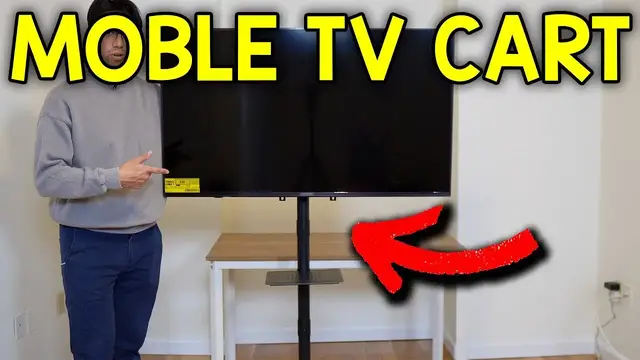
In this video, I go over the Bontec Mobile Cart TV Stand.
Check it out here https://geni.us/qVai3
Want FREE Shipping With Amazon Prime? Get a 30-DAY FREE TRIAL by signing up here http://www.amazon.com/tryprimefree?tag=thechrisreview-20
DISCLAIMER: This video and description contains affiliate links, which means that if you click on one of the product links, I’ll receive a small commission. This helps support the channel and allows us to continue to make videos like this. Thank you for the support!
Show More Show Less View Video Transcript
0:00
So this glides pretty easily
0:01
So here's everything it comes with. We have the square tube, the tube connectors, the top bottom middle pole, the pole connectors
0:05
the cable ties, the four wheels, the square plate, the TV arm set, the shell, the seat
0:09
clamp, the tools and hardware, and finally the instructions. All right, so it's time to assemble the base
0:14
And this involves connecting the square tubes to the tube connector. And we're going to place it just like this
0:19
And it's time to attach these bolts to it. And this is going to be baggy eye, the M6 by 16
0:25
Just like that. And now it's time to attach the wheels right over there. and we're going to be using this wrench from the toolkit of bag N
0:38
Just like that. And now this can be put right side up, and now it's time to start building the pole
0:42
And we're going to start with the bottom pole, which is going to be this one right here. And we know it's the bottom because all the way at the bottom
0:48
it has this here, so this can be placed just like so. And then all the way on the backside here, there's this hole
0:55
so this just has to be moved until we can see the hole. Right over there and now it time to screw this in and this is gonna be from Baggy K the M6 by 16 just like that Now it time to flip this over right here And we actually going to attach a screw here And that going to be from baggy J M8 by 20
1:14
And there. And now it's time for the next step, which is going to involve attaching the other two poles to the pole connector
1:19
And we're going to start with the middle pole. And we know it's the middle pole because both sides are going to be open, just like so
1:25
So the pole connector can be put right on top here. And then also notice that there's like this little divot here
1:30
This right over here. and make sure it aligns with this screw. And there, now it's secure in place
1:36
I can't twist it or turn it around. And then I can do the same thing for this pole
1:40
So right here, this is where it goes. And now we can go to the side
1:46
And right here, this part can be tightened. Now the poles won't come loose
1:51
They're pretty tight on there. I can't pull them apart. All right, now it's time to add the shelf to the middle pole
1:57
And I'm going to start by grabbing the C-clamp. And inside, there's going to be this foam piece. So this adhesive can just be stuck on on the inside here
2:04
And this will give it some extra grip when we actually attach it to the middle pole And it gonna be screwed in just like this over here in the middle clamp and we gonna be using the rest of the eye bolts And there just like that all right now it time for this step which involves securing this square plate to the top
2:21
pole just like so and i'm going to start by using this bolt from baggie m the m6 by 60
2:27
just like this and now it's time to use the bolt and washers from baggie l
2:31
to attach to both of these sides here there just like that all right so it's time to attach the
2:36
brackets to the tv and right here i have the tv right here is the bottom and over here is the top
2:41
and these little things should face the bottom so they should be pointing down so i'll put them
2:46
right over here and go like this and here's all the hardware it comes with so now i'm just going
2:51
to choose which bolt fits in these holes yeah i think i'm going to go for mc and see if those fit
2:56
and when i tighten it all the way at the bottom it was all the way secure like that but i think i
3:00
still do have some more space so let me actually go to md instead yeah these appear to be the same
3:04
size these are just gonna be longer. And yeah it would be these. So I'm just gonna grab the small
3:11
spacer and it's gonna be MG and MH. All right and actually now that I think about it I don't think
3:17
I need both spacers I just gonna use these plastic ones instead and this is gonna fit at the bottom So right here and then I going to put this yeah like right here I put it on the fourth one Then I do this one here and these don have to be tightened too much so there no drill
3:31
just a screwdriver and the same thing over here and there just like that. Oh wow yeah I think
3:38
that's it. And to keep the cables in place this also does come with some cable ties. So this glides
3:42
pretty easily although I will say I'm still going to be careful with this. I don't know how secure
3:47
this is, although I mean it doesn't seem to be like falling, but I'm not going to push it on the
3:52
TV itself. I'll just grab it from the side over here to like move it around. And also one thing I
3:57
did notice is I think this is slightly bending towards the front. Now that might be because of
4:02
the weight of the TV, although this brand is supposed to hold up to 60 inch TVs, but this one
4:08
might just be a bit on the heavy side at 50 inches. So I'd probably not go any bigger than this just
4:14
in case or just use a smaller or more lightweight TV. But yeah, here it is. This is going to make
4:20
transporting it a lot easier. Now I just have to put some connections and it's ready to be used
4:26
But yeah, that's a quick look at the mobile cart TV stand
#Computers & Electronics