Up next in 10



AI, Windows, and quantum computing took center stage at Build.
Show More Show Less View Video Transcript
0:00
Developer conferences are always about understanding tech shifts, understanding the new stack
0:06
but it's also about really coming to grips with the new opportunity for us as developers
0:13
for the companies that we work at, as well as the broader world
0:18
So today we're going to unpack this. This conference is all about that
0:22
And if there's one key takeaway, it would be this. How do you all participate fully in this frontier intelligence ecosystem
0:33
If we can deliver unmetered intelligence to every desk and every home, right
0:40
It takes us all the way back to the very beginning, but that's what we said
0:44
Can we do that in this era of AI? For example, Adobe After Effects or Premiere are both using Windows ML across NPUs and GPUs for local processing
0:57
And so today, one of the things that I'm really excited about in order to tap into all this compute power is to expand the scope of Windows ML and Windows AI
1:08
So you now have the full install base of GPUs that you can get to
1:13
So I'm really thrilled that every developer out there can count on building for local onboard AI and then have it run across all of the install bays
1:23
We are also announcing two very cool new models that are all going to run on Windows Inbox
1:31
The first is a new SLM. It's sort of a more efficient model, ION Instruct
1:38
And it's a great reasoning model. and then we have the planning model, IonPlan
1:45
which is a local agentic loop. I mean, think about it, right? You now have a full local agentic loop
1:50
You can give it tools access and build a fully onboard agentic applications
1:56
without having to round trip to the cloud. That brings us to NVIDIA and RTX Spark
2:05
This is a next generation SOC for PCs. It brings together the CPU, the GPU, as well as the AI capabilities into a single SoC
2:15
And that's the exciting part. And it includes unified memory architecture and also the integrated DRTM
2:23
So you now have all of the systems innovation and the SoC coming together
2:28
And we're really thrilled that one of the first devices that we built was the Surface Ultra
2:35
It's a beautiful device, and it really brings the power of NVIDIA together with the design and the craftsmanship of Surface
2:46
It's 128 gigabytes of unified memory. It's a beautiful 2,000-lit display, and it has an all-day battery life
2:57
And so we're very excited to see this later this fall. We said, okay, this is fantastic
3:03
What can we do next? So we said, let's try and push this and push the architecture to its limit for developers
3:14
What if we could just max the compute, max the memory, build out that developer machine that's the dream machine
3:23
and that's what we're announcing today. Surface, RTX, Spark, DevBox is truly a dream machine
3:30
It's got one petaflop of AI compute, 20 CPU cores. All of those things have 128 gigabytes of unified memory access
3:43
So super excited about this coming in the fall, and you can join the wait list
3:49
I on the wait list as well so we get there So then we said why stop there We said what if we did one more thing
4:02
And in fact, I think Jensen did that already. And he said, Windows is coming to the DGX station
4:09
So a new, I describe it as the desktop data center, which you can have right there
4:16
and running a one trillion parameter model locally. I mean, just to sort of put it in perspective, it's pretty close to what perhaps we had when we built GPT-2.5 or 3, right
4:27
One of the first supercomputers. So it's pretty crazy to think that we've come this far where you can now have a data center on your desktop
4:36
Live from Taipei, Jensen Wang, CEO and founder of NVIDIA. Well, this all started about three years ago between a conversation between you and I
4:49
And we were talking about how we could build a new class of PCs that's incredible for designers and creators
4:58
And it would be incredible for artificial intelligence. And it would be one of these systems that has the processing capability, but also the software stack that's integrated into the world's design packages and creator packages and, of course, all the things that we're doing with AI
5:14
And here we are, three years later, we built an incredible new chip
5:20
And this system is supported by all of this new software that you create for Windows
5:27
And we now have the ability to have essentially an autonomous agent running on the PC
5:35
Now, when you take a step back and you think about what does that mean? For the 40 years or some 30 years we've been working together, we went from inventing DirectX together to creating now this incredible computer that has autonomous systems running
5:54
The PC evolved from being an incredible tool to now being a tool that's used autonomously by an AI assistant
6:03
And so the idea that I could be traveling and I'm on the phone and I could text my PC and ask my PC to get some coding done or some idea that I have, and it would fire up the tools on the PC
6:19
And it would make the modifications or the changes or the design that I told it to do, and it would iterate with me while I'm away from the PC
6:29
My PC became an assistant. While I'm sitting there, of course, this PC would be my great assistant as well
6:35
And so this idea that the PC evolved from a personal computer to a personal AI
6:42
it's just really exciting. Today, we are really thrilled to announce that OpenClaw runs on Windows leveraging MXC
6:52
yeah we are very deeply engaged with the team to make open claw run super well on windows and so
7:03
let me hand it over to my colleagues uh scott and samantha to show you open claw on windows
7:09
hey friends you know open claw came out in november of last year and it took the world by
7:15
storm and for the last several months i've been using my open claw to stay on top of my health
7:20
My claw can help me manage my blood sugar, and it gives me even proactive notifications via heartbeat
7:27
I've got mine triaging my personal email. It's doing my GitHub issues and tracking packages, and it even buys me movie tickets
7:34
So, Samantha, what are you using your claw for? That's cool, Scott. I turned my OpenClaw agent into my triathlon coach
7:41
I'm nowhere near ready for my race in September, but Coach Claw developed a work-back plan for me
7:46
and is using my Strava data to notify me on how I progressing and to keep me accountable when I slacking Now we both found our claws to be super useful and that why we working closely with OpenClaw to make them successful
7:59
and even more successful on Windows. We've been collaborating in the open on GitHub to bring you all an OpenClaw Windows companion app
8:07
It's going to help you set up your own claws or connect to existing ones, whether they're hosted in Windows or in WSL
8:13
And the Windows companion, we're going to sandbox the OpenClaw tool calls
8:17
to keep you and your system safe. Yeah, you'll see the OpenClaw Windows Companion app running right now in the background
8:25
Go ahead and right-click on it, Scott. All right. That looks awesome
8:31
You'll notice immediately it looks like a native Windows app, because it is
8:35
It's written in WinUI 3. It's got all kinds of information about my gateway
8:40
other machines that are participating in my claw, my sessions, and my usage
8:44
I've also got quick access to things like chat, canvas, the main dashboard, and more
8:50
Let's jump into companion settings. Within the app, we've got full chat support with tool calling
8:57
And you'll notice down here in the corner, we've got lots of permissions options along with our sandbox configuration
9:04
I'm going to do something really scary and ask OpenClaw to delete all the files on your desktop
9:09
That's cool, because I have a nice clean desktop. I think you're keeping a secret
9:14
You hid all your icons from the audience while we were on stage. I think we need to show the audience who you really are
9:21
So disrespectful. I know where everything is. It's just, don't touch my stuff
9:28
I know where they are. You know, Sam, I need to make sure that you're clear that a messy desktop is an organized mind
9:34
I'm pretty sure that that's the quote, right? So what we've done is we've asked OpenClaw to delete those files from the Windows node
9:41
and the only thing that is going to keep from happening is MXC because we've turned off all of the many layers that OpenClaw offers
9:48
but our IT, in this case Samantha, has set it to read-only. So it's trying to go and delete all of those files
9:54
We can actually see the different attempts where it's going and deleting and then checking the directory and then deleting again
9:59
because it's very persistent. It wants these files gone and I want them to stay
10:05
Nope, nope. The read-only sandbox is there. 94 JPEGs are still on the desktop
10:11
Absolutely. My desktop icons are safe from Samantha's reign of terror. Boiled again
10:17
Oh, my goodness. I'm so excited to see OpenClaw native on Windows
10:22
You know, watching a claw try to delete all your desktop file and just fail made me really happy
10:31
Because six months ago, it totally would have worked. You know, I built OpenClaw to have access to everything
10:39
My files, my machines, my chats, always on and fully open source
10:44
That's what makes it so powerful. And that's what also makes companies a bit nervous
10:50
You know, what I kept hearing was, Peter, I love my claw
10:55
Can I use this at work? And that's what we spent the last few months on
10:59
with Microsoft, GitHub, OpenAI, NVIDIA, just to name a few. We added observability
11:07
We added auto mode for permissions. We changed how access works. It's not all or nothing anymore
11:13
You can pick which folder should be read-only, which one should be write-it or hidden
11:19
So here's the news. You can totally run OpenClaw inside your company now
11:23
and we even made the harness itself a plugin you can bring your own co-pilot codex whatever you
11:37
already trust and your rules come right with it and then you put open claw on top of it you get
11:44
persistent memory heartbeats and you get a claw right inside slack or teams We also continuing to make rapid progress on our long goal of building a scalable quantum computer We announced last year our
12:01
first QPU. We created a new state of matter that was only theorized 100 years ago, and we proved
12:09
it out that it exists, our vision was to take a very radically different approach to addressing
12:17
the fundamental barriers to building a scalable quantum machine, which is all about reliability
12:24
speed, as well as size. Since then, we have continued to make progress across the full
12:31
quantum stack with both our academic and industry partners. In fact, in Q North, we will have
12:37
a quantum computer powered by atom computers, natural atom computers, with our stack in there
12:44
We are also working with Algorithmic and Columbia and ETH Zurich. And we ourselves, in fact, use this discovery agentic loop to accelerate the work in quantum
12:58
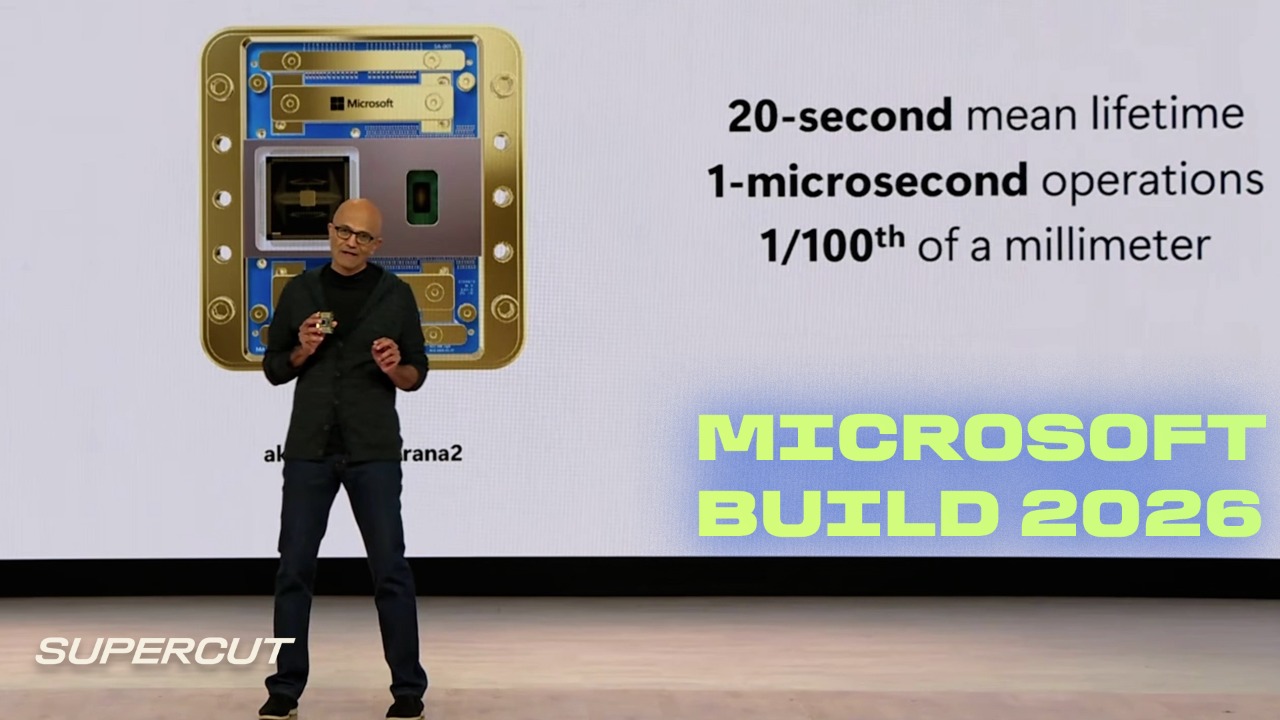
compressing years of research into this last year. And today, I'm really thrilled to announce Majorana 2
13:08
And so this is Majorana 2. Majorana 2 implements the next generation material stack that we use Discovery to discover and build and help fabricate
13:22
The resulting qubits are exceptionally reliable and capable of maintaining their state much longer
13:30
While other common approaches deliver a lifetime of just microseconds or even milliseconds
13:36
Majorana 2 provides qubit mean lifetime of 20 seconds or up to even a minute
13:43
essentially a thousand times higher than what we were able to achieve with Majorana 1
13:50
And the operations, and this is so key, operations in Majorana 2 are one microsecond
13:57
enabling pretty complex quantum computation in that lifetime. And all of this in the same qubit form factor of Majorana 1
14:08
in one one-hundredth of a millimeter controlled all digitally, which is, again, a super important aspect
14:14
making it all possible to fit a million of these qubits in a chip smaller than a credit card
14:21
It's this combination of the reliability, the speed, the size that makes the topological approach so unique
14:30
With Majorana I, we had proven out the foundational physics, and with Majorana II, now we begin the engineering scale
14:41
But ultimately, it is never about tech for tech's sake. It's about tackling those pressing challenges of people and planet
14:53
It is also the fundamental point of this conference. The question is not whether you can build the next great model, the next great platform, or even this quantum machine
15:05
The question is, how do we build this frontier ecosystem together? Because there are really two stories people can tell about this moment
15:17
One is that technology concentrates power, reduces human agency, and leaves the society to absorb the consequences
15:26
The other is that we use this next wave to unlock opportunity for developers, scientists
15:33
enterprises, and every community. And our job is to make the second story true
15:39
That's our North Star for the frontier ecosystem. Let's all go build together
15:44
Thank you all very, very much. Thank you
Celebrities & Entertainment News