Up next in 10



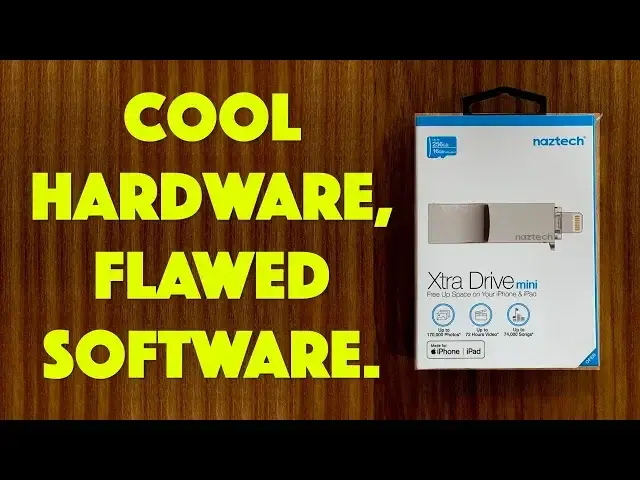
Imagine a flash drive that has a Micro SD card at its heart and supports USB-A on one end and MFi-certified Lightning on the other. Base config is 16GB but you can put up to a 256GB MicroSD card in. Great idea, right? The problem, as tech expert Dave Taylor of https://www.AskDaveTaylor.com/ demonstrates, is the software you're required to use with the unit.
Backing up your iPhone or iPad should be a no-brainer but with the Naztech Xtra Drive Mini app, it just isn't. But... it does offer some cool features nonetheless, as shown...
Check it out at https://www.Naztech.com/
Show More Show Less View Video Transcript
0:00
Can this little device solve all your iPhone and iPad storage problems? Let's find out
0:12
Dave Taylor here and I'm looking at this. This little guy is the NASTEC ExtraDrive Mini and
0:19
it's pretty interesting. Obviously it's keychain but more importantly it has a lightning connector
0:25
on one end and it has a USB 2 connector on the other end and in the middle it looks like a
0:32
whistle but there's actually space for a microSD card. Now the device comes with a 16 gig microSD
0:39
card but you can pull it out and you can replace it with up to a 256 gig drive. That's a lot of
0:46
storage space for a little doohickey like this. Now you would think that the hardest problem here
0:52
is getting the hardware right. Well they pretty much did that. Turns out the problem is the
0:58
software but let's get to that. First off I want to show you that you pop off the little protective
1:04
cover put it in your phone and in this case I actually still have the case on and it still
1:10
works and it prompts you to launch the ExtraDrive Mini app and when you do it's a pretty straightforward
1:18
interface. As you can see the top represents your phone and the bottom represents the actual storage
1:24
unit or drive. To copy something across you simply drag and drop the circle. Theoretically
1:31
straightforward and easy but it doesn't really work that way so let me step you through this
1:36
little sequence I recorded. First off you'll see it only shows that I have 18 photos but hang on
1:44
a second let's go over to my camera roll. Okay my camera roll you can see I have 1,898 photos
1:51
Where are the rest of them? I don't really understand. It makes it really difficult so still
1:56
we'll do that. We'll drag and drop and it copies everything pretty quickly but when I go and look
2:01
on the device it's the 18 pictures. That's it. Where is everything? Even more confusing on the part that
2:09
actually is for the iPhone. If I go into the in-app photos it shows zero. Where are my photos? Did it
2:17
delete them? Is it not on the drive? Turns out it is but the whole software interface is really super
2:24
confusing and I really don't think they did a very good job with it. So that's really what's most
2:29
frustrating to me is that I want access to everything. I want to be able to drag everything
2:34
and say that's 1,800 photos. Do you want to copy all of those and then to be able to say yeah I do
2:40
just copy it all across. If I run out of space okay that's its job right is to be backup storage
2:47
but now once I've copied those 18 if I try to do it again it literally says there are zero photos
2:53
and that is just wrong. It's just confusing. So let me pop it out though because there's more
2:59
I want to talk about because in addition to that you know they say that you can replace the micro SD
3:07
card but it turns out that it fits so deeply in there it's not so easy to get it out. A little
3:14
bit of finagling you can do it and so then here's my micro SD. So then I suppose it's actually not a
3:20
bad micro SD reader for your computer but then again here I am with my MacBook Pro and this is a
3:27
couple of years old now this is not the latest model and it only has USB-C so I need to use an
3:33
adapter. Okay we'll try an adapter. So the adapter is easy enough you plug it in the whole thing
3:41
plugs into the side of the computer. I launch my computer and what I'm going to do is I'm going to
3:47
copy across a copy of the latest Jurassic Park movie and it's an mp4 and it's pretty big so we'll
3:54
see. As you can see from this it takes about two and a half minutes to copy across 2.2 gigabytes of
4:00
movie but it does eventually get there and if I look I will see in the finder it shows up as SD
4:07
card and I can look in the finder and there's a folder called photo backups and you know what
4:13
happens is that it shows me the 18 photos. Okay that's nice but not super useful. Where are the
4:20
rest of my photos? Still we'll just step that aside. So now what I'm going to do is I'm going to
4:25
go ahead and I'm going to eject the drive. You should always do that. Generally a good practice
4:31
and then I'm going to pop it off pull it out go through all of these additional steps. It's totally
4:37
worth it right? So then I'm going to put the device back in my phone and now let's see if I can
4:44
actually watch this movie and the answer is yes. So that's a really great feature. So one of the
4:51
great features is I can actually access files that I've copied on with my computer and then I can
4:58
like watch movies on my phone without having the movie take up space on the phone storage itself
5:05
So you know they got some of the functionality but that whole backup system is just seriously broken
5:12
and I just feel like if they just did a software update maybe things would just work well. So not
5:18
sure what to say about that. I will say however that this whole clumsy USB-C adapter they did tell
5:26
me at the consumer electronics show that they have a USB-C version of this device coming out
5:31
So this end will have USB-C and that will have lightning but I gotta say nasdaq if you don't do
5:38
a major rev of your software then changing your hardware is not going to really fix anything and
5:44
it's still going to cause I think a lot of confusion and a lot of frustration with your
5:48
user base. Now maybe it's just me. Maybe other people are having great experiences with it but
5:54
you saw and I'm showing you this is how it's working for me and that's a little bit funky. So
6:00
before I tell you the price let me go ahead and ask if you can subscribe to my channel
6:04
Really appreciate when you subscribe and if you have one of these devices or a similar device
6:09
leave a comment and tell me what you're using and how it's working for you because again
6:13
I don't know. I don't see how but maybe this is user error. Maybe there's something I'm not doing
6:18
that I should be doing. I mean I even showed you settings. There's nothing there that says show me
6:22
all photos instead of just the latest. I don't even know what the 18 are. It's not the latest
6:27
It's just randomly picked 18. So not a huge recommendation here. The hardware is really cool
6:35
but they really need to work on their software. This is the nastec extra drive mini supporting
6:42
micro sd and lightning connector and it comes with a 16 gig micro sd card for $59.99 at nastec.com
6:52
You can upgrade it to 256 gig if you really want but then you're going to have to use their
6:57
software for now. So this is Dave Taylor. I think I am going to get back to that movie but I think
7:02
I'm going to watch it on my computer because it's a little bit bigger screen which means I'll catch
7:06
you in my next video
7:22
you
#Computer Hardware
#Computer Drives & Storage
#Consumer Electronics
#Software
#File Sharing & Hosting
#Gadgets & Portable Electronics
#Cloud Storage