Up next in 10



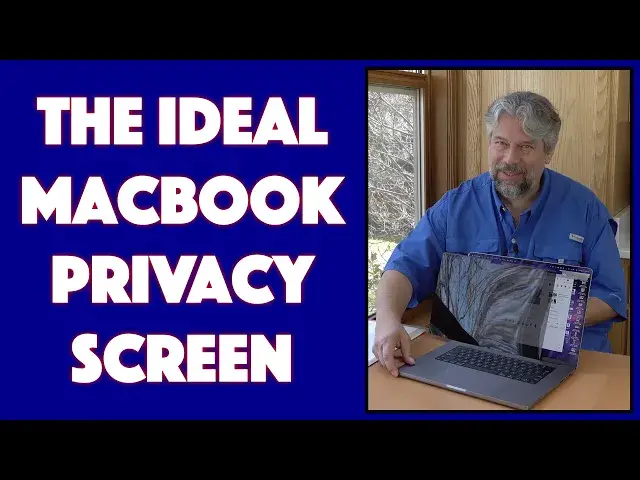
Tired of people staring at your computer screen and seeing what you're reading, watching, or playing? You need a privacy shield! Tech expert Dave Taylor checks out the FILMEXT Privacy Shield for the Apple MacBook Pro 16" and finds it a great solution. With its magnetic edge, you don't even need to adhere it to your laptop to gain the benefit of a 30º field of view, and when it's on, you'll barely even notice it while you're directly facing your screen
Sound good? Check out all their many sizes and options at Amazon, starting with the MacBook Pro 16: https://amzn.to/38peVRg
Check out Dave's Q&A Web site at: https://www.AskDaveTaylor.com/
#privacyshield #filmext #macbook #privacy #screen #askdavetaylor
Show More Show Less View Video Transcript
0:00
A magnetic privacy shield for your laptop
0:03
Let's definitely check this out. Dave Taylor here, and I'm working on my laptop, as I often do
0:16
Now, when I'm working at home, it's not a big deal. But when I'm out and about, if I'm on a plane or a train or in a coffee shop or really any other public place
0:26
it's really annoying to think that other people can look and start
0:29
see what's on my screen regardless of where I'm sitting. So even if they have, let's just turn
0:36
this way, even if they have just the slightest view of my screen, they can see everything that's on
0:42
it. That is no bueno. What I really want is I want to have something with a little more privacy
0:48
Now, the solution to that is something called a privacy shield, and it turns out that there's
0:53
some really cool options out there now. What I want to look at today is I'm going to look at this
0:58
well, let me open it up and pull the shield out, is this is the FilmXed MacBook Pro 16 privacy shield
1:08
And it comes in a carrying envelope, which is super helpful. And just turn it the right way and pull it out
1:16
And this is basically what you get. So it's a kind of polarizing screen
1:23
So if you look at it straight, it's fairly clear. but as you turn it at an angle, it gets more and more opaque
1:30
Now when you feel on the top, there's a tiny little bar along the top
1:35
And you want to have that facing outward. So I'm going to turn it this way
1:39
And now you can see it notched to match my Mac So I going to go ahead and turn it and you see that it super easy to put it on It literally again magnetic So all I have to do is line up all the corners and I done That it
1:59
Now I have that privacy screen. So you can see that my screen is much less visible until you get straight on
2:08
and then like magic, you can see what's on my screen, and then as I turn away
2:13
or you could imagine if you were looking at it from like this angle, you'd see nothing
2:18
You'd be like, why is that dude looking at a blank screen? It's really weird
2:22
Now, you can see it has the cutout, which is great, and it's magnetic
2:27
So the obvious question is, well, will your computer close with it? And the answer is that there's nothing holding the bottom
2:34
So if you just move it like this, you can see it's going to actually sort of fold out. But if you hold it in, it will indeed
2:45
close and your computer will go to sleep. Now, that's not a great solution. So what the company
2:51
does is they include these tiny little two-sided tape. So I can use these tabs and put them on the
3:02
inside on both corners and then it will stay on really well. Now
3:07
I haven't done that because I really like the fact that I can just pop it off when I want
3:12
So if I'm working at home, like I said, I can just put it back there
3:17
And now I have much more of an angle of visibility. You can see even at that angle you can see
3:23
It doesn't really matter if you can see it. But it does give me a slightly brighter and better view So it a great fit exactly designed for this screen And it gives you about a 30 degree viewing angle which is a whole lot better than I don know what 175 degrees or something
3:41
And your best result is going to be to have your screen brightness turn down a little bit
3:47
And one other great benefit is it's anti-glare. So if I put it on halfway, let's see if we can
3:54
get this to work. So I'm going to put it on. on like two-thirds of the screen and it's not optimal because it's not
4:02
perfectly flat against the screen but even here you can see the dramatic difference
4:08
that having this on does and offers me in terms of privacy so dimensions wise
4:14
this particular unit is for the MacBook Pro 16 so it is 14.4 by 10 inches by
4:22
0.28 inches or 0.3 millimeters it is a very very thin object. Now, it comes with, like I said, this storage sleeve, which is great
4:35
because if you don't want to use it 24-7, you can just put it in here, and then you can slide this
4:41
into your computer bag or put this in your desk or wherever else you might want to store it
4:46
and then whenever you need it, just pull it out and you're ready to go. Now, microfiber
4:52
cloths are also in hot demand right now, too. I'm not entirely sure why, but I want to
4:57
We'll point out that the Filmex privacy shield comes with this very nice microfiber cloth
5:06
So you can use this to clean your screen and of course to clean the privacy shield
5:13
So lots to like about it Really simple to use I really like the magnetics because I don really want to stick things on my computer But if you want to it does include that two little sticky tabs and you good to go
5:28
Now, I will say I was slightly disconcerted when I opened up the package and there's no instructions
5:34
And then you realize there doesn't really need to be instructions. It isn't a pretty darn simple device, right
5:38
You pull it out, you line it up with your screen, you put it on, you're done
5:42
That's it. Easy as that. So not much else to talk about. I hope that that demo showed you that you don't have to be at the mercy of people within 180 degrees of your screen watching and seeing everything that you have. This gives you a lot more privacy options, especially if you turn your brightness down just a little bit. So the only thing left to talk about is the price. But before we get to the price, I'm going to ask if you could subscribe to my channel, click or tap on that subscribe button and we're connected. Great. All right
6:12
Put this aside. So this, hopefully you can see that, is the FilmX, MacBook Pro 16 Privacy Shield, and it's $39.99, but there's a $6 coupon right now, dropping it down to $3399 at Amazon.com
6:29
Again, you can put this on when you want to have extra privacy. You can take it off and put it in the sleeve when you don't
6:35
It's as easy as it gets. It's definitely one to check out. That's all I got. Going back to my work, so I'll catch you in my next video
#Consumer Electronics
#Product Reviews & Price Comparisons