Up next in 10



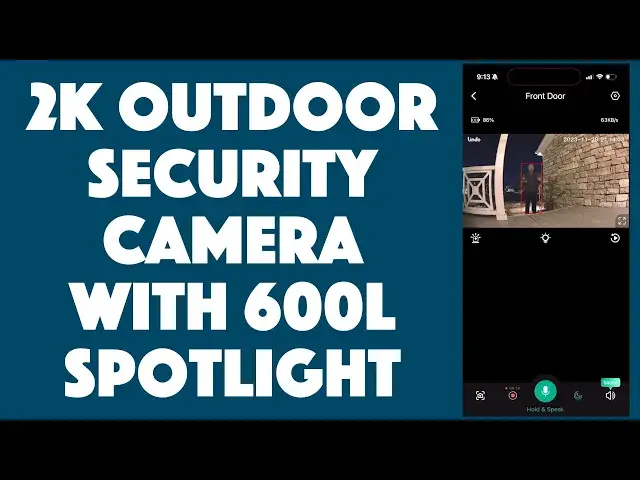
Don't wonder about those strange and alarming noises from your driveway or backyard in the middle of the night! The Lindo Intelligent Battery 2K Spotlight Security Camera features a bright 600-lumen spotlight and siren, along with live streaming to your smartphone and Alexa compatibility. It's also IP67 weatherproof and ready to protect you during storms, freezing weather, and everything else. Tech expert and homeowner Dave Taylor checks out and demonstrates the key features of this smart addition to your home (or office or retail) security solution.
Lindo Intelligent Battery Spotlight Camera: https://amzn.to/47B5UhB
20% Off Code: LINDOCAM
Lindo Pro Dual Camera Video Doorbell: https://amzn.to/3HMP9Wf
Lindo official website: https://www.lindolife.com/
Visit Dave's Q&A Web site at: https://www.AskDaveTaylor.com/
#lindo #securitycam #securitycamera #security #homesecurity #officesecurity #motionsensor #spotlight #askdavetaylor
Show More Show Less View Video Transcript
0:00
You'll always know what's going on outside even in the middle of the night with this security camera
0:05
Let's check it out. [♪ music playing ♪ Dave Taylor here and I want to talk about home security
0:16
Now, has it ever been the middle of the night and you hear strange noises outside
0:20
Maybe from your driveway or your backyard and you wonder, what the heck
0:25
Well, what you need is a night-friendly security camera. That's exactly what this is
0:31
This is the Lindo Intelligent Battery 2K Spotlight Camera. And most obviously, it has two different night modes, one of which is a super bright spotlight
0:44
It's a 600 lumen spotlight, which means if you have this mounted pointing at your driveway, for example
0:51
and since it has motion sensors, if someone walks onto your driveway, even at 4 in the morning
0:58
this can just, boom, put a bright spotlight on there. It'll start capturing video. It does everything you want
1:05
Your phone will get notifications. You can look at the live feed
1:09
You can decide what you want to do. You can even trigger a siren. In fact, let's start our demo with that
1:14
So, I'm going to go ahead and I have a lot of stuff I want to show you about this
1:19
It's very fun and really quite beneficial from a security perspective. And I hooked it up last night and experimented with it
1:27
We'll get to all those demos in just a second. But first off, it has an app called the Lindo app and you can see it on the side here
1:36
And I can just go straight to live feed and obviously you're going to see my camera
1:41
And you can hear the audio. So, it's kind of funny. I'm not sure that's super beneficial, but let's go to turn on the spotlight, for example
1:55
I actually turned the volume down on my phone. And so, we can just tap that button and now you can see that is one bright spotlight
2:03
And that is definitely going to slow down anyone who thinks that they're able to skulk into your yard and check out things
2:10
You turn it off and you can hear there's that audio. You can actually talk to the person
2:16
So, there's two-way audio, which is really great. You can also zoom in so I can show you
2:22
There are my notes that I'm using so I know all the specs and everything
2:26
It's sort of a behind the scenes there. And if we go back, I can also look at my saved footage
2:33
And here's one of the pieces of video from last night. And what happened in this is that as I walked up to the camera, it turned on and it included that flood
2:45
So, there was a lot going on there. And if we go back here and we go to settings, you can see there are a lot of settings you can tweak too
2:54
Now, let me tell you the camera features 2K video with 166-degree field of view
3:00
And then for night vision, if we go to video settings and we go to night vision, you can see you can do either black or white or color
3:09
Now, for color, it will turn on that spot and that will impact your battery life
3:14
But the black and white I find is actually really cool and it has this infrared ring of little red lights that turn on
3:21
Again, we're going to get to that demo in a second. But you can switch which one you want
3:25
You can even turn off night vision if you're just like, I don't need that. I'm in an environment where, you know, nothing's going to happen in the middle of the pitch dark
3:33
So, audio settings, you can set privacy zones, which is really helpful
3:40
If you have it, say, pointing at your door, but it also has your neighbor's door, you can actually isolate them so that they won't trigger motion sensors
3:50
The battery is definitely worth mentioning. Let's go to power manager and you can see it's 100% charged
3:56
The battery can last up to a year before you have to charge it again
4:01
And when you do have to charge it, on the bottom there's a power button and there's also a little thing you pop out
4:08
And that gives you USB-C and it has a USB-C to USB-C charging cable included
4:15
And it only takes about three hours to go from completely dead to fully charged
4:20
And then you're going to be charged up and ready to go for a year
4:24
That's pretty crazy. Not only that, but the company actually sells a solar charging panel separately
4:30
So, if you really want it to be as self-contained as possible, you could do that
4:35
And then once in a while, check your battery level to just see, hmm, how's that going
4:39
So, let's see, you could turn on notifications and you can specify if you want a notification that's just text
4:47
Or if you'd like to actually get some sort of a snippet or view of what's going on
4:52
Both of those have their places. I have mine set to just text. So, before we go further with the demo, let me show you what else comes in this box
5:02
And it's a nice recyclable box, props to them. So, you get the camera, you get the cable, and you get a whole mounting kit
5:09
So, it includes screws with sinks there if you're using it on like a gypsum board or something
5:17
It has a little sticker so you get the holes in the right place. And then, let me pop this off
5:22
So, this is the piece that you would actually screw onto your wall
5:26
And then you can see the actual mount. You just put that on and then adjust this however you need
5:34
And this screws right into, on the back of the camera, is a screw hole
5:39
So, you just screw this in and you can mount this, they say, and recommend 8 to 10 feet above the environment you're monitoring
5:48
So, if you have a driveway, for example, this would be good to put at the very top of your driveway garage door or something
5:56
You know, in that sort of angle above your garage door that so many people have
6:01
If you have a basketball hoop, you might want to not put it there because if someone does not do a great shot, it might be impacted
6:08
But otherwise, that's sort of exactly where you want to put it. If you want it in your backyard or something, it's easy, really, really easy to mount this and get this all working
6:17
And it also comes with a user manual. And of course, you download the Lindo app and then that pairs
6:23
It's super easy. And then you're just ready to go and all the configuration is there
6:27
Now, while we're here, let's do that siren. Are you ready? So, let's see
6:33
I think I go into here. Obviously, I have not done the siren a lot
6:37
So, let's see. I think this is the siren. You ready? It's going to be loud
6:44
So, you can imagine at four in the morning, if this is suddenly what happens when someone comes up your driveway to peek in your car, they're going to be like, yikes, and run the heck away
7:00
So, hopefully, you don't live in an environment where it's that dangerous
7:04
But if you do, something like this is really great. Now, let me stop this recording
7:09
And let's switch to my demo. And what I've done here is I have a whole bunch of different cameras all set up
7:14
So, I'll show you what this was doing. You'll see its footage and you'll see how it interacted with me as I moved into its range and stuff
7:25
So, let's switch to that and then I'll come back. This is going to be a little complicated
7:29
But on the left-hand side is a capture of what's on my phone
7:34
So, you'll see what's going on in the Lindo app. On the right-hand side, you'll see the saved footage from the camera
7:44
And it's going to be complicated because then the third view, the one that's on the lower right, is actually capturing from a camera behind me what's going on with the actual Lindo spotlight camera itself
8:01
There's really a lot to like here. They call this their intelligent battery camera
8:05
And it is pretty darn smart. It's not just smart with the battery, though
8:10
This is just a smart webcam sort of security camera. And you can see it's pretty small
8:17
It's pretty light. I mean, it's not super light. There's a lot of battery in here
8:21
So, it lasts a super long time. But there's so many applications for this
8:25
I really like having something like this near my front door. So, if I'm away and, you know, suddenly someone walks up to my door, I'm going to get a notification on my phone
8:37
And then I'll be able to go on there and look and see who it is
8:42
But it's also recording that. So, one of the other things I'll do is sometimes I'm in a meeting or something and I'll notice notifications pop up and I'll ignore them
8:51
And then later I'll go back and see, oh, it was the neighbor kids knocking on the door because they want to go in the backyard and get their soccer ball
8:58
Or it was a UPS delivery person. Or it was some solicitor who was standing at my door for five minutes knocking and knocking and knocking and knocking
9:07
What the heck? So, you know, all of that. I really like knowing what's going on
9:12
And a security camera like this really can do that. And don't forget, this is IP67 outdoor rated
9:19
So, it can be outdoors in rain and snow and really frigid weather
9:23
But you could use it indoors too. So, if you have a small business and you have a warehouse in the back, you could put this as high up as you can pointing at all of your storage shelves
9:35
Or actually in the shop itself and you can track things. Now, in the shop itself, you wouldn't want the motion sensor going during business hours because you would have endless footage. Right
9:46
Because people keep coming in and out. But once you close up and lock down that shop, wouldn't it be nice to know that if someone did come in and wanted to check out and maybe take some things off the shelf, you'd actually have footage of the whole thing
9:59
It would be really helpful. And your insurance company would appreciate that too
10:03
So, that's really everything. Did I mention it also works with Alexa
10:07
So, if you're an Alexa fan, you can also hook this up and you can get it to say notification from your Lindo camera or something like that
10:15
Really cool. So, that's everything. This is definitely a really great place to start if you don't have any home security yet
10:21
And if you do, this is a really smart way to understand what's going on outside, daytime or nighttime, with a million different controls that you can easily set to work exactly as you want
10:34
So, definitely one to check out. Now, let's talk about the price too
10:38
But before we get to the price, I'm going to invite you to subscribe to my channel
10:43
As you can see, I put a lot of time and effort into my reviews because I really want to show you
10:48
I don't want to tell you. I want to show you how all the equipment works
10:52
So, I would be really thrilled if you were to subscribe to my channel by clicking or tapping on that subscribe button
10:58
Give me a thumbs up if this was useful. Leave a comment if there's something that you really liked or something you wish I would have demonstrated
11:05
Either way, always great to get feedback. So, this is the Lindo Intelligent Battery 2K Spotlight Camera
11:13
And it's $109.99 at Amazon.com. If you want to get two, they have a nice price break for two of them instead of one
11:21
But even just one of these is a solid starting point for you to increase the security of your home or workplace
11:28
That's all I got. I need to go and install this. So, I'll catch you in my next video
11:37
Make sure to subscribe to my channel for more videos. And if you like this video, give me a thumbs up
11:44
And if you want to see more videos like this, click on the subscribe button
11:48
And I'll see you in the next video. Peace
#Consumer Electronics
#Home Alarm & Security Systems