0:04
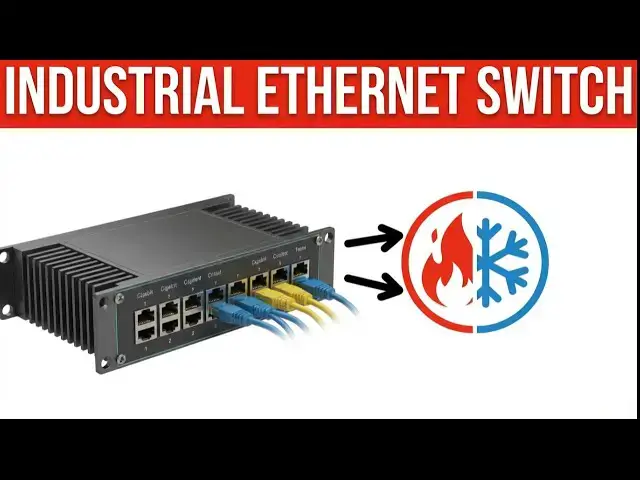
Did you know that over 40% of industrial
0:06
network failures are attributed not to
0:08
software bugs or hackers, but to simple
0:10
environmental stress? Imagine a
0:13
scorching summer day on a factory floor,
0:15
ambient temperatures rising above 100°
0:17
size, or a remote utility station
0:19
freezing in the dead of winter. In these
0:22
moments, standard office grade equipment
0:24
doesn't just falter. It melts, cracks,
0:26
and quits. When the network goes down,
0:28
production stops. And when production
0:30
stops, money burns. If you are relying
0:32
on the same plastic switch used in a
0:34
climate controlled server room to run
0:35
your oil rig, manufacturing plant, or
0:37
outdoor kiosk, you are sitting on a
0:39
ticking time bomb. Today, we aren't just
0:42
looking at a switch. We are looking at
0:43
insurance for your uptime. Detailed
0:45
information contained in this video can
0:47
be found at acccca.ca.
0:50
A link has been put in the description
0:52
below. The website offers extensive
0:53
links, references, and coding samples,
0:55
making it a one-stop shop for all your
1:02
Welcome to the world of industrial
1:04
Ethernet. Today we are focusing on a
1:06
piece of hardware that acts as the
1:07
central nervous system for rugged
1:09
operations. The stride industrial
1:11
unmanaged Ethernet switch. Specifically,
1:14
we are looking at the 8port gigabit
1:16
model. Why does this matter? Because in
1:18
the age of IoT, industrial internet of
1:20
things, data density is increasing. You
1:23
aren't just sending simple onoff signals
1:25
anymore. You're streaming video from
1:27
vision systems, pulling massive logic
1:29
files and monitoring real-time
1:30
analytics. You need bandwidth and you
1:32
need speed. This stride switch offers
1:34
eight Ethernet gigabit RJ45 ports
1:37
encased in a housing that looks like it
1:39
could survive a tank tread. It is built
1:41
for the extremes. Rated for a staggering
1:43
40 to plus 175° 40 bgra to plus 167
1:48
degra. This is where IT meets the grit
1:50
of OT operational technology. Let's be
1:53
honest about the environments we work
1:55
in. Industrial settings are the enemies
1:56
of electronics. First, there is
1:59
temperature. A standard switch is happy
2:01
at 70° F, 21 da, but put that switch in
2:04
a Nema enclosure outside in North Dakota
2:06
in January or next to a blast furnace in
2:09
Alabama, and the internal components
2:10
will expand, contract, and eventually
2:12
desolder themselves. Second, there is
2:15
vibration. Large motors, punch presses,
2:17
and forklifts create constant tremors.
2:20
Standard RJ45 jacks and plastic clips
2:22
vibrate loose, causing intermittent
2:24
packet loss, the kind of ghost problems
2:26
that take hours to troubleshoot. Third,
2:28
there is electrical noise and dust. A
2:30
typical office environment is clean. A
2:32
factory floor is a storm of
2:34
electromagnetic interference, EMI, and
2:36
conductive dust. If your switch isn't
2:38
built with IP30 protection and shielded
2:40
components, you aren't building a
2:42
network. You're building a failure
2:43
point. The challenge isn't just
2:45
connecting devices. It's keeping them
2:47
connected when the world around them is
2:49
trying to shake, bake, and freeze them
2:53
This is where the stride shines. Let's
2:55
get this beauty on the bench and see
2:56
what makes it tick. The unboxing. As we
2:59
crack open the box, the first thing you
3:01
notice is the weight. This isn't flimsy
3:03
plastic. It's a robust metal housing. It
3:06
feels cold, solid, and substantial.
3:08
Included in the box, you'll find the
3:10
switch itself, a terminal block for
3:12
power, and your mounting hardware.
3:14
The form factor. It's compact, designed
3:16
for a 35mm D rail mount. This is
3:18
standard for control panels, allowing it
3:20
to snap right in alongside your PLC's
3:22
and power supplies. It also supports
3:24
panel mounting if you're working in a
3:26
tight cabinet without rails. The IP30
3:28
rating means it's protected against
3:30
solid objects larger than 2.5 mm.
3:32
Perfect for keeping out tools and stray
3:34
wires in a busy panel. Wiring. Doing it
3:37
right with feral rules. Now, let's give
3:40
power to this beast. This is a critical
3:42
step that many amateurs get wrong. The
3:44
stride switch uses a removable terminal
3:46
block for its power inputs. You are
3:48
likely using stranded wire for your DC
3:51
power distribution because it's flexible
3:53
and better handles vibration than solid
3:55
core wire. However, never insert bare
3:58
stranded wire directly into a screw
3:59
terminal. Why? As you tighten the screw,
4:01
the strands spllay out. This leads to a
4:04
poor connection or worse, a single stray
4:06
strand touching the chassis or a
4:08
neighboring terminal causing a short
4:09
circuit. The solution? Use fererals.
4:12
Strip your wire, slide on a fereral, and
4:14
crimp it down. Now you have a solid
4:16
metal contact point that inserts cleanly
4:18
into the terminal block. It ensures 100%
4:20
surface area contact and vibration
4:22
resistance. Wiring with fererals isn't
4:24
just best practice. In the industrial
4:26
world, it's the mark of a professional.
4:28
Initial powering up. Once your power
4:30
wires, usually 12 to 48 VDC, are secured
4:34
in the terminal block, plug it into the
4:35
switch. Flip your breaker or power
4:38
supply on. You should see the power LED
4:40
light up solid green. This indicates the
4:42
internal logic is receiving juice.
4:45
You'll also see LEDs for each of the 8
4:47
GB ports, which will flicker with
4:49
activity once you patch in your Ethernet
4:51
cables. Troubleshooting the fault light.
4:54
Here is a scenario that trips up even
4:56
seasoned technicians. You've wired up
4:58
the power. You turn it on. The switch
5:00
works, but there is an ominous red
5:02
light. The fault LED is on. Panic sets
5:04
in. Is the unit dead? Did you fry it?
5:06
The reality the stride switch is
5:08
designed for missionritical redundancy.
5:10
It has inputs for power supply 1 P1 and
5:13
power supply 2 P2. In a perfect world,
5:16
you would have two separate DC power
5:17
sources wired in so that if one dies,
5:19
the other takes over instantly. However,
5:22
many of us are just wiring a single
5:24
power supply for a simple application.
5:26
The switch detects voltage at P1 but
5:28
sees 0V at P2. It thinks a power supply
5:31
has failed, so it triggers the alarm and
5:33
lights the fault LED. The fix. If you
5:36
are intentionally only using one power
5:37
source, you need to trick the switch.
5:40
Take two small jumper wires. Jump the
5:42
positive terminal of P1 to the positive
5:44
terminal of P2. Jump the negative
5:46
terminal of P1 to the negative terminal
5:48
of P2. By jumping these out, the switch
5:51
sees voltage at both inputs. The logic
5:53
is satisfied. The red fault light turns
5:54
off and the relay output closes. You now
5:57
have a healthy status. This is a pro tip
5:59
that saves you from staring at a red
6:01
warning light for the next 10 years.
6:03
Real world application. Consider a water
6:06
treatment plant in Minnesota. Last
6:07
winter temperatures hit 30°.
6:10
Their previous commercial grade switches
6:12
froze. The capacitors failed and the
6:14
telemetry data for tank levels went
6:16
dark. They had to send a technician out
6:18
in a blizzard to manually check gauges.
6:20
They swapped to this stride unmanaged
6:22
switch. Because of its 40° C rating and
6:26
metal heat sink properties, it shrugged
6:28
off the cold. The gigabit speeds handled
6:29
the high-res security camera feeds
6:31
monitoring the perimeter and the
6:33
redundant power inputs wired correctly
6:35
this time meant that even when a drail
6:38
power supply hiccuped, the network
6:39
stayed live. That is the difference
6:41
between a crisis and a normal Tuesday.
6:44
If you are enjoying this video, please
6:46
hit the like button below. Keeping up
6:47
with all the latest automation
6:49
innovations can be difficult, so hit the
6:50
subscribe button. Remember to hit the
6:53
bell beside your subscription to receive
6:54
the notifications. The Stride 8 port
6:56
industrial Ethernet switch is more than
6:58
just a junction box for your cables. It
7:01
is a hardened warrior built for the
7:02
front lines of industry. From the metal
7:04
housing and IP30 rating to the wide 40
7:06
to plus 175° C temperature range, it is
7:10
designed to survive where others fail.
7:12
By taking the time to install it
7:14
correctly, using fererals on your
7:15
stranded wires and understanding how to
7:17
jumper the redundant power inputs to
7:19
clear faults, you ensure a clean,
7:21
professional, and reliable installation.
7:24
Whether you are running automation in a
7:26
hot automotive plant or data logging in
7:28
a freezing wind farm, this switch
7:29
ensures your data keeps flowing. Have
7:32
you ever had a network switch fail due
7:34
to heat or dust? What was the cost of
7:35
that downtime? Drop a comment below. I'd
7:38
love to hear your horror stories from
7:39
the field and how you solved them. If
7:42
you found this unboxing and wiring guide
7:43
helpful, make sure to check out our
7:45
other videos on industrial control
7:46
panels and proper grounding techniques.
7:49
Stay wired, stay safe, and keep those
7:51
packets moving. Ready to transform your
7:53
approach to industrial automation?
7:55
Discover how the machines simulator can
7:57
revolutionize your training,
7:58
development, and manufacturing
8:00
processes. To learn or see more, click
8:03
here. Click here to learn the five steps
8:04
to PLC program development. The best way
8:06
to build the future is to simulate it