Up next in 10

Google AI Studio is INSANE to Build Full Stack Coding Apps From Prompt Using Gemini Destroys Claude
Apr 1, 2026

Watch My Visual Studio Code IDE Setup Video For Fonts,Themes & Extensions
https://youtu.be/Bon8Pm1gbX8
Hi Join the official discord server to resolve doubts here:
https://discord.gg/cRnjhk6nzW
Visit my Online Free Media Tool Website
https://freemediatools.com/
Buy Premium Scripts and Apps Here:
https://procodestore.com/
Show More Show Less View Video Transcript
0:02
Uh hello guys. In this live stream, I
0:05
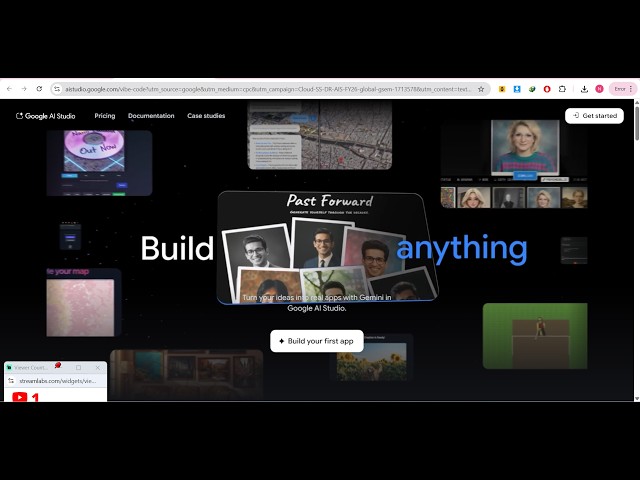
will show you Google has launched a new
0:07
product in the field of coding and
0:10
programming.
0:11
It's called as Google AI Studio.
0:13
So, if you are going to actually build
0:16
out full stack coding applications using
0:19
AI, this will be a perfect project for
0:21
you. If you go to Google, simply type
0:24
Google AI Studio.
0:25
And
0:27
the first result which comes, this is
0:29
actually the product.
0:31
So, it's actually using Gemini models in
0:34
the background. So, once you land on
0:36
this, just accept the terms and
0:38
conditions, continue.
0:41
And you should have a have a Google
0:43
account for this.
0:44
So, once you're logged in, you can
0:45
actually generate anything. It can be
0:49
text, image, code, reasoning, chat. It
0:52
You can even generate images,
0:54
text-to-speech in real time,
0:57
video generation as well.
1:00
Everything. So, from here you can
1:02
actually
1:04
simply tell inside the chat prompt what
1:06
sort of application you want to
1:07
generate.
1:09
Uh
1:10
I will simply write this in the chat
1:12
prompt, "Build a image-to-PDF web app in
1:15
browser."
1:16
You simply run this.
1:18
Now, Gemini will actually build out this
1:21
project.
1:22
So, from a single prompt, as you see,
1:25
it's actually building out all the
1:27
necessary files with live coding here,
1:30
HTML, CSS, and JavaScript.
1:34
You can even connect Google Drive as
1:36
well.
1:41
So, once you enable Google Drive, all
1:43
the work will be saved in your Google
1:45
Drive as well. So,
1:47
as you will see, it's actually built
1:49
out. You also have the ability to
1:51
actually download the actual code which
1:54
is generated using AI,
1:56
or you can simply copy to clipboard as
1:58
well. So,
2:00
this is
2:04
the product here, Google AI Studio,
2:06
which is really
2:07
fantastic. You can even click on
2:11
build.
2:13
So, from here you can actually build out
2:15
a app here. So,
2:17
this is Google AI Studio.
2:20
So, you can simply say, "Generate
2:24
Describe an app and let Gemini do the
2:26
rest." So,
2:30
once you click on that, so create a
2:32
cross-platform social media content
2:34
generator. User inputs an idea, the
2:37
task
2:38
for the desired tool.
2:41
So, once you click the build button, the
2:43
AI will start developing the
2:45
application.
2:46
On the right-hand side, once it
2:48
completes, it will show you the actual
2:50
code
2:51
and the live preview as well. So,
2:54
one by one, as you will see, the AI will
2:57
start developing this application. It's
2:59
using the Gemini models.
3:05
So, you also get the publish button
3:07
where you can actually deploy this
3:08
application.
3:10
You can even download the code as well.
3:12
So,
3:14
Google AI Studio, it's a really good
3:16
alternative if you're using Cloud,
3:20
Cursor, ChatGPT, or anything.
3:24
It's a great alternative.
3:27
Just go to AI Studio.google.com
3:30
and you can create fantastic
3:33
websites and apps in a matter of
3:35
seconds. So, it's actually constructing,
3:38
you can see, file by file.
3:46
So, one by one, it is actually coding
3:48
out the entirety of the application.
3:51
So,
3:53
once you just need to wait for some
3:55
time. It's completely free. That's the
3:58
main part.
4:00
This Google AI Studio is completely
4:02
free. You create account
4:04
and then just write the prompt, and
4:08
after that, it will start developing
4:11
everything
4:12
on autopilot.
4:14
So, everything will be automated.
4:17
The AI will do the
4:18
rest of the stuff.
4:49
So, as you can see on the left-hand
4:51
side, it's actually creating file by
4:53
file.
4:57
So, once it finishes, you will get the
4:59
live preview of the application.
5:08
So, if you're watching it for the very
5:10
first time, please hit that like button
5:12
and subscribe the
5:14
channel as well.
5:24
So,
5:25
you can see it's a working on this.
5:28
So, now the app is complete, I think.
5:31
Uh so,
5:35
you just need to select the API key.
5:39
So, you need to paste the API key right
5:41
here and then
5:52
So, right here you specify your idea.
5:56
And then you can actually
5:59
For the API key, you need to set up the
6:01
billing here. This is just an
6:02
application.
6:04
In the same way, you can build out any
6:06
sort of application.
6:08
It's clearly you go to the
6:16
Similarly, you can simply write, "I want
6:19
to build out a image-to-PDF
6:24
web app."
6:28
So, once you click this, again the
6:32
application will start building out
6:34
this.
6:42
So, it's a really good product, guys.
6:45
Google AI Studio, it's officially
6:48
created by Google
6:50
for letting the developers create
6:52
unlimited applications for completely
6:54
free. You just need a Google account and
6:56
start developing your applications.
6:59
So, I personally like this product a lot
7:02
because it's just saves a lot of time.