Up next in 10

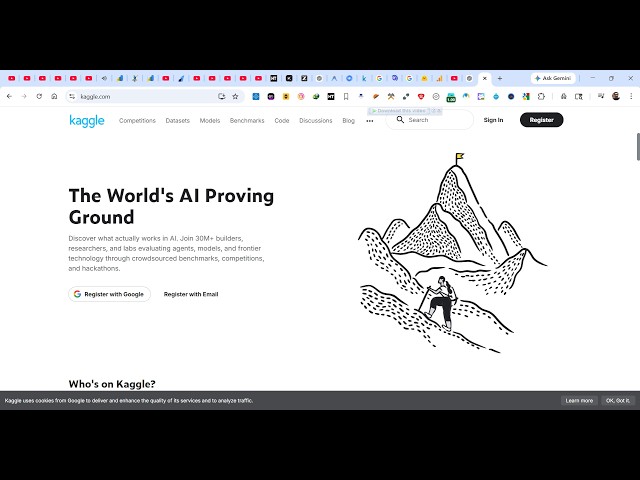
This Google Kaggle is INSANE Download Code of Unlimited AI Models & Run it Locally For FREE (100%)
Apr 6, 2026

Watch My Visual Studio Code IDE Setup Video For Fonts,Themes & Extensions
https://youtu.be/Bon8Pm1gbX8
Hi Join the official discord server to resolve doubts here:
https://discord.gg/cRnjhk6nzW
Visit my Online Free Media Tool Website
https://freemediatools.com/
Buy Premium Scripts and Apps Here:
https://procodestore.com/
Show More Show Less View Video Transcript
0:02
Hello guys, welcome to this live stream.
0:05
I will show you in this live stream a
0:07
very famous product for programmers and
0:10
developers. Google has released this
0:13
If you just type here Google Kaggle on
0:16
Google, the very first result which
0:18
comes So this actually allows you to
0:22
search AI models
0:24
and directly host them them inside your
0:26
local machine. So once you visit this,
0:29
it's actually
0:31
a playground section where you can
0:32
explore different AI models
0:35
which are there in the market and you
0:37
can simply download those AI models and
0:39
directly run those models inside your
0:42
machine
0:43
without internet.
0:45
So once you go to this, you will
0:46
actually see it's a AI proving ground.
0:49
So
0:51
it actually has various AI models which
0:54
are there. You simply log in with your
0:56
Google account.
0:58
And once you log in right here, you will
1:00
be able to search different AI models.
1:04
So just
1:13
just complete and you will be
1:14
registered. And now in the left-hand
1:17
side, you will actually see models right
1:19
here, AI models.
1:20
And you simply search for any AI model
1:23
that is there in the market. So
1:25
you will actually see in the search bar
1:29
you can actually search for any model
1:31
that you want to download. So as you
1:33
search right here, all the models will
1:35
show one by one. So simply click on
1:38
individual model
1:39
and then it will actually show
1:40
information related to this model such
1:42
as Quant 3.
1:44
It will exactly tell you the
1:46
information, the total number of
1:48
downloads. So you can download this
1:50
model inside your local machine.
1:53
So
1:54
it will exactly tell you the latest. So
1:57
from here, you can download this model.
1:59
So we have the download button. So it's
2:01
really important website for AI
2:04
developers. So you can actually search
2:07
and
2:08
can download this model. So once you
2:10
click the download button
2:13
the download will start
2:15
instantly. So you will see the size of
2:17
this model is 1.12 GB.
2:20
So from here, you can directly actually
2:23
download a particular model
2:25
by selecting
2:27
this download button.
2:29
So in this easy way, you can actually
2:31
see you can even see the code related to
2:33
the model as well. Different
2:36
AI models which are submitted [snorts]
2:39
on a daily basis. So you can even
2:41
individually click as well.
2:43
This is the thing about this.
2:46
You can even create a new notebook
2:49
new code as well.
2:52
So if you want to add this model, can
2:54
select the framework.
2:59
And from here, you can select the
3:00
variation, which model which part of
3:02
this AI model you want to use.
3:06
And click on add model. So now instantly
3:10
this model will be added right here.
3:13
And it has its own
3:15
code editor as you see, it's in Python
3:18
language.
3:19
So you can directly execute the code
3:21
directly inside its own editor.
3:24
So you have the play button. So you can
3:26
run this code directly using this AI
3:29
model. So now the code will be run.
3:35
So you can just see here. So it's really
3:38
a very
3:40
powerful AI coding editor where you can
3:43
actually explore different AI models
3:46
and directly run them
3:48
or download them. So it's really
3:50
important website kaggle.com. Simply
3:52
visit
3:53
and similarly, you can actually the
3:56
search bar individually, you can
4:00
in this easy way.
4:02
So all these models which are released
4:04
on a daily basis are mentioned here. So
4:07
like Gamma 4 which is released by
4:09
Google.
4:11
So again, description about this, total
4:13
number of downloads.
4:14
So it's a really important website.
4:16
Definitely visit this and simply
4:18
download and run AI models directly.
4:22
So we have different categories as well.
4:25
So whatever
4:26
you can click this model finder.
4:30
This will exactly show you which models
4:32
you want. Let's suppose for image
4:34
generation, you click this.
4:40
So category-wise, you can actually
4:42
search for AI models. It will exactly uh
4:46
show those models for you.
4:49
From here, you can filter out which
4:51
models you want to use. So this is a
4:53
really important website. Definitely
4:56
visit this.
4:58
kaggle.com. So we have different AI
5:00
models as you see from here.