Up next in 10

Build a Vue 3 Pagination Project to Paginate Data From REST API Using vue- awesome-paginate in TS
Jan 9, 2025

Get the full source code of application here:
https://gist.github.com/gauti123456/d1c3de98c182cbe5dd24c5a06ecf9969
Show More Show Less View Video Transcript
0:00
uh hello guys welcome to this video so
0:03
in this video I will look at a vuejs 3
0:07
package which allows you to do this
0:08
pagination uh this data is coming from a
0:11
rest API which is Json placeholder API
0:13
fake rest API for developers and we are
0:16
displaying 10 post per page so we are on
0:19
the first page in the pag na if you see
0:21
we are on the first page and we can go
0:24
to the second page the next 10 post will
0:26
show and same goes with the third fourth
0:29
page you will see you can go to the next
0:31
page so all these pagination controls
0:33
will be there so if you want to navigate
0:36
to the first page you can click the
0:37
first button so it will navigate to the
0:39
first page in the pag nation and same we
0:42
also got the last button so if you click
0:44
this you will be redirected to the last
0:46
page of the page Nation so we have 100
0:48
post which are coming from the Json
0:50
placeholder API and we are displaying 10
0:53
post per page and on each page you can
0:56
go to a specific page inside the pag
0:59
Nations so the 10 post will be shown
1:01
right here so there is this package here
1:04
uh if you go to npmjs.com and just
1:06
search for this package which is re uh
1:10
view awesome Paget this is actually the
1:16
package it's a modern view3 package for
1:21
implementing pagination inside your view
1:24
three applications so first of all you
1:26
need to install this module by simply
1:29
executing this command I have already
1:31
installed it it's almost having 8,000
1:34
weekly
1:35
downloads so it has got a nice little
1:38
documentation so I've already created a
1:41
view3 project so first of all you will
1:44
go to
1:45
your
1:49
application and the very first thing we
1:52
need to
1:54
do so there is this main.ts file will be
1:58
there in typescript I am configuring my
2:02
view3 project so you will have this
2:05
typescript file which is this main.ts
2:08
file so first of all we need to
2:09
configure this module we need to require
2:12
it so just go to this file and uh just
2:16
import this package just add the import
2:19
statement so import view awesome
2:23
paginate and this package will be coming
2:25
from
2:26
this view awesome page inate so this is
2:29
actually the component right here module
2:32
we are registering it so it's almost 35
2:35
kiloby so once you add this we also need
2:37
to add the CSS file for this so we will
2:40
add this which is located inside view
2:43
awesome paginate disc SL style. CSS so
2:47
it's a style CSS file for this
2:49
pagination plug-in it's almost 187 bytes
2:54
so after this we need to pass this
2:56
module as a middleware so we can simply
2:58
write this
3:00
app.use and here we need to pass view
3:03
awesome page in it so just make these
3:06
modification in this file first of all
3:08
import this then we import the CSS file
3:11
and then we use it as a module by using
3:13
the use function we are passing this
3:15
module inside our vuejs application as a
3:18
middleware view awesome paging it so
3:21
then you need to close this file and
3:23
then you need to configure the app view
3:26
component which is your main vuejs
3:28
component so right here here as you know
3:31
VJs components comprise of three things
3:33
first of all your script so we are
3:36
writing the script in typescript not
3:38
JavaScript so setup and here will be
3:41
language will be typescript which is TS
3:43
which is a super script of JavaScript so
3:47
first of all we need to
3:49
import The View package on mounted
3:53
computed all will be coming from The
3:56
View
3:58
package and then we also need for this
4:01
tutorial which we need exos
4:06
package
4:08
so you also need to require this exos
4:12
package so npmi xos so you just need to
4:15
install this package as
4:19
well so I have already installed it so I
4:22
will just start this application
4:32
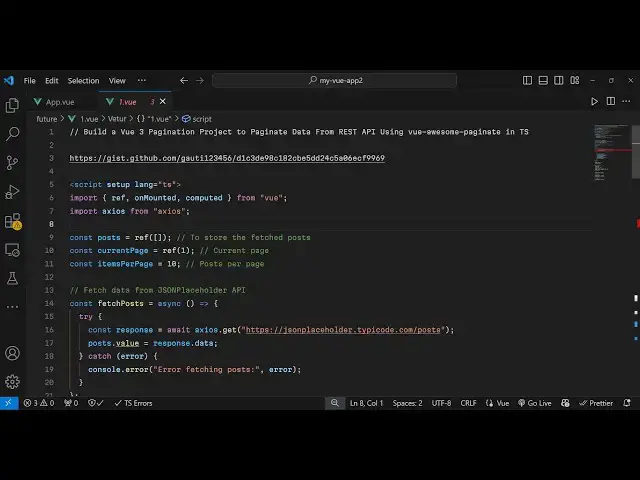
so here after you just put a
4:41
semicolon so we are requiring these two
4:43
packages xos
4:47
and it is just showing this error
4:49
because we have declared it but haven't
4:51
used it so we need to use it as well so
4:54
and also we need to declare a reference
4:57
here we will use this
5:00
and this will be the post here which we
5:02
will be doing the pagination so we will
5:04
have this variable for that and then we
5:07
will have variables for the current
5:09
page so again we'll be using the
5:12
reference right
5:14
here so whenever users lands on the
5:17
application the page number will be one
5:19
so we are giving this value one and how
5:23
many items you want to display per page
5:26
you can configure this so I will be
5:28
displaying 10 items per page so I will
5:30
just configure that and now we need to
5:33
fetch the data from the pagination for
5:36
this I will use this method on mounted
5:39
so on mounted actually will execute
5:41
whenever your VJs application renders
5:43
for the very first time and here it'll
5:45
be initializing this function fetch post
5:48
and I now need to declare this function
5:51
which will fetch the post from the Json
5:54
placeholder
5:55
API so what this function will do it's a
5:58
ASN function
6:03
and we'll be writing this code in the TR
6:05
catch
6:16
block so right here we need to make a
6:19
simple request to the Json placeholder
6:21
API so we'll make a wait we'll use the
6:24
AOS package and we'll make a get
6:27
request and the URL will be Json
6:31
placeholder do typo code.com
6:36
slost and then here whatever is
6:41
your post here post. value we have
6:46
declared this variable early on so we
6:48
will response. data so you can even add
6:51
a console log line as well just to check
6:54
the response in the
6:56
browser so if you refresh your
6:58
application just go to Local Host the
7:02
application open the console you will
7:04
see this response this object which
7:07
contains this data here which is the 100
7:10
post are returning so now we need to
7:13
actually paginate this response and
7:15
showing 10 post per page using this
7:17
package and then implement the
7:19
pagination so for doing this pagination
7:22
after storing this inside this variable
7:25
of post now we need
7:28
to come to the template part so the
7:31
second part in VJs so we will write the
7:34
HTML for
7:36
this and inside this you will have the
7:38
unordered
7:41
list and you'll be displaying
7:45
Li and you'll be having the for Loop
7:49
here Post
7:52
in paginated post so here we need to
7:56
declare this property here and we'll be
7:59
finding this key property which will be
8:02
post. ID I have given all the source
8:04
code in the description so if you need
8:07
the full source code you can go to it
8:09
and here you'll be just uh printing out
8:13
the Dynamic Property which is the title
8:15
of the post and then in the paragraph We
8:19
can inside Double C bracket post.
8:23
body so now we need to Define this
8:25
paginated post so this is your computed
8:27
property inside vuejs we can easily
8:30
Define this so this is right here we can
8:34
Define
8:35
this
8:37
paginated post and it's a computed
8:45
property so here we need to
8:49
just calculate the current page and the
8:53
end page and then return the
8:55
post accordingly so you'll write these
8:58
three lines we calculating the starting
9:00
index and the ending index based upon
9:03
the current page and then we are
9:04
returning the values from the post array
9:07
and we are using the slice array of
9:09
JavaScript which is a function and then
9:12
we are returning this
9:15
inside so if you refresh and you will
9:20
see 10 post will be returning so it is
9:23
exactly 10 because we have configured in
9:25
the pagination plugin that we only need
9:27
to show 10 post so let's suppose I
9:29
change this value items per page let's
9:32
suppose I change it to five so now what
9:35
happens you will see only five post will
9:37
be returned 1 2 3 4 5 so now we need to
9:42
also show the pagination controls out
9:45
there uh just after
9:47
this just after this UL tag we need to
9:50
now use the actual plugin which is view
9:54
awesome
9:56
pagate this is your plug-in and it
9:59
actually take some options first option
10:01
is your
10:03
total items the total items that you
10:06
want to display it is located inside
10:08
this variable which is post do length
10:12
and then this next one is items per
10:15
page this parameter it takes is we have
10:19
already created this variable items per
10:21
page and then maximum Pages
10:26
shown is five
10:29
for the pagination and then show ending
10:32
button if you also want to show the
10:34
ending buttons as well you can put it to
10:36
this Boolean parameter true and if you
10:39
also want to show the breakpoint
10:49
buttons I will say false and then the
10:53
actual model that you want to display
10:55
which is the current page so we have
10:58
declared all all these variables if you
11:00
see total number of post items per page
11:04
maximum page is five if you want to show
11:06
ending buttons it's true breaking points
11:09
false and this is your current page so
11:12
I've declared all these variables if you
11:15
see so if you see now you will see your
11:18
pagination it will calculate the total
11:21
number of pages we are on the first page
11:24
you can go to the second page third
11:25
fourth fifth 6th 7th and we also see the
11:28
last and the first Pages as well if you
11:31
want to customize the look and feel of
11:33
these pagination controls if you want to
11:35
change the background color you can add
11:37
some CSS here at the bottom
11:40
side I have given all the source code so
11:43
you will find all these
11:45
styes so you can
11:47
customize the background color just add
11:50
the style tag and you can do this very
11:55
easily so if you refresh now you will
11:58
see the background color will get
12:00
changed and it has now blue background
12:02
color so whenever you are on the current
12:04
page this has a nice little blue color
12:07
so signifying that you are on the
12:08
seventh page in the pagination so in
12:11
this way you can fetch data from a rest
12:14
API and show the pagination inside vuejs
12:17
with this awesome little plugin which is
12:19
view a awesome pagin it so you can use
12:23
this package and thank you very much for
12:25
watching this video and do check out my
12:27
website as well free media tools.com uh
12:31
which contains thousands of tools
12:33
regarding audio video and image and I
12:35
will be seeing you guys in the next
12:37
video
#Programming
#Computer Education