Up next in 10

Build a Next.js Full Stack TikTok Clone Video Downloader Web App in Browser Using TypeScript
Mar 5, 2026

Buy the full source code of application here:
https://procodestore.com/index.php/product/build-a-next-js-full-stack-tiktok-clone-video-downloader-web-app-in-browser-using-typescript/
Show More Show Less View Video Transcript
0:00
Uh hello guys in this video I'll show
0:02
you I built out a tech talk fullstack uh
0:04
video downloader application in nextjs.
0:07
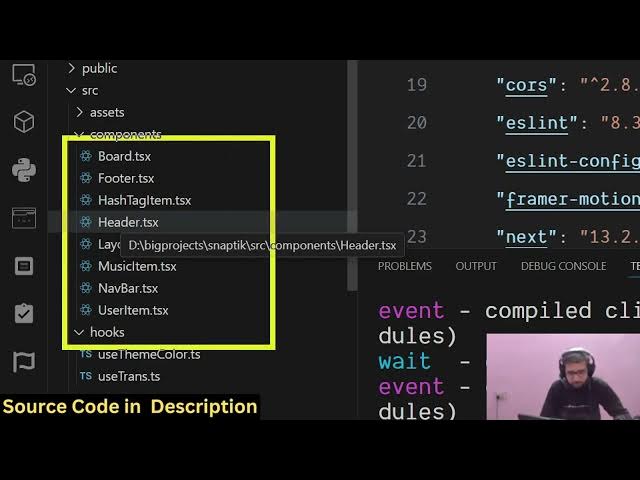
So let me show you the actual directory
0:09
structure. Uh so this is actually the
0:10
full directory structure of the project.
0:12
Each and every component is coded inside
0:14
typescript and it's fully customizable.
0:18
So the link is given in the description.
0:19
You can directly purchase the source
0:21
code. Uh after purchasing it all the
0:23
source code will be downloaded from
0:25
Google drive automatically. So if I show
0:28
you the package.json JSON file. We using
0:30
the latest version of next here and we
0:33
are running this application as you can
0:35
just see here locally. So this interface
0:40
looks something like this. It's a Tik
0:43
Tok video downloader full stack uh
0:45
application. So right here you will
0:47
paste whatever video you want to
0:50
download. Simply copy link address and
0:52
simply paste it. As soon as you paste
0:54
it, you will see this download button.
0:56
You simply click the download button and
0:58
then the downloading will start and
1:01
after that you will see the video is
1:03
successfully downloaded and now you can
1:05
actually play the video
1:07
locally. So this will save you a lot of
1:10
time. This is a full stack uh nextjs
1:13
project. You will see this is the video
1:16
successfully downloaded inside your
1:18
machine. You can take any other exam.
1:22
Repeat the process. Just paste the video
1:24
link
1:26
and simply click download. And this is
1:29
unlimited. Uh there is no limit to it.
1:31
How much how much videos you basically
1:34
download. So you just need the uh simply
1:39
the link of the video. Whatever link you
1:42
basically paste the link. So there is no
1:45
limit to it. You can paste the link
1:49
and automatically it will download the
1:51
MP4 file. So the interface is quite
1:55
simple. It's a single page application.
1:57
We are actually in the background in the
1:59
back end we are communicating with the
2:01
Tik Tok API to actually get the download
2:03
link of the video. So you can just see
2:06
here each and every component is divided
2:08
into its appropriate TypeScript file
2:10
here. So we have this API folder where
2:14
we are writing the backend code for this
2:16
application and it's also very easy for
2:19
you to deploy this application. You can
2:21
see we are running it locally. So you
2:23
basically have the build script. You can
2:26
build out the application. We using Xios
2:28
to make the HTTP request to the backend
2:31
API Tik Tok API to get the download
2:33
links. And
2:37
so it's it's very easy for you to deploy
2:39
this. It's just a single page
2:41
application. You also have the light and
2:44
dark theme.
2:48
You also have the trending section as
2:49
well. You can click the trending section
2:51
to go to the
2:54
[snorts] so interface is quite simple.
2:59
You go to the Tik Tok and simply paste
3:02
the link. Whatever link you need to
3:11
just need the link of the video
3:21
[clears throat] and inside this you will
3:23
paste it.
3:26
So if you still face any problem in
3:28
running the application, you can mail
3:30
me. I will help you in running and
3:33
deploying the application.
3:37
So interface is quite simple. Uh you
3:39
paste the link and once it reaches the
3:42
100% you will see it's actually showing
3:45
you the progress bar
3:48
and automatically the video will
3:50
download as a MP4 file and then you can
3:52
play the video using a video player.
4:00
So this is a full stack project in next
4:02
years. So it's fully customizable. So
4:04
once you get the source code, you will
4:06
be able to see how I coded this
4:07
application. It's uh very easy for you
4:10
to see the source code once you get the
4:12
purchase and the link is given in the
4:14
description. You can see
4:17
every file is customizable. Every
4:19
component is splitted across their
4:22
respective components. So
4:25
you will be able to see how I coded this
4:27
application from scratch. So
4:31
you can just see right here. So we are
4:33
also using some framer motion for
4:35
animating Xio course library emotion.
4:40
This is chakra UI library we are using
4:42
for building the user interface.
4:47
So [snorts] you can just see here it's a
4:48
fullyfledged project and uh it's if
4:52
you're interested in this guys the link
4:54
is given in the description. It's a Tik
4:56
Tok video downloader full stack clone
5:00
application that I developed. So if
5:02
you're interested in this the link is
5:04
given in the description.
5:07
Uh you can directly purchase the
5:08
application.