live_tv
Livestream Starting Soon
00
Hours
:
00
Minutes
:
00
Seconds
Up next in 10



They Just Changed The Game...
Show More Show Less View Video Transcript
0:00
This is not the usual packaging
0:03
We've seen some different things over the years. This one, we don't really know what we're about to encounter
0:09
I'm told that it might be challenging, which is why I've brought you here. This is Will, ladies and gentlemen
0:15
We did not coordinate our outfits today. Yeah, let's out with that. wooden puzzles you do that and I'm gonna take a look at this
0:35
Take this one out
0:46
Oh, okay. We got something here. Number five. I'm going to attempt this one
0:53
Oh, have you seen this one before? No. Oh, there you go. Four
1:06
Two for two. Hmm. Oh
1:17
There's a dice. What? The six is in white and the rest are in black
1:24
This is six. Four, five, six makes sense to me. No dice. Five
1:31
Four, six. Five, four, six. Five, six, four. Alright, so a special product calls for a special unboxing experience
1:48
hence the challenge of getting into this particular package. But the device is exciting in and of itself
1:56
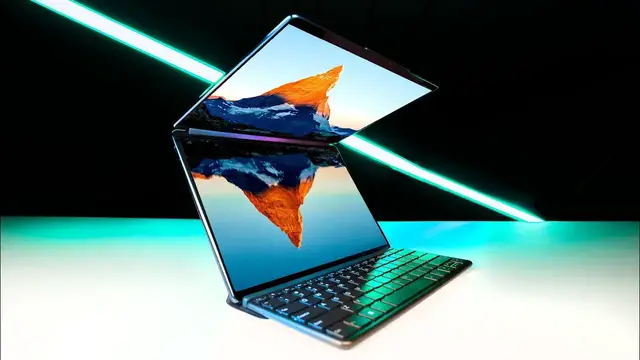
This is the YogaBook 9i. I had seen clips of this thing from CES
2:01
I was intrigued, to say the least. a dual screen device. It's hard to even call it a laptop
2:07
because I think there's a lot of different ways in which people are going to use it. Might dock it in this configuration
2:11
might fold it all the way around and use it as a tablet They might use it in tent mode Extremely versatile By the way this unit that they sent over here is a production sample Some of the software and stuff I can really test extensively
2:25
but it's still totally worthwhile to look at. We've seen folding and bending displays
2:29
but maybe the optimal solution for a device of this form factor
2:33
is just two different beautiful OLED panels, sandwich them together in an extremely thin and light package
2:40
Well, what about a keyboard? How do I type into this thing? Obviously, you could use an on-screen keyboard, which would be fine if you're trying to travel extremely light
2:48
But also, you do have a keyboard attachment. This guy can sit in front of the laptop, sit on top of the laptop, can also sit at the top portion
3:00
And what this will do is activate a trackpad section on the lower portion of the display
3:05
Many different configuration options. Maybe this is slightly more comfortable for you to have it over here, or maybe you don't want to have it on the display at all
3:13
And this is an origami style, extremely lightweight stand. I was a little bit apprehensive about this when I first saw clips emerging with it
3:22
It turns out that it's actually surprisingly robust. It clips together like that, sits on the table, and then this guy slots in
3:31
And you might have been worried about it, but this can go anywhere with you
3:35
Check out how small that footprint is. It's pretty wild. Like where do you put the audio? So they figured out a way to work it into the hinge and that's putting it beautifully at ear level
3:44
Now try to think of another way that you can carry around this type of screen real estate in a package in a form factor that's this tiny specific dual screen settings to allow you to kind of configure things, control the brightness of each display independently or automatically
4:01
You can have dual screen wallpaper, virtual keyboard and touchpad settings, cross screen browsing
4:08
Look at all the different potential configurations can also go this way with it
4:12
You can imagine for software development, for coding, or even just for web browsing, social media management, all types of different uses
4:20
The beauty is it's just so versatile. You still have tent mode, so this will stand on its own with limited desk space and still
4:28
get this thing placed all the way back to traditional laptop-like setting
4:32
So as you can see the keyboard pops up now It all about meeting your personal criteria for work You have options here It actually a pretty big on keyboard
4:43
The quick brown fox jumps over the lazy dog. You know what
4:52
If you're used to typing on screens, then this is actually, it's really not that bad
4:57
You can replace it with this. Jumps over. I actually put a typo on the real keyboard
5:02
This keyboard is pretty nice. Obviously, it connects wirelessly. Another thing I should mention at this point, how solid the whole thing feels
5:08
Very robust feeling construction. Really sturdy. There's a tab on the front for lifting up the screen
5:16
You have this nice easy spot to reach. Thunderbolt connector on this side, which also works for power
5:21
There's two more Thunderbolt ports. Very thin and light device, yet you're still getting some pretty decent expansion
5:27
Turn off the front-facing camera with this mechanical switch, and then the power button's over there
5:32
And an interesting color choice as well. Touchscreen is obviously there as well, and it goes a step further
5:38
You can use the included pen for sketching, note-taking. You could fold this thing all the way around into tablet mode
5:45
Very comfortably hold this like this, get some sketching done. Artists, Photoshop work
5:50
It's kind of wild how many different things this aims to replace
5:54
The angle Lenovo is taking here is sort of one device that can do a lot of different things, to say the least
6:00
It can be your tablet, it can be your convertible, it can be a dual screen workstation, it can be docked, it can have the external keyboard, it can be a drawing tablet, and so forth
6:11
Power brick is actually pretty slender for a 65 watt. What kind of specs are you going to be getting in this device
6:17
It's going to feature the 13th gen Intel Core i7-1355U or 1335U, so i7 or i5, targeted at low power consumption and long battery life
6:28
Display specs, which are extremely important. You guys know I'm a huge fan of OLED
6:32
This is dual 13.3-inch, 2.8K, 400-nit-capable OLED displays. 100% DCI-P3, 16x10 touchscreen as well
6:42
You have everything that you're looking for. You're going to get Windows 11 Home or Pro
6:47
It going to have integrated Intel Iris Xe graphics 16 gigs of LPDDR5X memory storage configuration either 5 12 gigs or 1 terabyte PCIe SSD Gen 4 2 watts and 2 watt
7:01
Bowers and Wilkins speakers featuring Dolby Atmos. Not something that I'm going to test at the moment since this is a production sample
7:07
So Lenovo is stating that battery life, you can see up to 14 hours of video playback
7:12
but that is on a single screen mode. Screens tend to take up a fair amount of power
7:16
They consume a lot of power. But it's not going to completely wreck your laptop
7:20
if you like to have both screens on at the same time, and why wouldn't you
7:25
There's about 10 hours of video playback in an optimal scenario using both screens at the same time
7:30
So 10 versus 14. All of these accessories are also going to be standard
7:35
which is kind of interesting. They're not gonna nickel and dime you and sell you everything separate
7:40
Instead, in the box, you're gonna get the pen, folio, and the Bluetooth keyboard
7:44
So the keyboard is gonna fit in here like this. Like this
7:50
And like that. Ooh, check it out. The keyboard actually stores in this folio, and so does the pen
7:56
A pretty lightweight package collectively. I'm noticing the magnets all over the place now
8:01
The cool part there is that they're making this stuff standard. I don't have a price point at the moment, but at least you get everything
8:08
This is a whole different level of clean. 1.38 kilos puts it in that three-pound area
8:14
It's actually amazing that they've got all these screen components, and yet the weight hasn't increased substantially
8:19
when compared to having a keyboard in there instead. So many different configurations
8:26
It's endless. You have a wonderful multimedia machine for content consumption with a variety of orientations you can put it in
8:36
So many of our applications and the type of work we're doing is going online these days as well
8:41
Might not need a tremendous amount of horsepower in your laptop and instead you need just some beautiful displays
8:46
some versatility of orientation. That is the Yoga Book 9i. When you pop this baby open, let me tell you
8:53
you're going to be turning some heads when they see that second display light up. Good job
8:57
Very cool, Lenovo
#Online Media
#Online Video
#Computers & Electronics