live_tv
Livestream Starting Soon
00
Hours
:
00
Minutes
:
00
Seconds
Up next in 10



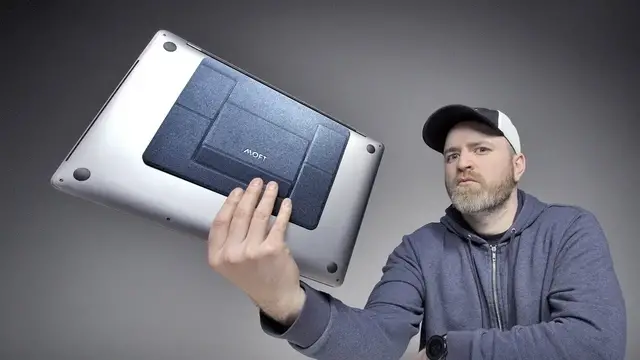
Would you put this on our laptop?
MOFT - http://kck.st/2Qxl1jI
WATCH SOME MORE VIDEOS...
The Most Insane $40,000 Gaming Setup
https://youtu.be/Nd33S6C4lwc
Galaxy S10 Pricing Revealed - This could be a problem.
https://youtu.be/QOoJhMuhhWU
Unboxing The $1300 Bluetooth Speaker
https://youtu.be/IJue4uVwVoo
Dave2D Says Don't Buy These Laptops
https://youtu.be/EAOdW4SjcyI
Lose Weight Without Exercise
https://youtu.be/K76L9TWdfh0
Show More Show Less View Video Transcript
0:00
I'm quite excited about this one. I know you think that's strange because you're looking at the table and you're like, I don't, what are those
0:05
These are like the first run of a product that's currently on Kickstarter. I have not seen something like this before
0:12
This is a product that sticks to the bottom of your laptop. It acts as kind of a little stand. You want a more comfortable working environment
0:20
The early bird was 19 bucks. The eventual retail price I think is going to be 25. They come in a few different colors
0:27
Now they have a kind of metallic thing going on to them
0:30
I have a Surface laptop over here. It can hold some tremendous amount of weight
0:36
What does it say on the Kickstarter, Will? 18 pounds or something, which is wild for something which is so thin
0:41
An adhesive portion. Now, I'm assuming whatever they're using here to stick this onto your laptop
0:46
is probably not going to leave a residue. You'd have to think they've thought about that
0:51
This is a thin and light, right? That's an ultrabook. I'm going to flip this upside down
0:55
adhesive protector here. Ladies and gentlemen I'm gonna eye this out. Now you want to get it close to the back edge as close as you can get
1:03
Now the magic happens or what? I'm gonna spin this back around. Okay. Wait a sec. Let me figure this out real quick
1:13
Did I get it? I got it. Ooh! Surprisingly sturdy here on the surface laptop implementation
1:22
Look at the elevation on this now From the front you don even notice the fact that you dealing with a stand at all the lazy dog it is pretty nice if you really go up
1:37
here you can kind of wobble it a bit when you go to the keyboard you rest as
1:41
a consequence it creates a very stable typing experience much more than I
1:46
expected I was skeptical actually when I first saw it then you're ready to go
1:50
that's it boom so the other way is like this. So this is the 25 degree angle. Look at that. So that's even higher. That's your docked
1:59
setup at home, at the desk. The other setup, this is when you're out. You know, you might be at a
2:05
coffee shop. There is magnets in here. So as you can see, it doesn't come down too easily. I mean
2:09
you could shake it down if you really try like that. We're going to pull in Willie Do. He's got
2:15
the MacBook Pro. We're going to get him a seat. He feels like he hasn't been on a show enough
2:19
Recently and personally I just don't appreciate getting kicked around booted out of my my spot
2:26
Which I earned from this point forward. I just this is my beef with Dave 2d
2:35
It's exactly right so now you guys are gonna have to get a fireplace going
2:40
You probably want to use this one. I'm guessing so this is a 15 inch MacBook Pro
2:43
I mean not the heaviest laptop, but definitely heavier than the surface laptop
2:49
Like this? Yup. Give it the old one too Now see if you can figure this out real quick In their video they make it look so slick they like they just pop up you know they at the Starbucks they just yeah that it right there okay get that baby cracked open Hey it a bit of a wobble It more if you get up towards here That said if I just quick brown foxing
3:13
Because there's something that happens when you place your hands down here
3:21
It kind of stabilizes. It does. It absolutely does. You want to quick brown fox it
3:25
Sure. Sure. Are you showing off right now? Yeah. I mean, it's pretty stable
3:32
This is the maximum size laptop that you would want to place on here. Right. Do you want to try the other angle
3:37
See if you can figure that one out. All right. Yeah. Yeah. Okay
3:42
Okay, that's it. This is the 25 degree angle you pop that back
3:46
That's the 15 degree angle very easy actually to switch between the two
3:50
You just got to get used to how the mechanism works on this thing right boom you get home more serious
3:56
The Photoshop comes out keyboard mouse who knows maybe you're even gaming probably not if you're on a MacBook
4:04
If you try if you give her the shake Huh, I was pretty quick there. Yeah. Oh
4:13
Who's this for will is it for a college student a weekend warrior
4:17
I think all of the above maybe not a gamer but especially I can see this in like a coffee place You a big fan of this Yeah it pretty nice I think I actually might keep this on You work for the company Yeah On the sides Just keep that on the wraps but
4:33
Immediately when you pick it up, it seems a little flimsy. When you have it installed, it's actually
4:39
Surprisingly stable. Surprisingly solid. If I'm here, look I'm there, I'm there
4:44
Yeah, that's not a good look. Who am I? Yeah. Who am I
4:49
You don't want to be Quasimo. So, you go, I mean, if you go to the highest one, look at you
4:56
Ergonomics, posture. I will say, though. Whoa! Okay, show's yours
5:07
I mean, that's what you wanted. Since that's what you wanted, Will. I was on the outro there
5:12
I was fully into the outro there. I gotta say one thing, though
5:16
One more thing. I told you he's getting fed up getting kicked off the show day to the super saff
5:23
He's got to take over the show. Okay. It's all yours. Well, I will say though for laptops that do have vents up here
5:34
Maybe it may not work, but I guess you could just move it down and it'll be all good
5:41
There you go Done done. I'm out
#Computers & Electronics
#Laptops & Notebooks