Up next in 10



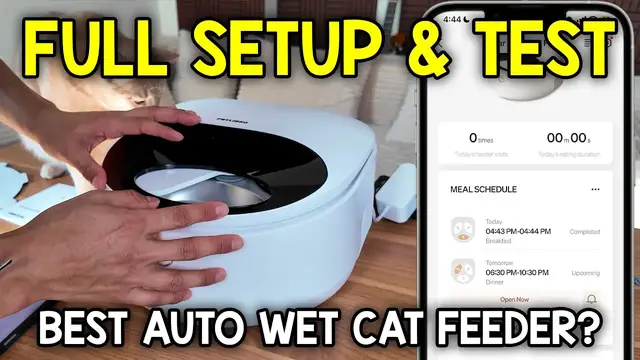
Everything To Knoaw About The PETLIBRO Automatic Wet Food Cat Feeder
Show More Show Less View Video Transcript
0:00
I just got the automatic wet cat food feeder by Petlibro, so let's check it out
0:04
I wasn't expecting this to be a big box, but this is pretty big for a feeder
0:09
So I've never had one of these for wet food, so I'm excited to actually check this out
0:13
And on top, here's what we have. There's going to be a quick start guide
0:17
There's a user manual. Here's the power adapter that's pretty big and chunky
0:21
And finally, the feeder itself. All right, so this thing has some pretty good weight to it
0:26
And then right here is a very big opening for where the food is going to be shown
0:31
And then there's a button right here. And once I click it, this pops right up
0:36
And it reveals the inside. So there's this cardboard piece that come right out. And there it is, the actual feeding dish itself
0:44
So here's the three spots it comes with. And this is plenty of space
0:48
And then the rest of this is actually going to be, I guess, the refrigeration portion of it to keep it nice and cool
0:53
And here it gives me an important note. To clean the refrigeration area, use a dry towel. Do not wash with liquids
1:00
So I'll make sure to be very careful with that. But for now, let me put this dish back. And it looks like there is a right way and a wrong way to put it
1:08
So these numbers are labeled over here. And then likewise, it's also going to be labeled on this part here too
1:19
So I'll make sure to match everything up correctly. and it slides into place and then on the lid itself it gives me this option to unlock this
1:26
cover so if I push down pull it out here it is so if this ever gets dirty I can always just clean
1:31
it up and this part is probably what's going to rotate back and forth as well as this part too
1:37
depending on when it's time for feeding time and there and there and then other stuff you should
1:46
know about it on the sides it's going to have these vents on the back side we're going to have
1:50
the port as well as a reset button and then here's the bottom it gives me a little bit more
1:55
information on the unit here we're going to have the soft feet rubberized feet and then right here
2:01
too what is this i guess this is can also be slightly battery operated so it's three double
2:06
a batteries so the batteries are basically a backup power system and it not going to actually work the refrigeration unit it just going to turn the food itself And then here you can just double check that on the user manual
2:21
So now it's time to actually mess with the settings of this. So let me just plug this in
2:33
And right now I hear it rotating on the inside. oh actually that's not the rotation that's the refrigeration part working
2:41
yeah so there's some air being blown off from the sides and now it's time to go through the app so
2:48
here's what the app looks like i already have something else attached to the pet libro app
2:52
which is going to be a different feeder so let's actually add this one too and to do that i'm going
2:56
to press this plus button on the upper right corner it's going to search for a device and
3:01
boom it found it and since this already is connected to my wi-fi i'll just go through
3:05
the settings here i'll confirm that and give it some time to actually connect
3:13
all right so it's all finished up continue upgrade device all right so i can try this for free
3:21
I'm going to skip that and my device is the white option
3:32
so I'll confirm this I'll ignore that for now and there it is
3:38
so let me just actually set the meal schedule oh okay that's cool
3:46
so yeah I can just click the appropriate one and it'll tell me when it'll happen
3:50
so I'll start with one one will happen on let's start thursday tomorrow confirm and i'll start the time for 6 p.m oh
4:01
actually no it'll be for breakfast time so that'll be 8 30 a.m 8 30 a.m confirm duration
4:14
Okay so I leave this for actually how long can I I can leave it for up to 4 hours So in this case you know what let me just put it the max time four hours Confirm that And then I label this as breakfast
4:35
Confirm. Oh yeah, he's already curious about this machine. And now let's go for two
4:44
I'll also put this for the ninth. I'll start this for... 6.30 p.m
4:59
Confirm. And I'll also leave that for four hours. And that's going to be dinner
5:07
Confirm. And then there's the third bowl, but I really am not going to use that third bowl, so I'll
5:11
just start the schedule now. Enable schedule auto-repeat. So yes, I want it auto-repeating, so every single day that'll happen
5:19
And here's what the screen looks like so far. It gives me my meal schedule. So tomorrow from 8.30 to 12.30, this is going to be opening up
5:25
That's going to be for breakfast. And then tomorrow from 6.30 to 10.30 p.m., it's going to be opened up for dinner
5:32
I have it set for automatically repeating that. But what I do want to do now is to see how this actually works
5:38
So when I press open out, I'll probably slide over. So let me just adjust the camera so you can see a little bit better
5:43
And now let's go for the open now. Feed from which bowl
5:48
Yeah, from bowl one, I'll confirm that. And then that just opens right up
5:56
Oh, and it's got like a little ding as well too. And I don't know if you fully saw that, but let's try that again
6:04
So now let's close now. Oh, it might have gotten stuck, so let me..
6:22
Alright, so it's still loading. Okay so I think the cover might have gotten stuck, maybe I put it wrong
6:31
Let me open this up ah okay i see what happened this probably wasn fully inside these little divots here when i took
6:51
it off earlier so now there there now this is placed correctly so now let me try that again
7:00
open now confirm how long do you want to open i'll put one minute there it opens up now
7:08
and still doing okay so now let me all right so i guess i'm going to wait a minute and then
7:15
they should close automatically so let's wait a bit all right there so it's been a minute and it automatically closed so it looks like it has
7:29
no problem now so let me just try that again open now and i'm gonna do for bowl number two actually
7:36
and confirm that so if you saw that first it opened the cover and then it spun this bowl around
7:48
now let me press close now and it's closing flawlessly and there yeah looks to be working
7:56
good now and now we can go over the history as well too so we can see all the manual it says
8:00
manual feeding was initiated it was ended it was initiated it was ended and then meal schedule has
8:06
completed so that's about it for this and then if i want i could uh yeah i already have it for
8:13
automatically repeating schedule so that's fine and if i press these three dots let's see yeah
8:17
it'll let me manage the schedules or edit these schedules out which uh i don't need to do any of
8:22
that but yeah that's basically about it for that everything's looking all good so now it's time to
8:28
actually find a spot for this so i found the perfect spot and it's going to be right here by
8:32
my kitchen and currently if you see over there that's where i have his current food bowls but
8:37
now i'm going to switch it to over here and yeah everything's all set up now it's all all that's
8:43
left to do is basically just wash these dishes or wash this dish put the food and he'll be all set
8:49
for tomorrow but yeah that's a quick look at the pet libro automatic wet cat food feeder
Computers & Electronics