Up next in 10



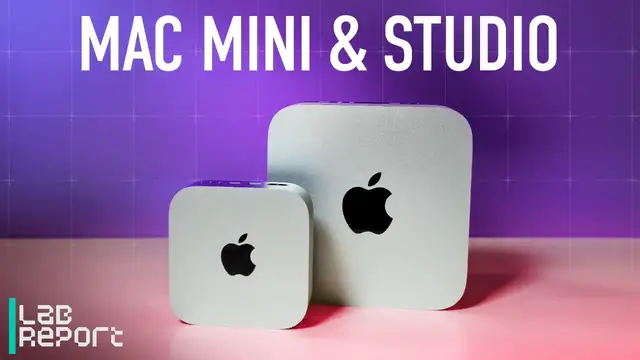
Looking for a new desktop? We test M6 Mac mini, M5 Pro, and Mac Studio to see if Apple's higher price tags are worth it.
Show More Show Less View Video Transcript
0:00
I'm a big Mac fan. And I'm indifferent. And we're here to talk about the brand new Mac Mini and Mac
0:05
Studio models for 2026. All right, Joe, so tell me about the Mac Mini with the new M6 in it
0:17
Should I get it? Yes and no. I think it really depends on your level of appreciation for Mac OS
0:23
as always is the case with Macs. Now, however, to get in on the ground floor with the Mac Mini
0:30
the price has risen considerably from the launch of the M4 model. Right, but everything's risen considerably
0:35
Yes, and that also plays into Apple's favor when we get into the performance and how these things do
0:42
But yes, to start, to get in, it's $900. And when the M4 model, the previous model, released, it was $600
0:49
It got bumped up mid-cycle, actually late cycle, to $799. So it's less of a difference if you were shopping for a Mac Mini last year
0:58
but way more of a difference if you were shopping for a Mac Mini or already bought one a couple
1:02
years ago. And this is all seemingly because of the rise in prices of RAM and storage
1:08
Absolutely. Absolutely. And that's going to raise the prices of everything because
1:12
usually those prices get put onto the consumer and we all love that and that's wonderful
1:16
But yeah, so should you buy – I think it really depends on whether you really are into macOS already or you're deeply curious about it for the performance that it gets you versus other comparable mini PCs on the Windows side
1:32
And that comparison couldn't be better right now for the Mac mini
1:36
And it already was incredible previously for the M4 model, and that trend is only continuing
1:42
Right. So for us, the only thing we've tested recently is the Asus Ascent QN10
1:50
And that's got a Snapdragon X2 Elite in it. And that does perform really well on AI tasks
1:59
Yes. So it's not quite head-to-head still, though. That's like top for PC
2:05
And even then, it just barely competes, it seems like, with the M6
2:12
That's an extremely important point. This is the base level. And it's twice the – well, not twice
2:17
The one we tested is twice the price. Right. But it's still, I think, $1,300 for the, like, entry-level QN10
2:25
Right. Absolutely. And outside of AI, like even just general mini PCs, we've tested a few – several recently, honestly
2:31
And when we compared them with the Mac Mini M6, they got blown away
2:35
We had a Geekom model that cost $1,600. This is, again, $900 to start
2:39
Our test model was $1,300 with a little bit more memory. But the point is, even on silicon testing, it just blew away the AMD Ryzen
2:50
I think it was the Ryzen AI 9 470 was in that mini PC
2:55
And then if you go into a mini PC that's even higher end on the Windows side
3:00
we're talking things like what we tested recently was an Asus Nook. one of those build-it-yourself bare-bones mini PCs
3:06
with an Intel, I think it was the X7 358H. And it's got that brand new dedicated graphics
3:14
in there on the integrated chip, which is way better than what they've done previously
3:19
M6 GPUs still blew it away. Right, and that's the thing with a lot of the new chips
3:23
is while the processor performance or the main CPU tests and even the NPU tests are sort of comparable
3:36
Yeah. It's the GPU that's really taking away from the PC market there
3:43
Yeah, I think so. Though, you know, honestly, in our productivity testing
3:46
even the M6 kind of blew away the other competitors. So it's really, and what's remarkable here is we're used to
3:55
at least on PC mag seeing, I think industry-wide, But, you know, generational bumps, we're used to seeing maybe 10% to 15% gains generationally
4:04
Now, this is skipping M4 to M6, so that helps. But we'll get into the M5 Pro version in a minute where it's the same story
4:12
We're seeing like 20% to 30% gains, which is pretty remarkable. So, and you know what
4:17
It's hard to deny. This thing is freaking adorable. Oh, yeah. I mean, look, it fits in my hand
4:22
You could throw it in a bag. Five by five inches. Yeah, and the form factor itself hasn't changed
4:28
The design is the same as the M4 version, and you still get all the same ports on back
4:36
and the power button is, for better or worse, still on the corner underneath, right
4:41
And should we still care about that? I get it. I mean, most mini PCs have the power button on the front
4:48
I don't personally find myself turning off my system pretty much ever unless there's a problem
4:53
usually going in sleep mode. So I don't really care too much about where the power button's placed, personally
4:58
I will say the Mac Mini's a little difficult to mount behind a monitor already
5:03
Right. So if you were to mount it behind a monitor, now it's even more difficult to turn the system off if you need to, depending on how you mount it
5:10
Yeah, but this thing is so tiny, you just toss it in your bag. Right. It's like if you have a desk setup at two locations, you're just taking this little desktop with you. Absolutely
5:19
And it's quiet, right? Oh, yeah. It's really quiet. And cool. It runs cool as well, which was great
5:24
I mean, under sustained loads for, like, gaming that I tested, yeah, it gets hot. I mean, any system gets hot if you're going to run a video game for longer than 10 minutes
5:31
But even under sustained load productivity testing, which some of those tests take 10 minutes or longer, it was cool throughout the entire thing
5:38
All right. So who is this one for? This is like the – if we're talking about the entry model, that base configuration, that's for average home user or home office
5:50
It ranges, right? Because that's how Macs work. So you can apply a Mac to your house and just whatever you want to do at home, but they're also applicable to business
6:00
So in any case, it's the ground-level Mac, which is a shame because the ground-level Mac even two years ago was only $600
6:08
It was kind of a marvel for that. It kind of blew every budget PC out of the water
6:14
And that's why they're all gone and impossible to find. Yes, exactly. There was a huge – a few folks have been paying attention
6:19
There was a huge AI boom for these machines where people were taking these and running them for agentic AI purposes
6:25
Now I think you just skirting by with 16 gigs of RAM which is what this comes with to start For agentic AI it sort of the bare minimum It similar on Windows where you need minimum 16 gigs to run Copilot It a similar situation with Apple Intelligence and Siri AI
6:41
But yeah, I think it's for the entry-level Mac fan. It's just a shame that now that's changed again
6:48
and we're back up to close to $1,000 in price for that sort of constraint or that conceit
6:53
Yeah, right. But again, even anything comparable on the Windows side is actually more expensive and not actually performance comparable
7:02
Right. A saying comes to mind, a rising tide floats all boats, but unfortunately this rising tide is price
7:06
Yeah. But in terms of the design, just to get back to that for a moment, like a lot of folks are going to look at this and say
7:11
oh, it looks, it's the same thing. And this is a thing with Mac products often is, you know
7:15
they take quite a while to do redesigns on their products. They really lean into sort of the design ID for a given product
7:22
for longer than some other brands would. But I'm not personally too concerned about it because really connectivity standards haven't really changed a ton since the previous model
7:33
This still has Thunderbolt 4 on the back, so you're going to get 40 gigs a second on there
7:37
Still got HDMI. You got your Ethernet. This changed a little bit where now you get 2.5 gigabit per second as the default, and then you can upgrade that for $100 to get 10 gigs
7:46
And this has the Bluetooth 6, right? Yes, that's a big update
7:50
And Wi-Fi 7. Yeah, I think it's a big update personally, especially if you run on Wi-Fi 7 in your house
7:55
The previous model only had Wi-Fi 6E, I think. It might have only been 6. I'm pretty sure it's 6E
8:00
But going to Wi-Fi 7 and Bluetooth 6 is pretty huge for a system that doesn't really have much connectivity otherwise
8:06
It's very potent connectivity, right? And you've got these Thunderbolt 4 ports. They're very versatile
8:11
You can run, I believe, up to three displays from the Mac Mini M6
8:14
Same goes for the M5. You just get a bit more on the resolution that you can pump out
8:18
But, yeah, it's a vastly powerful machine for its size. And the design doesn't really change that
8:27
And maybe next time we see one, would I like to see Thunderbolt 5 on an M6 or an M7 Mac Mini
8:34
I don't even know. Because I don't know what use cases the general audience or even the professional audience in that matter, maybe more so those folks, would want Thunderbolt 5 on a base-level Mac Mini
8:45
I think Thunderbolt 4 is enough. Do you think we'll see a Mac Mini Neo
8:49
Oh, wow. That could be exciting. That could be really exciting. Where they take this form factor, different colors
8:55
They scale back the chip to one of the mobile processors. Well, it's possible
8:59
I mean, that would be a good way to lower the price. Yes. Oh, wow
9:03
That's really exciting. I never considered that. That would be really cool. That would be really cool. Let's hope
9:08
But, yeah, otherwise, you know, I think the M6 Mac Mini is unchanged
9:13
It's the same it's ever been. It's just a little pricier. but you're getting a lot for that increase in price right it's like a relatively speaking you're
9:22
going from 600 to 900 that's a 30 increase you're seeing a relative 30 bump for that money which i
9:27
think is rare all right so that covers the m6 uh this also has an m5 pro available for it um say
9:35
again same body same everything it's just a presumably faster chip even though we're moving
9:41
back a generation in naming. Yeah, it is kind of odd, right? Like you have the M6, it looks shiny
9:46
and new. And then you're like, wait, M5 Pro, we've had that for a year now. It is kind of odd. But
9:51
the difference is in the core counts and how they're applied. So the M6 chip, just to backtrack
9:56
a little bit, is a 12 core CPU, 12 core GPU. The M5 Pro is still more powerful than that in
10:03
multi-core processing loads because it simply has more cores. So I believe it starts with 16 core
10:08
CPU and an 18 GPU, and then you have the option for, I think, $200 to upgrade that version
10:13
of the M5 Pro to an 18-core CPU and a 20-core GPU
10:18
So you're already working with a huge advantage in terms of multi-core loads versus the M6
10:24
And that's where the difference is. And that's why there's such a difference in price here. It's about a $900 difference, which almost makes it like a different product
10:31
But on top of that, you get more memory too, correct? Yes
10:36
You have higher memory capacities here. The M6, I believe, tops out at 32 gigabytes
10:42
This one tops out at 64 for the M5 Pro. And not to mention that, but more importantly
10:47
and this is something we saw in benchmark testing, it's not just the memory capacity, because that's kind of a losing game right now
10:52
with the memory crisis ongoing, AI demand mopping it all up. It's about memory bandwidth
10:57
How much speed, how much throughput can you put through those memory modules versus the others
11:02
And this is where the M5 Pro especially beats out comparable chips
11:07
especially things like, for instance, the AMD Ryzen 9 395 Max Plus
11:14
which is their sort of answer to Apple's approach to processor design
11:19
where it uses the unified memory structure instead of traditional RAM. Even in that case, it just doesn't have the memory bandwidth to keep up with
11:26
For instance, the M5 Pro can reach up to 307 gigabits per second of memory bandwidth, which is huge
11:33
whereas I believe the AI Max Plus 395 can do, I think it's 256 gigabits per second
11:40
so you're already at a huge advantage. So you brought up unified memory, and that's kind of a blessing and a curse a little bit
11:48
because if you're a PC user, maybe you've gotten used to being able to throw in an extra stick after a while
11:56
and beef up your memory, and you haven't been able to do that for a while
12:01
No. Yeah. So with the ongoing shortages, you don't want to, I guess, underbuy at this point
12:11
You want to make sure you're buying exactly what you need now and like potentially five, ten years
12:18
Yes. I've written this exact thing in my reviews. Yeah. Is you want to configure your systems for the future because you don't really have any opportunity to upgrade after that
12:26
Right. Whereas even in some mini PCs on the Windows side, you can get in there, you can pop the top off, you can change the SODIMs out, change the storage
12:34
That's just not going to happen here. And it hasn't really – I don't knock the Mac for that these days because it just hasn't been a factor for so long that I think both consumers and professionals have gotten used to this fact
12:45
Right. And you really can't deny what it seems to do for the performance
12:50
It's really wild. And like similar to M6 to M4, we're seeing 20% to 30% gains between M5 Pro to M4 Pro, which is only a single generational jump versus two
13:01
So it really an interesting story And that also helps alleviate the price bump here which is a little more substantial than it was comparatively with the M6 model The M5 Pro model I believe starts at Our model that we tested had a little bit more memory
13:15
I think it had 48 gigabytes. That was $2,800. But, however, when compared with a like-priced $2,700 top-end Windows Mini PC, this one, again, the Asus Nook, it had a considerable lead over it
13:29
It wasn't a blowout. Right. But we're talking about several percentage points here
13:34
And I think that's the thing is like when you change – when you go to buy, you're going to buy for what you're using now
13:42
But also you really have to plan ahead right now. Absolutely. You do
13:46
So there's really no way around it. Even if you're like, well, I might get into Agentic AI
13:53
Right. Right. Exactly. I don't know that anybody chooses to get into it. Right
13:56
I don't know. But, yeah, you really have to plan now for that potential change in whatever you're doing
14:07
And I guess that brings us to who's the M5 Pro for
14:13
Yeah, I think the M5 Pro is for sort of a cross-section of folks. I think it's more geared toward professionals and maybe amateur creators, things like that
14:23
On the creator front, this is definitely a better buy for those purposes
14:26
the GPU is going to just get you much further, especially video editing. If you're just like a photo editor or something like that
14:32
you probably could get away with the M6 model because it's really dependent on CPU there
14:36
in apps like Photoshop and Affinity, things like that. Where you get into video editing, that's where it leans on the GPU
14:41
and you're going to want those extra cores. So, yeah, but also you mentioned AI
14:46
and I know that the M6 model is going to be very popular for that, but I think it's going to be very popular for consumer AI, if I can make a distinction, right
14:54
You're just at home. You want to talk to Siri AI. You want it to automate some processes for you
14:58
This is more for the developer. This is more for the person who's actually creating AI tools using existing models
15:05
And what really leans into that or lends to that is the Thunderbolt 5 ports that you get on the M5 Pro model versus the M6
15:12
And that gets you up to 120 gigabytes per second of connection speed
15:17
And what that unlocks is the ability to sort of daisy chain these systems together
15:24
And then you kind of share the compute resource of all the systems, and that way you unlock access to much bigger models that require larger capacity memory stores
15:33
Right. And then you couple that with the advanced memory bandwidth, and you're off to the races
15:36
So, and since we're talking about those ports, there's a good chance
15:43
especially if you're doing video editing, that you're going to need extra storage
15:47
Yes. Because, I mean, the M5 Pro starts with 512 gigs. Is that right
15:52
Yeah, it's really rough in both cases. I should mention, like, the M6 model starts with 256
15:58
This one starts with 512. In either case, it's not a good look for starting prices
16:04
Right, so you're probably going to need more gigabytes of storage there. Yes. So, yeah, I guess that's another thing to take into consideration is that you're probably going to have to add on storage at some point
16:15
Yeah, and the tough thing with that is, yes, Thunderbolt 5 is incredibly fast, but it's never going to be local storage
16:23
Right. And it's tough now because the storage prices are also commensurately increasing in price
16:29
And it's sort of – we were used to $200 increments, right, when you're buying a Mac
16:34
Like, you know, doubling your RAM costs $200, doubling your storage. It's definitely exponentialized, if I could make up a word there
16:40
and you're seeing ballooning in prices between tiers of storage and stuff like that
16:45
You could spend, I think when I priced it up, you could spend as much as $3,800 on storage on this device alone
16:51
And that's probably not worth it in the long run unless you're using it for extreme professional cases, things like that
16:59
Right. AI development. You can obviously get by with external storage. It's just not going to be as fast if you want to rely on it for specific uses
17:08
Right. So the M5 Pro model starts at $16.99, which is a bit up from, I believe, the M4 Pro model, which started at $12.99 to begin with
17:17
So yeah, M5 Pro, definitely for the professional or the amateur sort of creator at home who really wants to just get more out of their system
17:27
Maybe they're specific enthusiasts, but otherwise I wouldn't bother. All right, so that takes us through the Mac Mini with the M6 and the M5 Pro
17:36
and above that also came the new Mac Studio and that doesn't even have an M6 chip in it, right
17:46
Isn't that weird? Yeah. Yeah, it is strange. A lot of people will look at that and go, well, the M6 is the newest
17:51
What's going on here? What we're looking at is a slow rollout. This is what Apple does for all of its new M series chips
17:56
You get the M base level chip first and often they launch in iPads, oddly enough
18:02
We've seen that happen in the past. We have. This time we're seeing it launch in a Mac Mini, a little more appropriate
18:08
But that is just the ground floor for that. And it's a brand new lithography for them
18:12
It's two nanometers in size on the die, which is the smallest we've gotten
18:17
So that's exciting. But they're going to roll out the M6 Pro and M6 Max
18:22
potentially later in 2026. We don't know. Or more likely, possibly early 2027
18:28
Right. We usually see some sort of Apple release coming up here in late October or November, right
18:36
So there might be still a MacBook Pro or something to come
18:40
Right. And the thing is here, the M6, you're going to see in benchmarks that the M6 is going to outperform chips like the M5 Max and even the M5 Ultra, which is a quad-die chip
18:51
It's on the interconnect that they've used called UltraFusion. And that's because of the new lithography
18:57
Right. It's a 10-nanometer chip or 2-nanometer chip. And that's just going to do better on a single-core basis
19:03
and that's why the Mac Mini is better for the base level one is better for general audiences
19:08
because those single core performance tasks like web browsing documents spreadsheets things like that they all run
19:16
on a single core most of the time whereas when you get into the Mac Studios
19:20
you're getting into immense amounts of cores for these chips you've got the M5 Max
19:25
and then that itself is actually two M5 chips put together That's a dual core or a dual die chip
19:34
But then the M5 Ultra takes two of those M5 Max chips which those themselves are already on an interconnect and they created what they call a quad interconnect And then you getting into the 80 GPU
19:49
You're getting into immense processing. Right, and with all those cores, with the massive amount of cores, a massive price comes along with it
19:56
Yes, yes. So what does it start at? $2,500? $2,499, yes, for the M5 Max
20:02
And I believe it's more than $5,000 for the M5 Ultra model
20:06
And it just goes up from there. I think the unit we tested was up over $12,000
20:13
So it's a lot. It's not a hobbyist computer, really. No, not even. I said the M5 Pro Mac Mini would be for the enthusiast at-home amateur creator or things like that
20:28
I wouldn't even put the Mac Studio in that class. I think if you're buying a Mac Studio for yourself, you might have messed up and you should go back on the website and reconfigure before you hit buy
20:39
If the Mac Studio is coming to you and it's not from a fleet manager at your production studio or something like that
20:43
You always want to hope somebody else is paying for something that expensive. Yes, absolutely. But that's the one I want if I'm gaming on a Mac, right
20:51
Yes, if you want to game on a Mac. Yes, it is possible. And look, to their credit, they have made massive gains in gaming performance
20:59
It's really impressive. you can actually get to run on a Mac. I had some luck with Cyberpunk
21:03
testing it on the Mac minis and getting very playable frame rates
21:07
obviously playing with AI rendering and things like that. But that's more of a side thing
21:11
If you're a professional who works with Macs and you want to game on the side at night
21:16
after you're done pushing the latest release of a code base or a new cut of a video
21:22
then yes, you can get into gaming. So that was a joke. But yes, thank you for the explanation
21:27
But yes, I guess the key question is, which do I go with
21:35
Am I going to go with the Max or the Ultra? And now, like, what's going to separate
21:42
Who am I to buy those? Right, exactly. So the M5 Max model, there's actually less of a distinction these days now because the M5 Ultra, just to talk about that real quick
21:52
Like Apple's Ultra chips used to be taking two of the previous generation's chips together and putting them into a single product
21:59
Right. Now we're putting current generation chips into that sort of format
22:03
And that's why they call it QuadDie because, again, those themselves are interconnected
22:09
So the M5 Max version of the Max Studio is definitely for an even higher level of creator, particularly for video
22:17
Maybe the break-off point should be high-res video for the M5 Pro, maybe 1440, 1600p video
22:24
Right. And M5 Max in the Max Studio, maybe 4K, 8K video
22:29
That's what you're looking at. And obviously, you have a lot of AI, you know, applications that you could use for the M5 Max model
22:36
But if you're really getting into developing large-scale, you know, new products using AI models
22:44
You're going to want to use the M5 Ultra product. And not to mention even then, because it's already pushing $12,000 in our test units
22:52
They all also, of course, have Thunderbolt 5. And they can handle the interconnect between the systems over that
22:58
Because those could be daisy-chained. Yes. And then you're looking at the memory bandwidth on the M5 Ultra can reach, I believe, 1.2 terabytes per second, which is insane
23:09
Now imagine daisy-chaining that power, and you can get into two, three, four terabytes per second of memory bandwidth, which is just nuts
23:18
And that's what it takes these days to operate at that level of cutting-edge AI development
23:24
So that's where I would really recommend you look if you're in that camp
23:28
Yeah, and just to be clear, this is still the Mac Mini in front of us. The Mac Studio is considerably larger but still really compact
23:36
Still really small. Yeah, I mean, if you're used to having like a giant desktop tower, the studio is just remarkably small
23:45
And it's heavy. It is. It's not something you want to throw in your backpack
23:50
I think it's 8 pounds. Yeah, it's 8 pounds, which is dense. It's dense for a thing of its size
23:53
Yeah. Now, what this does call into question, you know, 80-core GPU, you think, whoa, that's going to be massive
23:59
And it is. However, if we're talking amongst workstations, it still doesn't hold a candle to NVIDIA's RTX 8 6000 Pro models where you have a dedicated GPU on a card, on a PCIe slot
24:15
That's still going to blow away the M5 Ultra GPU. It's just a matter of physics
24:22
You're not going to get around that. It has its own power delivery. It has its own cooling where this is all cooled on the same heat sink and all that
24:31
So it's just not going to compare in that case. So if you're in need of either AI compute that requires massive amounts of fan-cooled, self-powered GPU, you're not going to get that here
24:42
Maybe you could reach it. Maybe if you have – we didn't do this testing, but if you have multiple M5 Ultra models and you daisy-chained together, could you reach the power level of a singular PC
24:54
Yes, of a star. Possibly. Who knows which one happens first? But jokes aside, you're still not going to compare it to something like – I believe my colleague Brian West ever tested it against a Dell Pro Max Tower and a Lenovo ThinkCenter workstation, and it just didn't compare in those regards
25:11
So, yeah, you could get there. But then you're going to be spending almost in triplicate of what you would spend on that PC workstation
25:18
So there's still a place, folks. There's still a place for PC. And there's plenty
25:22
There's plenty. And the Mac doesn't really change that. And again, you're going to hope that somebody else is putting the bill for that
25:29
Absolutely. Absolutely. My goodness. You're looking at – if you want to connect four of these together with Thunderbolt 5, you're looking at potentially $40,000
25:37
Yeah. So, yeah. All right. Thank you, folks, for watching. I've been Joe Osborne for PCMag
25:42
And I'm Josh Goldman with CNET. And you can check back on both of our respective websites in the coming weeks for more coverage on the Mac Mini from M6 to M5 Pro to the Mac Studios with the M5 Ultra
25:53
And we'd love to know what you think about these things. If it's something you want, I'm still indifferent, and I'm assuming..
26:00
I'm still a fan. Yeah. So let us know in the comments what you think about these, and we'll see you later
26:12
Bye
Celebrities & Entertainment News