0:08
In this video, we will discuss about
0:15
I will go to FCS0301.
0:22
I will open one node.
0:41
One is in green color, second one in
0:47
the one card is active,
0:49
second card is in standby mode. Okay?
0:57
Here. So, these two are one set.
1:00
These two are one set.
1:05
By default, the left side
1:11
And the next one is in
1:19
uh due to some problem,
1:23
the right side one taken the control,
1:32
Like that, we are having
1:36
Foundation fieldbus cards in our
1:41
So, let's see some details about these.
1:47
Now, I will go to system view,
1:51
and I will go to FCS0301.
1:56
And I will go to IOM.
2:00
In IOM, we have eight nodes.
2:04
You can see the same eight nodes on this
2:07
here also. 1 2 3 4 5 6 7 8.
2:17
In the node one, we are having these
2:23
and receives the duplicate
2:33
Similarly, this is second card.
2:36
And for that, this is the duplicate.
2:39
That is why the number is same.
2:48
communication card Foundation Fieldbus.
2:59
In the Foundation Fieldbus,
3:02
we will receive one pair cable
3:06
from one junction box.
3:09
In one junction box, we can connect
3:12
eight instruments, 12 instruments, 20
3:15
instruments. That depends on the size of
3:19
the junction box. It may vary. Depends
3:25
Foundation Fieldbus junction box.
3:34
may have 10 instruments. Junction box
3:37
two may have 15 instruments like that.
3:41
One ALF card supports
3:48
Foundation Fieldbus junction boxes.
3:51
So, this is one ALF We are not talking
3:55
redundant card, okay?
3:59
So, this is one junction box.
4:02
This is second junction box.
4:04
This is third junction box.
4:06
This is fourth junction box.
4:18
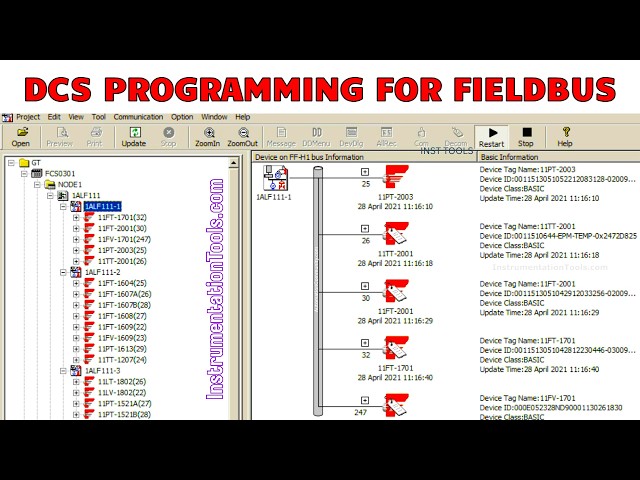
And go to tools, open device panel.
4:25
See, this is my node one.
4:32
In this ALF card, we have
4:36
junction boxes, okay?
4:46
Junction box one is selected. These are
4:50
connected to this junction box.
4:53
Each instrument in Foundation Fieldbus
4:57
have unique node address and tag name.
5:04
Click tag assignment.
5:09
the device tag name is
5:17
And the node address is 25.
5:22
So, you can give any number, no issue,
5:24
like 25, 26, 27, no issue, okay?
5:28
But, each instrument have unique
5:32
You cannot share same address between
5:38
In Foundation Fieldbus, it identifies
5:43
each physical instrument based on this
5:49
The tag name is for our convenience, but
5:52
the system will identify the 11 PT
6:04
first junction box, if you given node
6:13
Let's go to second junction box.
6:21
I open second junction box.
6:24
See here, the same 25 address is given
6:38
these node address are specific to
6:46
You can repeat the same numbers with
6:49
different junction boxes. No issue.
6:53
Clear? Because if you see
6:56
the first junction box address is
7:03
-1. This itself is unique. Under this,
7:07
we have 25 is the node address for this
7:13
for second junction box,
7:17
name itself is changed here. 1 ALF
7:24
Under this, we have 25
7:26
node address for 11 FP 1604.
7:34
individual junction boxes,
7:39
node address. You can repeat the node
7:45
But, within the same junction box,
7:51
it is not possible to give
7:54
same or duplicate addresses.
8:03
Like that, I'm going to call junction
8:08
Devices on FFH 1 bus information.
8:13
These are the devices which are
8:16
available in the field
8:18
connected to this node.
8:27
these tags are available on the system.
8:31
If you disconnected some instruments in
8:34
the field, or if you added some
8:36
instruments in the field, then you have
8:39
do the configuration.
8:45
Similarly, these all instruments, how
8:52
I will select the first one. One This is
8:55
the from first junction box. 1 2 3 4 5.
9:01
Second junction box. 6 7 8 9 10 11 12
9:10
14 15 16 17 18 19 20 21.
9:23
22 23 24 25 26 27 28 29.
9:37
around 20 plus instruments.
9:41
You can easily connect many instruments.
9:49
Here, the redundant card will not be
9:51
shown here. Remember that, okay? Only
9:54
the main one single card will be shown.
9:59
Opening the second card.
10:04
This is If you go to system view,
10:09
Now, we see in front of the first card,
10:11
this is duplicate. Nothing but
10:15
These two are one set, okay? Now, we are
10:19
ALF 311 and this is the duplicate.
10:23
Duplicate means it is for
10:29
If you expand this, these are the
10:39
Again, single ALF card supports
10:45
junction boxes. Nothing but each
10:50
will give us one pair cable
10:55
From single junction box,
10:57
we are receiving one pair cable, okay?
11:06
and it is coming all these instruments
11:11
via single one pair cable. That means
11:18
Okay, this is some type of serial
11:22
That is why this is digital
11:27
this junction box, right?
11:31
Now, the data is updating actually.
11:33
So it is taking some time.
11:38
10 to 20 plus instruments for one
11:45
That depends on your design actually.
11:49
See, in this card we are having many
11:58
10 11 12 13 14 15 16 17 18 19 20 21 22
12:05
23 24 25 26 27 28 29 30 31 32 33
12:16
This ALF card receives 33
12:20
instruments. Remember
12:22
if you go to field and if you check it
12:26
check the foundation field bus junction
12:30
still some spare slots are available.
12:33
You can connect new instruments.
12:37
In the spare channels
12:39
you can accommodate many instruments.
12:43
You can easily consider some 10 to 20%
12:46
of spares are available
12:48
for each junction box.
12:54
In the coming videos I will show you how
12:57
to configure a foundation field bus
13:00
instruments in the Yokogawa DCS.
13:05
Okay? It is very easy.
13:08
And I will show you how to do it.
13:12
If you have any questions regarding this
13:16
please share with us
13:18
using the comment section.
13:21
And please like our videos, share our
13:24
courses with your friends and social
13:28
Thank you. Thank you for your support.