Up next in 10



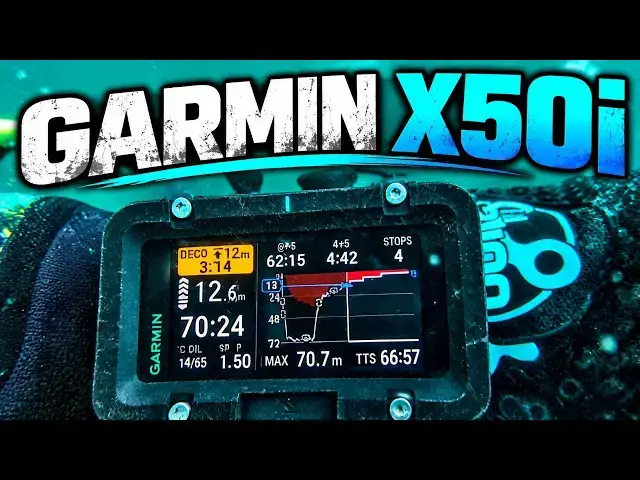
Can the Garmin X50i seriously challenge the Shearwater Perdix as a technical diving computer?
I've been diving the X50i alongside my Shearwater Perdix 2, using it as an independent secondary decompression computer on deep CCR dives.
In this video I look at the X50i's huge three inch display, CCR functionality, decompression information, configurable controls, bailout operation, vibration alerts, battery life and Garmin Dive app.
I also look at some of the features that make the X50i very different from many traditional technical dive computers, including GPS and mapping, T2 air integration, SubWave communications and the wider Garmin ecosystem.
And during testing I found something unexpected.
On one 70 metre dive, the Garmin was predicting almost 30 minutes more TTS than my other computers. I shared the results and dive logs with Garmin, whose engineers reproduced what I was seeing and identified an interesting difference in how automatic setpoint changes were being handled.
Most importantly, after diving it alongside the Perdix, would I actually trust the Garmin X50i as my secondary decompression computer on a 100 metre wreck dive?
This is the first in a series looking at alternatives to the Shearwater Perdix. Coming next are the Ratio iX3M, Halcyon Symbios and OSTC 5.
━━━━━━━━━━━━━━━━━━━━━━
*Chapters*
00:00 Garmin X50i vs Shearwater
02:08 Hardware and Display
05:34 Menus and Controls
06:39 CCR Setup and Underwater Use
08:00 Decompression Display
09:04 The 30 Minute TTS Difference
13:15 Bailout and Custom Controls
14:23 Garmin Ecosystem
19:26 Likes, Dislikes and Verdict
━━━━━━━━━━━━━━━━━━━━━━
*ABOUT THIS CHANNEL*
Deep Wreck Diver explores shipwrecks, submarines, and sunken aircraft from around the world - combining technical diving with detailed wreck identification and historical storytelling. Every dive uncovers a piece of history lost to the depths.
━━━━━━━━━━━━━━━━━━━━━━
*Kit I Use*
Note, some of these are affiliate links so help support making my videos:
- Gloves are Ansell Alphatec 87-063 - https://amzn.to/4jDHhX4
- Main torch is an Orcatorch D630 - https://amzn.to/4jlT4tA
- Backup torch is an Orcatorch D710 - https://amzn.to/4jhddRk
- Drysuit is an O-Three Ri200 - https://www.othree.co.uk/drysuit-range/ri-2-100-drysuit/
- CCR is an AP Diving Inspiration (XPD) - https://www.apdiving.com/
- Backup computer is a Shearwater Perdix v2 - https://amzn.to/42FXZOW
- Reels are by Kent Tooling - https://www.divingproducts.co.uk/
- Cameras are Paralenz Vaquita
- Video light is NiteScuba NSV60 - NiteScuba NSV60 - https://s.click.aliexpress.com/e/_onHEKQZ
- Phone housing is Divevolk Seatouch 4 Max - https://s.click.aliexpress.com/e/_omJlNKL
- Stickers for gear by Dive Signs - https://www.divesigns.com/
━━━━━━━━━━━━━━━━━━━━━━
*Strobes*
I use two different strobes (also affiliate links)
-- Prozhaozhu 3000 Lumen Diving Strobe - https://s.click.aliexpress.com/e/_c3Qb99tF
-- Prozhaozhu 4000 Lumen Diving Strobe - https://s.click.aliexpress.com/e/_c3KmWqCN
- Jon clip - https://s.click.aliexpress.com/e/_oDqq0RW
━━━━━━━━━━━━━━━━━━━━━━
📱Follow My Socials!
Instagram 👉 https://www.instagram.com/deepwreckdiver/
Facebook 👉 https://www.fb.com/DeepWreckDiver
Buy Me A Coffee 👉 https://buymeacoffee.com/d33puk
Email 👉 [email protected]
#GarminX50i #TechnicalDiving #DiveComputer #CCR
Show More Show Less View Video Transcript
0:00
Shearwater dive computers are the
0:02
benchmark by which other technical and
0:05
CCR dive computers are measured. I've
0:08
used Perdix 2, Perdix, Petrel, various
0:11
versions of those in different forms for
0:14
a number of years and I'm super familiar
0:16
with them.
0:17
But what there is on the market now is a
0:19
whole load of other dive computers that
0:22
offer different features to the
0:24
Shearwater and I've been diving with a
0:26
number of them alongside my rebreather
0:29
to see how well they work as independent
0:32
secondary decompression computers.
0:35
When I asked you guys which one you
0:37
wanted me to make a video about first,
0:41
the answer was really clear. It's this
0:43
one, the Garmin X50i.
0:47
It's very popular. Uh it's got uh
0:50
different features to the Shearwater.
0:52
Good example, it's got a touchscreen on
0:54
the surface, it's got GPS, it's got
0:58
mapping,
0:59
even a built-in backup dive light.
1:02
But there's also access to a much wider
1:05
Garmin ecosystem of products. Now, I
1:09
haven't tested all of those things,
1:12
but what I have focused on is how good
1:15
is the X50i as a standalone secondary
1:19
CCR decompression computer cuz that's
1:22
basically what I want.
1:24
Now, while I was testing it, I noticed
1:27
something very interesting on on a few
1:29
dives, but it was really apparent on a
1:31
70-m dive. My TTS on this turned out to
1:35
be nearly 30 minutes longer than my
1:39
Perdix.
1:41
At the end of my 2 hours of
1:42
decompression, it cleared to only about
1:46
3 minutes.
1:47
What I did was I fed that information
1:49
back to Garmin. They had a look at it.
1:52
They came back to me with an explanation
1:54
and I I they're in the process of
1:56
updating the firmware to remove that
2:00
issue. They also gave me a manual fix
2:02
that works really well, and I'm going to
2:04
talk about all of that later on in this
2:07
video. But first of all, let's look at
2:10
the computer itself. So, the X50i is a
2:13
substantial bit of kit. It's got this
2:16
lovely 3-in screen. I haven't found the
2:19
size of it to be an issue either on the
2:22
surface or underwater. In fact, I really
2:24
like it because it makes it easy to
2:27
operate.
2:28
It's got four physical buttons you can
2:30
see here,
2:31
and the touch screen, which I mentioned,
2:34
works on the surface, but underwater,
2:36
everything is controlled using those
2:38
four buttons.
2:40
They're large, well-spaced, and they
2:43
work really well even with thick drysuit
2:45
gloves.
2:47
It's also got an internal rechargeable
2:49
battery, which I'm going to come back to
2:51
later.
2:52
Rated to 200 m, which is deeper than I'm
2:56
ever going to take it, and will be
2:57
deeper than the vast majority of people
2:59
ever take it. So, overall, it feels
3:03
really solid and really well-made.
3:07
The display is particularly impressive.
3:09
It's certainly much better than my
3:13
original Perdix, this one here.
3:15
It's It's bright, clear, really easy to
3:19
read underwater. That size gives it room
3:22
for a huge amount of information.
3:25
Now, I think that's probably a mixed
3:27
blessing, and it's one of the things
3:28
that I've seen on several large-screen
3:31
computers.
3:32
How much information is too much?
3:35
On the bottom, there's only a few things
3:37
that I really need immediately. I want
3:40
time to surface. I want to know what set
3:43
point is set. I want to know how long
3:45
I've been there. I want to know the
3:47
depth. I want to be able to see what gas
3:49
mixture it thinks I'm breathing. These
3:51
things I need to be able to see really,
3:53
really quickly. During this sense,
3:56
slightly changed but but relatively
3:58
similar. I still want TTS. I want to
4:00
know what my first stop depth is or my
4:03
next stop depth, my current stop depth.
4:05
I want to know how long I'm going to be
4:07
there.
4:08
And I want to know how long I've been
4:10
underwater and I want to see the gas
4:12
mixture and set point same as I do on
4:15
the bottom.
4:16
So I think the test for all of these
4:18
dive computer manufacturers isn't in how
4:21
much information you can put on that
4:23
screen. It's how do you present the
4:26
information that I want at a particular
4:29
point in the dive.
4:31
That challenge is not specific for
4:32
Garmin, it's for all of them. And it's
4:35
something I'm kind of going to be
4:36
talking about, I think, with all the
4:38
larger screen computers in this series.
4:42
I think, on the whole, Garmin does a
4:44
really good job of presenting that
4:46
information.
4:48
But the crucial thing it offers is the
4:50
ability to customize screens. So,
4:55
having dived with it a bit, I realized
4:58
that I wasn't or there wasn't a screen
5:00
that really presented me with the
5:02
information that I wanted.
5:04
So, I went into the customization
5:06
function. I changed that and I came up
5:09
with the screen that you're seeing here,
5:11
which, as far as I was concerned,
5:13
presented everything that I wanted.
5:16
And that's one of those things that I
5:18
think
5:19
puts Garmin in a slightly separate
5:21
category from some of the other dive
5:22
computers.
5:24
I really liked it.
5:26
It's very, very customizable. I think
5:28
this is one of those things that once
5:30
people realize it exists, will get used
5:32
a lot.
5:34
It also, I think, does a really good job
5:36
of having menus that you can go through
5:40
relatively quickly.
5:42
Because
5:43
there's some stuff that you're going to
5:44
need to be able to find and there's some
5:46
stuff that you're going to need to be
5:47
able to do
5:49
relatively quickly.
5:51
Inevitably, there's going to be a
5:52
learning curve because you're used to
5:54
doing it one way, you think it should
5:57
behave in it in in one way and it does
5:59
it in a different way. I did find though
6:03
that I can quickly change the set point,
6:05
I can edit it to 1.5 or or whatever I
6:08
want. I can switch gases, I can bail
6:12
out, I can find details of the
6:15
decompression information.
6:17
I found the Garmin pretty good at that
6:19
and pretty intuitive.
6:21
My buddy will
6:23
also use the Garmin. He found it the
6:25
same. I even gave it to my wife who was
6:28
diving it in
6:30
single cylinder air mode and she got on
6:33
with it as well. So, you know, a few few
6:35
people have used it. The feedback is all
6:38
pretty good.
6:39
Preparing for the dive is also
6:41
straightforward. You can configure
6:43
everything that you need, diluent,
6:45
bailout gases, gradient factors, set
6:48
points, etc.
6:51
You can also configure automatic set
6:53
point switching at predetermined depths.
6:56
And that's particularly relevant because
6:58
one of those changes explains the TTS
7:01
difference I mentioned earlier. As you
7:03
would expect, I mirrored the what I was
7:06
doing on the rebreather on the on the
7:08
the Garmin and also on the other dive
7:10
computers I was carrying. So, my
7:12
Shearwater came with me on every dive I
7:14
did with every computer. I had the same
7:17
settings on the Shearwater as I did on
7:19
the Garmin or whatever other computer I
7:22
was testing.
7:24
And that way, if
7:26
two of the computers do disagree, I can
7:28
compare like with like.
7:30
Now, once I'm underwater, the large
7:33
screen really earned its keep.
7:36
You've got that important information
7:39
easily to hand and then there's other
7:41
data available on other screens. The
7:44
buttons allow you to move between the
7:47
screens, between the menus,
7:49
and that's really useful because when
7:51
you're busy underwater,
7:53
you want to be able to access that
7:56
information really
7:58
easily. You need it to be clearly
8:00
presented.
8:02
And the other stuff you want to be able
8:03
to access,
8:05
but but you know, by one or two quick
8:07
button presses. You don't want to have
8:09
to fight through a a difficult menu
8:11
system to get it.
8:13
And I think the X50i does a really good
8:16
job of making that important information
8:18
obvious.
8:20
And one of the things I particularly
8:21
like is the countdown that you get
8:23
through each decompression stop.
8:26
You don't get that on every computer,
8:28
but on a a long CCR dive, it's I think
8:31
useful to be able to glance at the
8:32
screen and immediately see how much of
8:35
the stop remains.
8:37
I also like the dynamic depth chart,
8:40
which gives you a graphical view of your
8:43
actual profile together with the
8:46
projected ascents,
8:47
uh the decompression stops, uh that kind
8:50
of stuff.
8:51
It's a I guess it's a nice to have, but
8:53
it is great to have that visual picture
8:57
of where you are and what the computer
9:00
expects you to do next. I think
9:02
something that I particularly like are
9:04
the vibration alarms, but I also know
9:07
that they polarize opinion.
9:09
Personally, they do it for me.
9:11
Um I don't have to rely on seeing an
9:14
alert. The computer physically gets my
9:18
attention when it wants me to have a
9:20
look at something. What did surprise me,
9:22
though, was the time to surface issue.
9:25
It soon became obvious that the Garmin
9:27
was telling a different TTS story to my
9:30
Perdix and the Shearwater HUD that I
9:33
dived with on the same on the same
9:35
dives.
9:36
And that was a huge surprise because
9:39
throughout all these tests, I've
9:41
generally found different computers to
9:44
produce very similar decompression
9:47
profiles when they're configured the
9:48
same. They all generally use the
9:50
Bühlmann ZH-L16C
9:52
algorithm. So, if you've got the same
9:54
gradient factors, you've got the same
9:56
gases, you tell it you're in the sea,
9:58
you're going to get, you know, very
10:00
similar TTS.
10:02
Why was the Garmin predicting something
10:04
that was significantly longer?
10:06
To give you an example, on a 70 m dive
10:10
with a 30-ish minute bottom time,
10:12
the Garmin was showing a TTS of around
10:15
30 minutes longer than my other
10:17
computers.
10:19
But as I ascended, that gap started
10:21
closing.
10:23
And by the final stages of
10:24
decompression, the TTS was falling
10:28
faster than actual elapsed time, which
10:31
which is bizarre if you think about it.
10:33
And in the end, it only cleared about 2
10:36
to 3 minutes later than my other
10:38
computers.
10:39
On a dive involving 2 hours of
10:41
decompression, that's entirely
10:42
reasonable. But the interesting question
10:45
is why was the Garmin telling me it
10:49
wanted more decompression than it
10:51
actually did require? The reason why it
10:54
predicted so much earlier in the ascent
10:57
uh
10:58
was one that I put to Garmin. I created
11:01
a video showing what I'd seen.
11:03
I shared it with Garmin. I sent them my
11:05
logs.
11:07
Their engineers were able to reproduce
11:09
exactly what I'd been seeing underwater.
11:13
And they were able to give me an
11:14
explanation, which was was fascinating.
11:17
I had the X50i programmed to
11:19
automatically switch from my high set
11:22
points to the low set point at 3 m,
11:25
which is also the depth of the last
11:28
stop. So, when the Garmin was
11:29
calculating TTS,
11:32
it looked ahead through the schedule and
11:34
treated that switch as taking effect
11:37
when I arrived at 3 m rather than when I
11:41
left 3 m. It assumed that my final stop
11:44
would be carried out at my low set point
11:47
of 0.7 bar. I normally complete my final
11:50
decompression slightly deeper than 3 m,
11:53
so remain at 1.3 or
11:56
whatever I've got throughout the stop.
11:59
The The Garmin was therefore predicting
12:02
TTS assuming I'd be doing really rubbish
12:05
decompression at 0.7 bar when I was
12:09
going to be at 1.3. And that's the way
12:12
that other computers treat it. That
12:14
explained why the Garmin subsequently
12:17
caught up.
12:18
What I was able to do is test Garmin's
12:21
explanation. This time I moved the
12:24
automatic low set point change from 3 m
12:27
to 2 m, so the Garmin behaved perfectly.
12:31
Its TTS stayed closely aligned with my
12:34
other computers, which is brilliant. And
12:37
they've also told me that they're going
12:38
to amend the software in a later
12:41
firmware, so the automatic set point
12:43
change is treated once you leave the
12:46
program depth that rather than when you
12:49
arrive at it.
12:50
And that should make its behavior
12:52
consistent with all the other computers
12:55
I've been using.
12:56
So for me that was one of the most
12:58
interesting finds from the whole set of
13:00
dives I did with the the Garmin. And I
13:03
was particularly impressed with
13:05
the Garmin engineers, the Garmin team
13:09
who got back to me really quickly,
13:13
fessed up that it was it was their
13:15
issue, and have given me that that route
13:17
ahead in order to fix it. So, you know,
13:20
big big thumbs up to Garmin. One of the
13:22
other things I particularly like is the
13:24
ability to customize the button
13:27
shortcuts.
13:28
You can assign functions to individual
13:31
buttons and combinations of buttons,
13:34
allowing you to configure the computer
13:36
around the things that you actually
13:38
need.
13:39
For me, that's a genuinely useful
13:41
capability.
13:43
If I bail out onto open circuit,
13:46
I want to get to the breathing gas menu
13:49
really quickly.
13:50
I want to be able to select the
13:52
appropriate bailout gas and have the
13:54
computer to recalculate my
13:56
decompression.
13:57
I don't want to have to work through
13:59
layers of menus. If it was a real
14:01
bailout, I'd already be dealing with a
14:04
load of other things, buoyancy, bailout
14:06
cylinders, my team, calling for gas,
14:09
whatever the issue was.
14:11
The last thing I want to do is to be
14:13
spending a load of time with my dive
14:15
computer. So, the ability to configure
14:18
those buttons in advance makes a a lot
14:22
of sense. As I already explained, I use
14:25
the X50i as a standalone CCR computer.
14:29
What that means is that I haven't tested
14:31
it really as an open circuit dive
14:34
computer. I haven't tested it as a open
14:37
circuit trimix computer. I also haven't
14:40
really had the opportunity to use much
14:42
of the wider Garmin ecosystem.
14:45
So, if we look at that, the the obvious
14:47
place to start is probably the T2
14:49
transmitters.
14:51
Um they provide air integration or gas
14:54
integration to the X50i, which is a a
14:57
capability that many open circuit divers
14:59
really value, and I understand why that
15:02
is.
15:03
What I would say is that I haven't had
15:07
this myself, but I've seen reports of
15:09
failures involving the small O-rings
15:12
used uh
15:14
with the transmitter.
15:15
Garmin says that it's probably due to
15:19
incorrect installation damaging the
15:21
O-ring.
15:22
As I say, I've not tested that, but my
15:24
good friend Henry Castellanos, he's had
15:27
these issues. He's a bit skeptical about
15:30
that. One of the things that is really
15:33
clear is the maximum oxygen content of
15:37
40% for the T2. So, it's not supplied
15:40
oxygen clean. For a technical um dive
15:43
computer, that's something that
15:45
surprised me. But, once again, it it's
15:47
not something that's unique to uh
15:50
Garmin. It does, however, mean that you
15:53
shouldn't use the T2 on richer
15:55
decompression gases or oxygen cylinders.
15:58
For me, I think that's a missed
16:00
opportunity there. And I think because I
16:02
think people who buy those um air
16:05
integration things, particularly people
16:07
doing uh technical diving, accelerated
16:10
deco, they they want to have that higher
16:13
percentage oxygen um functionality.
16:16
Moving on, another thing that I haven't
16:18
really used is uh the uh the mapping.
16:22
But, the Garmin does provide uh
16:25
bathymetric contours. It's got a load of
16:27
dive sites on there. It's got GPS
16:30
navigation to saved GPS locations,
16:34
obviously only if you're on the surface.
16:36
And this is something uh very few other
16:39
dive computers offer, but clearly with
16:41
Garmin's background, their ecosystem,
16:43
it's something that they are focused on.
16:47
And I can see it being genuinely useful
16:49
for shore diving, uh maybe for reefs,
16:52
maybe for established sites, and and
16:55
also useful for your log as well. But,
16:57
for me,
16:59
my diving where I'm miles offshore, it's
17:02
it's not something that's going to be
17:03
particularly useful. Those sites aren't
17:05
going to be on the the the Garmin app.
17:08
Um we find them using other facilities,
17:11
um you know, sonar,
17:13
other GPS capabilities, etc.
17:16
I guess it's it's maybe interesting to
17:18
know where you started and finished.
17:21
Particularly, I guess if the skipper is
17:23
is keeping that information to
17:24
themselves. Another capability that the
17:27
Garmin offers is communication.
17:30
And once again, that's something very
17:32
few competitors can match.
17:34
I haven't tested it because I don't have
17:37
anybody else with a Garmin computer.
17:39
But you can use um the sub-wave sub-wave
17:43
capability to show uh information from
17:46
other divers. You can also use it to
17:48
send uh preset messages between you
17:51
underwater.
17:53
You can also send them potentially to
17:54
the surface if you've got the uh S1 boy,
17:58
which also provides diver tracking and
18:02
communication with a surface team. So So
18:04
in certain circumstances, I can see that
18:06
being a particularly important piece of
18:10
functionality.
18:11
Not something that I personally uh use.
18:16
Something I did use was uh the Garmin
18:18
app. Obviously, almost all of these
18:20
computers offer that now.
18:23
And it does work really well for syncing
18:26
your dives, for logging your dives,
18:28
reviewing your dives.
18:31
And I think it's almost something that
18:33
we expect. Every We all live on our
18:35
phones these days. So having our dive
18:37
computer speak to our phone is something
18:39
that we all want. It does work really
18:42
well.
18:43
>> [laughter]
18:43
>> There's a kind of a a system on there
18:45
that kind of gives you little badges as
18:48
well. Uh I was particularly pleased to
18:50
receive my uh beginner diver badge,
18:53
which uh I think is quite an
18:55
achievement. I'm sure you will all agree
18:57
on that.
18:59
You can also feed your other Garmin
19:00
devices into the app. They all use the
19:02
same ecosystem. So if you're part of
19:05
that with your watch or whatever else
19:07
you've got, then your X50i becomes
19:11
something that's part of a much wider
19:13
system. As I say, there's a lot of this
19:16
that that isn't of particular interest
19:18
to me, but there is no denying that
19:21
Garmin offers functionality very few
19:24
competitors match. So, what do I
19:26
particularly like? Well, the first thing
19:28
is the screen.
19:30
It's big and bright. And particularly if
19:34
you got old eyes like mine, that's
19:36
really important.
19:37
I also like the four-button interface
19:41
and the configurable shortcuts as well.
19:45
Deco display is excellent.
19:48
I love the stop countdown. I love the
19:51
vibration alerts.
19:54
And I'm super impressed by just how much
19:57
capability Garmin has managed to build
20:00
into one computer.
20:02
There isn't actually much I disliked,
20:05
but I think there's probably a few
20:06
things worth mentioning.
20:08
Battery life, I guess, is one.
20:11
Garmin quote about 16 hours in dive mode
20:15
at medium brightness and 13 hours at
20:18
high brightness.
20:20
That's maybe enough for three, possibly
20:23
four substantial dives.
20:26
I think that's that's plenty, but I do
20:28
know that there are people out there who
20:30
would like more.
20:31
The battery's rechargeable, so for me,
20:35
charging simply becomes part of your
20:37
deep pre-dive preparation.
20:40
There's a whole load of stuff you need
20:41
to charge, uh cameras, lights, scooters,
20:45
rebreathers, all that sort of stuff. So,
20:47
you you just build it into your pre-dive
20:49
preparation.
20:50
Something that the Garmin doesn't offer
20:53
is direct PO2 integration.
20:57
It can't take it from a pod or from
21:01
oxygen sensors in in the rebreather.
21:04
Now, once again, that's true of almost
21:07
all the stand alone dive computers, but
21:09
there are a few OSTC 5, Halcyon Symbios,
21:14
uh
21:15
some of the Petrel 3 versions, they can
21:17
all integrate live PO2 data.
21:22
That means the computer knows what PO2
21:25
you're actually breathing and offers
21:28
some extra redundancy if you've only got
21:30
a single handset. It's it's a really
21:33
useful capability. Not something I use,
21:36
but I know there are people out there
21:38
who would uh be really interested in
21:40
that and who do use it through things
21:42
like nerds and Petrels as I've talked
21:45
about. Let's come on to cost. The X50i
21:49
sits
21:50
firmly in the premium end of the of the
21:53
market. It's broadly the same as the
21:56
latest Perdix 3.
21:58
But what you have to say is you are
22:00
getting a lot more functionality.
22:03
Not that I'm using very much of it, but
22:05
there are people out there who will want
22:07
that functionality and and therefore,
22:10
you know, will be happy to pay that that
22:12
premium for it. Would I trust the Garmin
22:15
X50i as my stand alone secondary CCR
22:18
decompression computer?
22:20
Absolutely.
22:21
I've got no hesitation at all at
22:25
taking my Perdix off, putting the Garmin
22:27
on, and using it
22:29
as my primary stand alone computer.
22:32
It does all the things I care about
22:35
extremely well. It's got a brilliant
22:36
super screen.
22:38
The decompression information is clear,
22:40
vibration alerts, stop countdown, easy
22:43
to bail out, configurable buttons.
22:46
All of those things are absolutely
22:49
brilliant. Initially, the TTS
22:52
discrepancy concerned me, but that is
22:55
now completely resolved. And in fact,
22:58
I'm particularly impressed by Garmin
23:00
with their explanation and the feedback
23:03
they gave me and the fact they're going
23:05
to update it anyway.
23:07
Maybe in an ideal world, there would be
23:09
the option for live PO2 integration,
23:12
particularly at this price, but it does
23:15
give you features that the competition
23:17
simply don't have.
23:19
Stuff like mapping, communication, the
23:22
wider Garmin ecosystem. Compared to the
23:25
Perdix 2, you've got simplicity,
23:28
familiarity on one side, you've got that
23:32
much bigger screen, the additional
23:34
functionality on the other. It is a
23:37
super capable CCR standalone computer in
23:41
its own right.
23:42
One that I'd very happily use. And I
23:47
guess if that's the
23:48
single message you take away, I think
23:50
that's a really good one to have.
23:53
The question now, of course, is how does
23:55
it compare to those other computers?
23:57
I will be doing more videos on those.
24:00
You'll be able to have a look at them
24:02
and as always with all my videos, I'd
24:04
appreciate your feedback. If you think
24:07
there's something I've missed on this,
24:08
if you think there's something I should
24:09
have emphasized more, if you've got one
24:11
of these, then then please give me a
24:13
feedback. I'd love to hear it in the
24:15
comments section.
24:17
But for now,
24:18
Dom Robinson, deep wreck diver,
24:21
there's another dive out there waiting
24:22
for me. Hopefully, you'll enjoy some
24:24
more of my videos and I'll look forward
24:26
to seeing you on the next one.
#Sports