Up next in 10



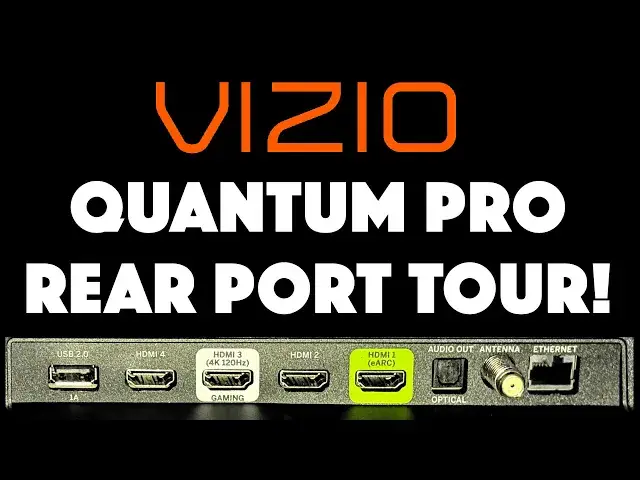
There's lots of information available online about the entire Vizio SmartTV lineup, but almost nothing that details all of the ports in the back of the unit! Tech expert Dave Taylor walks you through the entire input/output port lineup on the Vizio Quantum Pro 4K QLED HDR SmartTV so you'll know exactly what it supports and whether it'll work for your setup.
MODEL: VQP65C-84
Learn more about the Vizio lineup at https://www.VIZIO.com/
Visit Dave's Q&A Web site at: https://www.AskDaveTaylor.com/
#vizio #quantumpro #smarttv #askdavetaylor
Show More Show Less View Video Transcript
0:00
Big new Vizio TV, but what's in the back
0:03
Let's spin it around and check it out. ♪♪��
0:12
Dave Taylor here, and this is the Vizio Quantum Pro 4K QLED HDR Smart TV
0:19
This is the 65-inch version. It also comes in a 75-inch version
0:24
And there's tons of information about it on the Vizio site and on various shopping sites
0:29
But what no one shows you are all the ports on the back
0:33
I'm going to do just that, and I'm going to explain what everyone does
0:37
But before we get there, let me just give you a couple of specs. So it's 4K at 120 Hz, Full HD at 240 Hz, 1000 nits of brightness with an anti-reflective film
0:49
That's a big deal, actually, because I know that on some of my older TVs
0:53
all I got was reflections, and I had to turn off all the lights facing the TV
0:59
so that that wouldn't overwhelm whatever was on the screen. So, big fan of anti-reflective film
1:05
Dolby Vision HDR, HDR10+, and HLG. IQ Ultra Plus processor, that's the CPU that powers all this, and faster is always better
1:16
Also has something really cool called a Pro Gaming Engine, which lets you actually have even less lag when you're using this with a gaming system
1:24
like a PS5 or something. It's actually going to look pretty sweet
1:27
Wi-Fi 6, Bluetooth, two 10-watt speakers, lots of cool stuff, right? You can get all that from the Vizio website
1:36
But, let's turn this thing around and let's see what's in the back
1:39
Okay, we're looking at the back of the television. So the first thing to notice is that there are wall mount connections
1:46
and that is a 400 mm by 300 mm wall mount. Then on this side is the power plug, you can see I'm plugged in
1:54
And all of the actual input ports are all on here. Before we get there, I want to point out that there's actually a hidden button
2:04
underneath where the power light is, and if you push it, you go to the next input source
2:10
If you push it and hold it for three seconds, you actually get power on or off
2:15
And if you push and hold it for 12 seconds, it will actually do a reset on that television
2:21
if you find that you're in some weird state. Now, let's get a little closer with the input ports and I'll walk you through what they have
2:28
You can see there are a lot of input and output ports. So let's go ahead and swing this 90 degrees around
2:35
so you can actually see a little more clearly what's happening. Let's start with this USB-A port
2:41
This is also known as USB 2, and it's a 1 amp out
2:45
And in the Vizio settings, you can actually set it to have power all the time, which is really helpful
2:51
You can plug in things like a fire stick here. Then we have one, two, three, four HDMI ports
2:58
This is the main one you're going to want to use for your video signal
3:02
If you have something like an Apple TV, this is going to be the way to hook it up
3:06
because this has eARC, and eARC is the audio return channel. So that helps the box and the TV work as a coherent pair
3:15
And then this one with the white around it is actually for your gaming system
3:20
This one is actually HDMI 3, and it is 4K at 120 hertz
3:26
and it is intended to be for your PS5 or similar. Then we go down here, and this is digital audio output, SPDIF
3:35
This is known commonly as the optical connection, and that's the way that you're going to want to be able to connect your soundbar
3:43
Then we have a coax. You can hook up an antenna. The TV has a built-in tuner, so hook up a modern antenna and give it a shot
3:52
Let it run through all the possible channels and see what it can find
3:56
You might be very surprised. And then finally, it does have Wi-Fi 6, but here's also an Ethernet connector
4:03
So if you really want the best possible Internet speed for your television
4:08
then this is the way to go. I hope that was really helpful
4:12
I'm going to remind you to subscribe to my channel. Just a click on that subscribe button
4:16
Hit that bell icon for notifications. And if this was of value, go ahead and give me a thumbs up
4:21
Really appreciate that. Cool. This is the Vizio Quantum Pro 4K QLED HDR Smart TV
4:28
I need to finish setting it up, so I'll hope to catch you in my next video
4:44
Vizio Quantum Pro 4K QLED HDR Smart TV
Consumer Electronics
TV & Video Equipment
Science
Media Streaming Devices
Virtual Reality Devices