Up next in 10



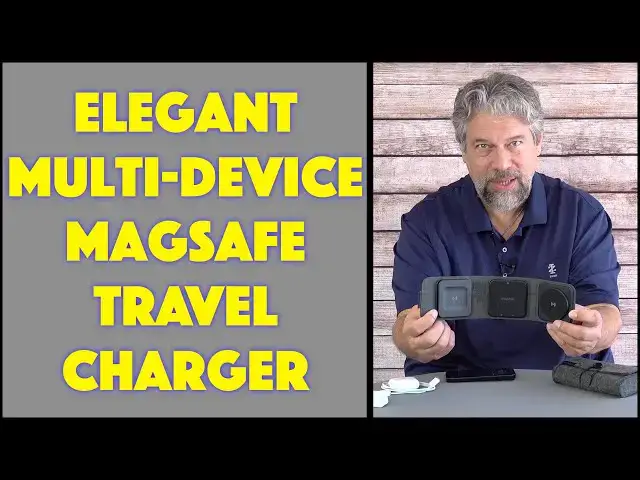
You don't need to travel across the globe to realize that our devices require a lot of cables, chargers, and wall chargers. It's a hassle! Until you get the Mophie Snap Plus (Snap+) Multi-Device Travel Charger. Tech expert Dave Taylor checks it out and finds a lot to like in this simple, elegant device. Bonus: it includes one of the nicest travel cases you'll ever own!
You can check it out at: https://www.ZAGG.com/
Then visit Dave's Q&A Web site at: https://www.AskDaveTaylor.com/
#mophie #charger #travel #travelcharger #iphonecharger #askdavetaylor
Show More Show Less View Video Transcript
0:00
This will definitely simplify your multi-device charging. Let's check it out
0:11
Dave Taylor here and I've got a lot of devices which means anytime I go to charge I need to
0:16
figure out do I have the right cable, do I have the right charging pad, do I have the right wall
0:22
plug. There's a lot going on and if you're traveling there's a lot to manage. Enter this
0:28
This is so cool. This is the Mophie Snap Plus multi-device travel charger. You plug this into
0:36
the wall and then you can charge a bunch of different things all at the same time. So let
0:41
me emphasize this does not have a battery. This does not charge unless you plug it in
0:47
So how do you plug it in? Well it comes with this really cool travel case. This is actually felt so
0:54
it has a really nice feel to it. Open it up and there's three compartments in here. One of which
1:00
is our USB-C to USB-C cable. The second of which is I believe this is a 30 watt charger. So that's
1:10
how we're going to plug this thing in to use it. But I want to show you it includes one more thing
1:15
because the Qi wireless charging here is magsafe. So what that means is that if you have
1:24
a phone like an Apple iPhone that uses magsafe it gives you this great connection. It's easy to
1:31
work with and you're always sure that it's perfectly positioned. So Mophie very nicely
1:37
included a spare magsafe ring and this paper gizmo that you can use to position it perfectly
1:46
on the back of your phone or device that supports wireless charging but doesn't have magsafe. So
1:53
pretty cool. Honestly I suspect most people aren't going to use it for anything but that's okay. So
1:59
let me close up the case again and I'm going to plug it in and we're going to see how it works
2:04
So I have lots of devices. This is I am I guess a pretty hardcore Apple user. So I have a lot of
2:11
Apple devices. I'm going to plug this in. I happen to have an extension cord pretty handy and then
2:17
this is USB-C to USB-C. So I'm going to charge it plug it in here all the way nice and firm
2:24
and then plug it into the top of this unit. Now what I don't like is there's no visual indication
2:31
that it's now plugged in and has power. So you just have to sort of wing it. So here's my iPhone 14
2:38
Pro. I'm going to put it on that magsafe charging spot and the battery now is lit up and it's
2:44
charging. That's great. I also have Apple AirPods Pro second generation and that should work
2:51
perfectly in this little space. You heard that tiny ding so it actually gives you audio feedback
2:57
when it's charging. But you know my Apple Watch needs a charge too. So while I have both of those
3:04
charging I happen to have an Apple Watch charging cable. So I'm going to plug this in and on the
3:11
bottom of the central portion of this unit is both USB-A and USB-C which is perfect because
3:20
the Apple Watch chargers are USB-C. So I should be able to plug it in and then put my watch on it
3:30
Let's see. And there you go. So now what I have with one small simple modest wall plug I am
3:41
charging three devices simultaneously and not only am I charging all three my AirPods Pro my Apple
3:48
Watch and my iPhone but I could actually use that fourth USB-A plug to charge something else too
3:55
Not sure what else I would have given that this seems to cover the vast majority of my mobile
4:00
technology but it's a really smart simple elegant solution. Now let me give you some specs. So the
4:08
wireless Qi charging gives you 7.5 watts to the iPhone. Not the fastest of charges but it's okay
4:16
It'll give you 15 watts to an Android device because Android's a little better at that
4:22
The AirPods charger it's a 5 watt charger so again not a huge amount of power but the good
4:28
news is that AirPods are really power efficient so you don't need to give it much wattage for
4:33
it to be fully charged. Certainly if I left all this overnight while I was like having my you
4:38
know some sleep it's been a great conference. I've had a really good time at this outdoor festival
4:44
but I need to recharge myself. While I'm doing that I'm going to recharge all my devices. So
4:49
two USB ports, one USB-A, one USB-C. This is indeed a 30 watt wall charger as I suspected
4:57
It comes with this fantastic travel case that you're going to have to keep away from other
5:02
people in your family because they're going to want to snag it for themselves. And when you are
5:07
done charging let me just show you it all fits in super neatly. So I'm going to take everything off
5:13
and this folds up and no big surprise there's a magnet to hold it closed. And then we have our 30
5:22
watt charger. We have the cable. All of this fits into this travel case. Now you obviously don't
5:29
need to use the travel case if you don't want to but why not have everything neat and organized
5:34
and right where you want it. And then this fits into that third slot and we are
5:43
ready to go. This is ready for my next big adventure and it's super easy to work with
5:49
So my two comments is number one I wish there was some sort of indicator light that said I am
5:54
powered up. I'm not sure why they couldn't have put a tiny LED somewhere so you would at least know
6:00
everything's working. And as just an observation or warning this does not include a battery. It
6:08
will not work unless you plug it into the wall. It is a power distribution and dissemination
6:14
tool. It is not an electrical tool that actually lets you power up and charge your devices
6:21
without plugging it into a wall socket somewhere. So with that in mind really smart really elegant
6:27
solution. We need to talk about the price because obviously that's the next question that you have
6:33
But before we get to the price I'm going to ask if you could subscribe to my channel. A click or
6:40
a tap on that subscribe button and then turn on notifications we're connected. Awesome. So
6:47
this is the Mophie Snap Plus multi-device travel charger and it's $99.95 at zag.com but currently
6:57
they offer a 20% discount to your first order if you sign up for their newsletter. So that would
7:02
drop it down to $79.96 which is not a bad price. Remember it's not just this but it also includes
7:09
the wire and the wall charger. So you are fully ready to go. You can leave all your other chargers
7:16
behind and just take this very smart solution. Definitely one worth checking out at zag.com
7:22
That's all I got. So I'm going to go pack and I'll catch you in my next video
Consumer Electronics
Science
Product Reviews & Price Comparisons
Gadgets & Portable Electronics