live_tv
Livestream Starting Soon
00
Hours
:
00
Minutes
:
00
Seconds
Up next in 10



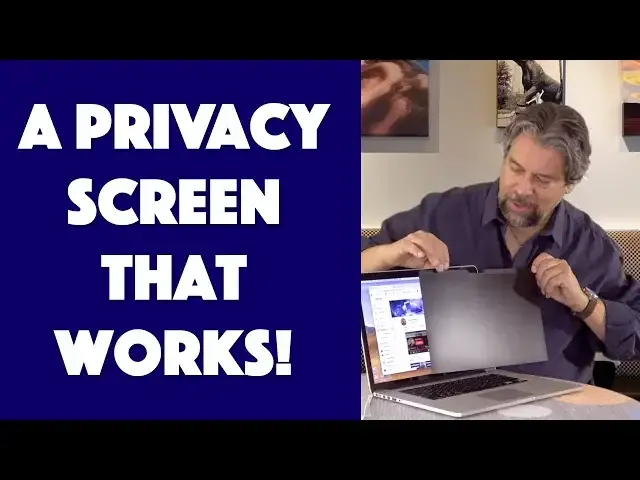
If you're fed up with people constantly staring at your computer screen and watching what you're reading, doing, programming, editing or just watching, you're going to love the Kensington Magnetic Privacy Screen for 12", 13" and 15" MacBook systems.
Tech expert Dave Taylor of https://www.AskDaveTaylor.com/ attached one to his 15" MacBook Pro and found that it worked (!!!) and there was a lot to like about the simple magnetic design. Except there's one big pitfall you'll want to know about before you make a purchase decision, so you'll definitely want to watch this review...
12" on Amazon: https://amzn.to/2UppafR
13" on Amazon: https://amzn.to/2HXp5Kr
15" on Amazon: https://amzn.to/2uLbxsS
Show More Show Less View Video Transcript
0:00
Tired of people looking at your computer screen, this solves the problem
0:04
Let's check it out. Dave Taylor here, and I use my computer a lot in public places, and I just sort of accept that
0:16
people are going to be looking at the screen, they're going to be watching what I'm doing
0:20
It's kind of a drag, really. If there's anything personal, I can bring the brightness down
0:25
but that doesn't really solve the problem. So before we go any further, let me show you what I'm talking
0:30
about. Here's kind of the problem, right? So here's my screen. And you can see, even from this
0:36
almost completely oblique angle, you can see everything that's on the screen nice and bright
0:42
That is kind of a drag. And you can imagine if you're sitting on an airplane and working
0:46
then you're basically showing everything you're doing to that person and that person and the
0:51
person behind you and the person way over there. That is not really good. So enter this. This is the
0:59
Kensington magnetic privacy screen for 15-inch MacBook Pros. Now, they have 13 and 12-inch versions
1:07
and there's certainly similar products for other kinds of computers if you're on a PC
1:12
but we're going to look at this. This is the MP15. And here's what it does, is it's just basically
1:17
a black screen, and it sticks onto your computer via magnets, which I thought was pretty interesting
1:24
because it's like, I didn't really think about how it would be magnetic. But it just works with your
1:28
computer you don't need to put any special tabs in or anything and it limits the
1:33
field of view to 30 degrees on either side of you so you'll see I'll put it on in
1:39
just a second reduces glare it's reversible and it also reduces blue light up to
1:45
22% of blue light and I've talked about blue light before you really want to
1:50
get rid of some of that unless you're doing really precise really important
1:54
work with like color or photographic editing or video editing or something
1:58
then you want to have it be exactly correct. But otherwise, generally speaking for your eye health
2:04
and your mental health, you want to limit that blue light. So let's go ahead and I'll pull it out
2:10
It comes in a little carrying plastic pouch, which is going to prove to be important when we get there
2:15
But as you can see it pretty simple It just a black screen and one side is glossy the other side is matte And you can even see here that like I can see through this at the camera but only barely
2:30
So probably was not the best demo in the world. Let's see
2:35
So I'm going to go ahead and let me just actually turn my computer around so you can see what's happening
2:41
So I'm going to do it at a fairly oblique angle. So right now, obviously you are able to quite easily see what's on
2:47
my screen but I'm going to go ahead and just put this on and it just puts on the top
2:54
and you center it so you still have access to your camera and now look at that
3:00
I've gone from you being able to see what's on my screen to not but as I turn it
3:04
you'll see suddenly when you're straight on you can see what's on the screen but
3:10
even when I turn it just a little bit big difference now I thought an interesting
3:16
demo might be to have it just on half the screen, not actually how they want you to use it
3:20
but it certainly makes it easy for you to see the difference, right? So, you know, here's an angle
3:26
where without the screen protector, without the privacy screen, you can absolutely see what's going
3:32
on, but on this side, you got nothing. Now, I will be honest that it does cut down on the
3:39
brightness of your screen. I mean, that's, I hope, fairly obvious that that's going to happen. So you
3:44
might have to pump the brightness up a little bit, but all in all, it's a pretty simple solution to the problem
3:49
And the only issue, the only issue is that some people say that it doesn't close properly
3:57
So you actually have the light here. So the light shows me that my computer is in sleep mode
4:03
And in this particular MacBook Pro, it's basically closed properly. It's definitely not as, you know, exactly the same as if I didn't have the screen protector
4:13
And here's what Kensington says about it. I'm quoting them. When you close your MacBook Pro with the MP15 privacy screen on
4:22
there will be a minimal gap that still allows your laptop to enter sleep mode
4:27
And that's exactly what I have here. So some people have said that when they put it in their briefcase in this orientation
4:34
as you can see, it's popped open. And interestingly it still not awake but it has popped open versus if I didn have the screen protector on then of course the slight magnet that Apple uses would keep it closed Now there a couple of solutions to that one of which would be a tight sleeve
4:51
another which would be to get into the habit of having your computer upside down. But really, the simple solution to this, and this is a simple solution, is to actually
5:02
hang on, take it off when you're not using it. So you have this handy little carrier
5:08
I told you this would become important. So you just slip it in here
5:12
And this is essentially exactly the same size as the computer. So if you can carry your computer, you can carry this safely and easily
5:21
And then basically any time that you need that additional privacy, go ahead, pull this out, put it on the screen
5:27
And then when you're done, you put it back in here, you put it back in your computer bag, your briefcase, your tote, whatever it is you're using to carry your computer around, and you're good to go
5:37
So when you're at home or you're at the office and you don't need the privacy screen, you're totally fine
5:43
When you do, you just pull this thing out and you use it. Kind of a simple solution for this, right
5:48
So people get really uptight that it doesn't close properly, and I understand. It would be probably pretty nice to have it be able to be on the computer and never have to think about it again
5:58
But that's not how Apple has designed this. So these are designed with really, really tight tolerances
6:03
And you can see here, there is enough of a magnet that, I have to put some energy into actually opening it
6:10
So that's really nice, but there's no space for even this incredibly thin little screen
6:16
that just messes up the hinge, it messes up the closure. Not enough that it's a crisis
6:21
not enough that I'm not gonna recommend it, but enough that you wanna know about it
6:25
So that's the deal. So I actually think this is pretty cool
6:30
and as I showed you with the demo, it does a really good job of giving you privacy
6:34
Now, if you pump your screen up to full maximum brightness then you're going to probably give people a little more angle of view. I think that's
6:42
sort of the trade-off there. But on the other hand, even if I'm just cutting off the people that
6:46
are sitting over there, that's still a benefit. So I've used this in practice a couple of times
6:52
and I don't feel like I need to use a privacy shield. So it's not something that's really
6:57
super appealing to me But if I was working for a law office or I was a therapist working on notes or something something like this would be really really beneficial because in those situations privacy is pretty darn important If I was at like the Woodside Cafe in Silicon
7:12
Valley working on notes for my new startup, yeah, I'd probably use it there too because I know
7:17
half the people there are VCs or are coming from really big companies that could look over and say
7:23
well, that's interesting. Snap, snap, snap, snap, snap, snap. So, you know, industrial espionage and all
7:28
that, privacy screen. And like I said, it does have the reversible, so it's matte on one side and glossy on the other
7:37
You can flip it back and forth and see which one do you prefer. I actually prefer the matte view out towards me because that just cuts down glare even more
7:45
So that's really all I have. I think this is a really nice solution to the problem
7:50
It's a little spendy, but before we get to the price, let me ask if you can go ahead and click on my subscribe button and subscribe to my channel
7:57
I am pushing out a ton of product reviews and you really want to stay up
8:01
So subscribe and we can do that. And if you are using a privacy screen, whether it's this one or anything else, go ahead and leave me a comment and tell me why you use it
8:10
Because I'm really curious what the market is for these. So there you have it
8:14
So this, well, that's the box. This is the Kensington MP15 magnetic privacy screen for 15 inch MacBook Pros
8:25
And you'll want to check their website to make sure you have good compatibility. And the pricing's a little complicated
8:31
So let's start with the 12 inch. The 12 inch version of this is 4999 on Amazon
8:37
The 13 inch version is 5699. And the 15 inch version is 5199
8:44
So this is actually less expensive than the smaller version of it
8:49
Why is that the case? Who the heck knows? But if you're interested in one of these magnetic privacy screens, you could definitely check
8:56
it out and it's going to cost you somewhere 50, 50, $56, somewhere around there
9:00
So, this is Dave Taylor. I'm getting back to being private on my computer
9:05
which means I'll catch you in my next video
#Laptops & Notebooks
#Consumer Resources
#Product Reviews & Price Comparisons