Up next in 10



Unboxing The $3000 Rolling Headphones -
https://www.youtube.com/watch?v=__RbDWQ2-ho&list=PL7u4lWXQ3wfI_7PgX0C-VTiwLeu0S4v34&index=1
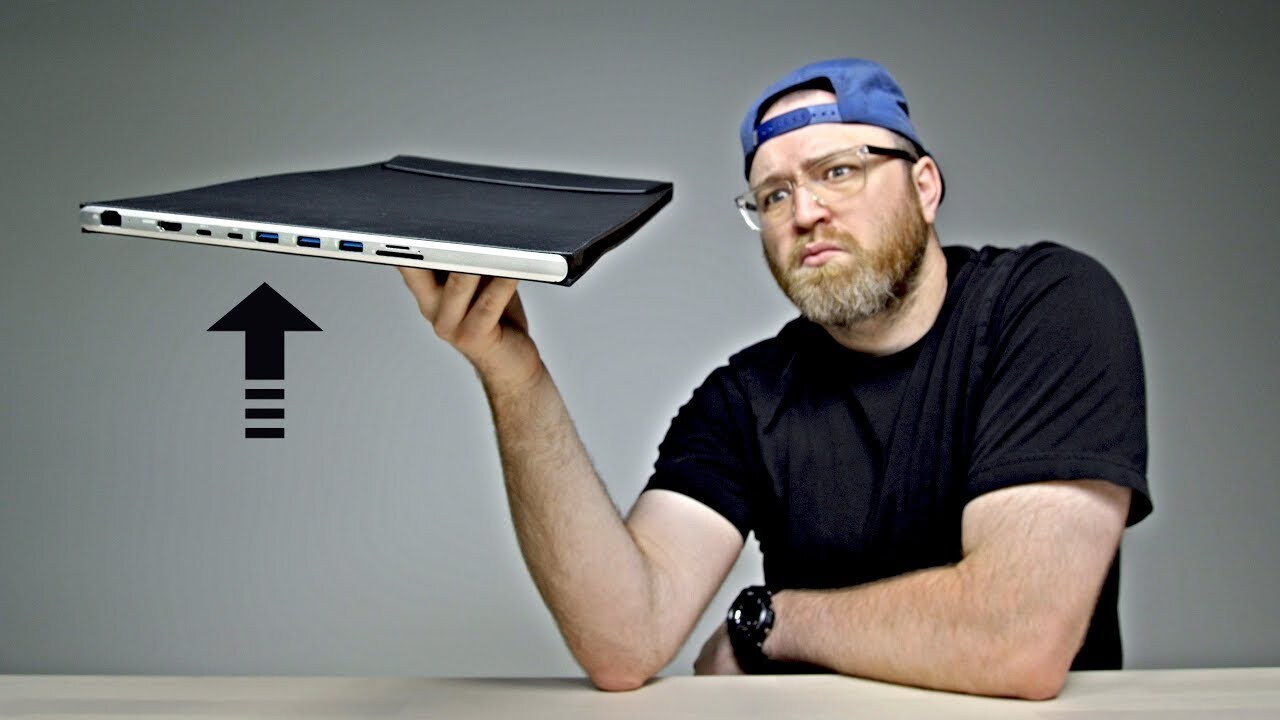
Here's a Macbook Pro sleeve that acts like a dock. It adds many of the ports missing from the latest Macbook Pro. Most importantly, It let's you live a dongle free lifestyle. So What do you think, will this case change you mind about the new Apple Macbook Pro.
Macbook Pro Dockcase - http://www.dockcase.com/
FOLLOW ME IN THESE PLACES FOR UPDATES
Twitter - http://twitter.com/unboxtherapy
Facebook - http://facebook.com/lewis.hilsenteger
Instagram - http://instagram.com/unboxtherapy
Google Plus - http://bit.ly/1auEeak
Show More Show Less View Video Transcript
0:00
So you guys know I've been using the new MacBook Pro for a while
0:04
The controversial USB Type-C only MacBook Pro. And there's been a number of remedies for the situation
0:12
Products that have emerged. Hubs, docks, dongles. Dare I say dongles? But today I've got something different
0:20
Maybe the best solution to date. Maybe not. I mean that's the point of this video
0:24
I'm gonna try this thing out. It's called the Dock Case for the 15 inch
0:28
15 inch MacBook Pro, pack your MacBook and all the missing ports into the dock case
0:33
So it's a case and a dock in one. As you can see from the package, it's gonna give you an Ethernet port, an HDMI
0:39
couple of Type-C connectors, including what looks like the Thunderbolt connection pass-through
0:45
Then you have three traditional USB 3.0 ports, an SD card slot, and a micro SD card slot
0:51
I mean, that's pretty cool, if that's what that is. And you can kind of tell from the side of the box here, it's a very slender case
0:58
Now you're gonna have to have a case for your laptop anyways, so why not get some ports along with it
1:03
After all, you're probably missing them on the new MacBook Pro. Or maybe you're not, maybe you're a one cable kind of guy
1:09
Who knows, maybe this device here can convince you to take the dive into the new MacBook
1:16
I know a lot of people are hesitant, if you came from the old generation MacBook Pro, you had access to pretty much all of this
1:23
Ooh, alright, so far so good. This is the dock case, whoa is this look..
1:30
Fake leather. Was hoping for genuine, but you know, you can tell from that smell, this is probably an artificial leather, no big deal
1:40
The vegans in the crowd can rejoice in fact. Ooh look at that it a beta version We sincerely invite you to review this product constructive feedback will be delivered to our product team and reflected to the next upgraded version Thank you Wow Okay so they looking for the feedback A nice texture This part flips open Magnets And then the laptop will go inside of here
2:04
This is just a placeholder. And then on this side, look at all the ports! Ethernet, HDMI, Type-C, USB 3.0
2:12
And yes, that is a micro SD card slot and a full size SD card slot. Cool
2:18
Also in the box, it looks like we have a Type-C cable. It's important you use the right one here
2:24
Because I've been using my MacBook Pro with various accessories and monitors and realizing that not all of these cables are created equal
2:32
So when you go out to like an HDMI for example to to certain displays some type C cables are just not
2:38
Functioning the way that I expected others work seamlessly I'm assuming this one is in the same boat since they've included it along with this hub
2:46
So what you're going to do is remove your laptop from the case and then plug it in to the hub like this
2:52
Now you have access to all of these extra ports right here Let's just make sure I'm doing this right that makes sense
2:58
Okay, so that is a USB Type-C input. The HDMI output is capable of 4K and the 3.1 data speed up to 5Gbps
3:08
Ah, I see how they've done this. So the MacBook Pro sits on top of the case when it's not in use
3:14
That's what it's gonna look like there when it's fully functional and using all the ports
3:19
I'm starting to really like this thing. This guy sits on top, I put the lid up, I'm using the laptop, plug in my USB Type-C
3:27
Pull it around like this and then check that out. Now my laptop has been expanded with an object the size of something I be carrying around to begin with I really like the touch of micro SD because you don see that even on the old school MacBook You would need the adapter and you can also see an indicator light here so that
3:46
shows you that you have power going to the hub itself. So just like this. It's
3:54
like a portfolio. Pull it out, spin it around, kaboom. There's gonna be people in the
4:00
audience saying why don't we just have all those ports on the on the laptop to
4:04
begin with well listen we're not going back to that world whether you like it or not that ship has sailed and of course as you know if you head to the
4:11
Apple Store you're you're spending like $30 per dongle on my desk up until this
4:16
point I've been using a little device from a company called who to I had to go
4:20
out and get it almost immediately after getting the new MacBook just because of
4:23
the other peripherals that were lying around the office that I still had to Let me tell you about a little story. Something that happened to me on one of my previous trips to CES in Las Vegas
4:33
It's just a barrel of excitement! Oh yeah, okay. This one year I'm out there, I'm hanging out, I got a great hotel, but the Wi-Fi, it's shoddy, it's terrible
4:47
I want to connect directly to the wired connection to avoid the Wi-Fi that everybody in the entire hotel is on
4:54
because it's all a bunch of tech savvy people and journalists from all over the world
4:58
So I had to head out to the Apple store, even with the previous generation MacBook
5:02
to look for a dongle just to get Ethernet. Ethernet, that's this one right here
5:06
So a lot of times you don't necessarily know when or why you're going to need one of these ports
5:11
That's two worlds colliding that makes me feel very warm and fuzzy inside
5:16
So let's just do a quick little test to make sure this thing is working correctly. I'm going to insert a micro SD
5:22
It clicks in with a spring We also have a USB thumb drive Ooh this is that fancy one that came with the smartphone jack If these people haven seen that video now that a video
5:33
A $20,000 Android smartphone. This came with that, go check that out
5:39
Conor McGregor, he needs one of these. Okay, so I'll slide this one in there
5:47
Look at that, we have a thumb drive, we have a micro SD, and if I..
5:53
Okay, so it's connected up. So I just want to be clear on something here. If you want to charge the MacBook while you're using it
5:59
there's a specific power delivery port. As you can see there, it's the first of the two Type-C connectors
6:04
And that will still connect to your power brick, and that will act as a pass-through for power to your laptop
6:10
Alright, so I have the USB thumb drive connected, and the micro SD plugged in as well
6:15
The two devices are both mounted. They open up perfectly fine. It works
6:20
Oh by the way in case you're wondering what I've got on top of my MacBook Pro here
6:24
That is a skin from the brand. It's got the leather look. Maybe the MacBook it makes a comeback right here
6:29
Maybe you're interested now Maybe not something worth noting is the fact that the device gets longer right
6:36
So this entire portion down here is the electronics associated with the dock your laptop in the sleeve is about an inch taller
6:44
than it would have been without that. Also, it feels like this is mostly made of plastic
6:49
have a little bit of a tinny kind of sound to it. Either way, I think this is a very cool device
6:55
I think it's gonna solve some problems for new MacBook Pro users. It's unusual that I bump into something like this. It's simple, but so obviously functional
7:04
I think this one is a win right here. You little slaphead! You little slaphead
#Computers & Electronics
#Laptops & Notebooks
#Audio Equipment