Up next in 10



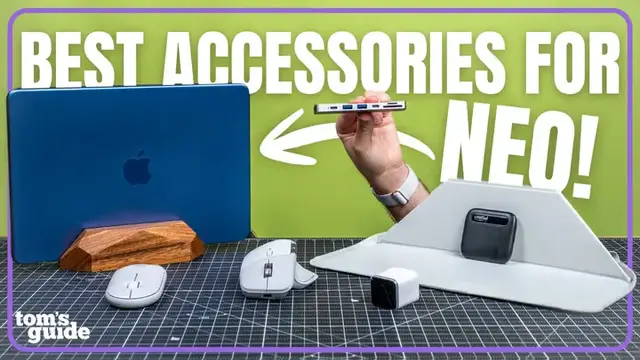
If you just picked up a MacBook Neo these are the best must have accessories that make this budget laptop feel supercharged!
These are @PaulAntill 's top USB-C hubs, peripherals, cases and skins that he recommends picking up and many of them are on sale for 30% off or more. From the best portable wireless mouse, best MacBook Neo charger, to the best vertical stand for laptops, there’s something for everyone here.
Show More Show Less View Video Transcript
0:00
Hey, in this video I'll be giving you my recommendations of the best MacBook Neo
0:04
accessories that really make the most of Apple's $600 laptop. Most of them are on sale right now
0:09
starting under $30, so I'll link those deals down below in case you want to check them out
0:14
So let's start with an accessory that addresses one of the MacBook Neo's biggest limitations
0:18
especially when compared to the MacBook Air and the Pro. You only get two USB-C ports. That's
0:24
where an accessory like this can really help. This is the Anker 547, and check this out. It
0:29
It attaches completely flush with the side of your laptop. And I happen to think that this looks like a pretty good, almost first-party accessory
0:37
but let me know if you agree. It's got two USB-C ports, two USB Type-A, one HDMI, one SD, and one micro SD card slot
0:45
So now you can connect a bunch of your devices, including monitors
0:50
But if you'd instead prefer a hub that uses a single cable, there's the 9-in-1 pluggable USB-C hub
0:56
which adds an additional USB Type-A and an Ethernet port. And this is what I usually pack with me anytime I know I need an ethernet connection when I'm working on the go
1:05
Speaking of working on the go, here's how I keep my Neo protected. The Moffed Carrier Sleeve is probably the coolest accessory on this list
1:12
It has an origami design, which lets me transform it into a laptop stand
1:17
It has a little lip to keep it in place. Open it up, and I have either a 15 or 25 degree angle that makes the Neo much more ergonomic to type on
1:25
And this has come in clutch so many times when I'm working. I don want to crick my neck down as much I had this exact same case since I made my MacBook Air accessories video like three years ago and you can see just how well it held up It also comes in a bunch of fun colors and it has this expandable pocket on the front for your smaller accessories
1:42
I also like that when I'm not using it, it folds completely flat, which doubles as a really nice mousepad
1:49
That said, if you want something a little bit more portable, skins can also be a great way to keep your shiny new laptop protected from scratches without the added bulk
1:56
Dbrand just released their 1984 Mac Design Series, which is a fun retro throwback
2:01
and their colors perfectly complement the new Neo. The wrap combo comes with a top and bottom for 360 coverage
2:08
and while this won't protect the Neo from falls, it keeps the aluminum safe from scratches and minor bumps
2:13
especially when I'm just quickly throwing this in my bag. Not to mention, this makes the laptop look especially retro
2:20
So surprise, surprise, the MacBook Neo actually still comes with a charger, but it's only 20 watts
2:25
If you didn't know, the Neo can actually charge faster. It supports 30-watt charging, so you're actually doing yourself a disservice by sticking with Apple's underpowered adapter
2:33
That's where the Anker Nano 45-watt comes into play. It's smaller than most 30-watt chargers despite being significantly faster
2:40
and I kid you not, this is my most used charger right now because I can take it basically everywhere
2:45
I know I can charge most of my power-hungry devices, including the Neo, the Air, and it's still very pocketable
2:51
It also has a display on the front which shows you charging speeds and the 180 degree rotation comes in clutch when plugging into those awkward outlets
3:00
Now another potential Mac book Neo downside is that it maxes out at 512 gigabytes of storage So a portable SSD like this is going to be an easy way to upgrade your storage and copy files between other devices
3:13
Storage prices are still pretty wild, but the Crucial X10 is currently the more reasonable choice
3:20
I've actually been using their older X6 model for the past four years, and you can grab the latest one terabyte model
3:25
for about 150 bucks, which is over $50 cheaper and faster than most other options right now
3:31
So if you work with a lot of big files, don't let the Neo smaller storage scare you away
3:36
Just grab one of these. Now, I know a lot of you probably already have a nice wireless mouse that you like using
3:43
but if you don't or you just want a good budget pick that's also great for taking on the go
3:47
there's the Logitech Pebble mouse. This is one of the best portable mice that I've tested and it fits perfectly in the mouse sleeve
3:53
The mouse on its own goes for around $20, but you can also bundle it with the Pebble keyboard for around $30 more
3:59
That said, if you're also looking for a solid desktop solution, maybe something a little bit more sophisticated, check out the MX Master 4
4:07
This is my favorite ergonomic mouse. It has quick action buttons and a side scroll wheel for navigating more quickly and even has haptic feedback for its built-in shortcuts menu
4:17
Super handy. And speaking of desktop setups, you may have noticed that my Neo is vertically held up in this beautiful wooden stand
4:25
I am a sucker for wooden accessories, especially ones that look and feel this premium
4:30
This is the Nuvo Grain, and if I asked you how much this costs, what would you guess
4:35
Clayton, what do you think? 50. 50 Okay It 17 bucks right now which I think is pretty crazy This is the nicest adjustable wooden stand i could find for under 20 bucks and it has overwhelmingly positive reviews
4:48
i went with the darker walnut finish but they also have a really nice light bleach too if that's
4:53
more your aesthetic okay and finally since the macbook neo is apple's most budget-friendly laptop
5:00
i know this is going to be the first mac os device for a lot of you if you find yourself
5:05
in that camp or you're just not as familiar with the best keyboard shortcuts for Mac
5:09
then this little sticker might just be the answer. It has a ton of handy shortcuts
5:14
including everything from copy and paste, spotlight search, and full screen mode
5:19
When I made my full-time switch over to Mac in 2020, I had to Google these shortcuts constantly
5:24
but if I knew a sticker like this existed, that would have made the transition way easier. So
5:29
don't stress about making the switch over like I did. This $6 sticker is here to help
5:35
So those are the best accessories they can get for the MacBook Neo right now
5:38
This might be a budget laptop, but these accessories will really give you that premium experience
5:44
So leave a comment letting me know which one is your favorite. You can find the best deals for everything I shared linked down below
5:50
Don't forget to like and subscribe. Follow me to see what other cool tech I'm reviewing. And until the next one, I'll catch you later
6:05
I was like, this is 20. I thought it would be like a fake wood or like plastic
6:10
This feels real, maybe, but yeah. I feel like the grain there feels really nice
6:14
Yeah, check this out
Computers & Electronics