Up next in 10



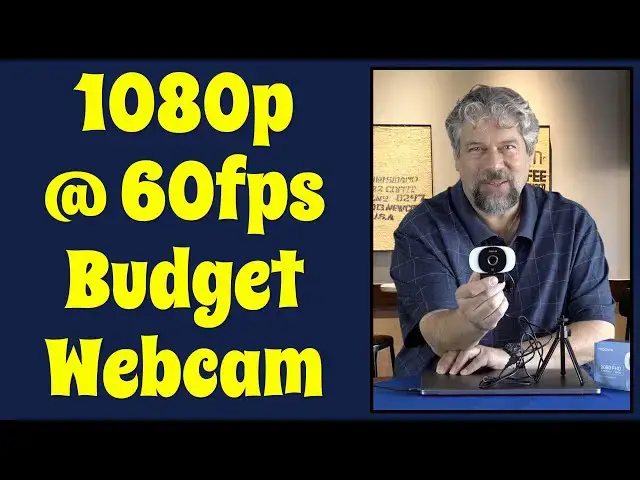
Tired of your current webcam? Wish you could have higher resolution and a higher framerate both? Tech expert Dave Taylor checks out the Mosonth 1080 FHD Webcam and finds it's a bit of a mixed bag. The tech is good, the mic is solid, the hinge and design are good, but the video signal? It's pretty light sensitive, as you will see in the demo.
Check it out at: https://amzn.to/3iO7ZzV
Check Dave's Tech Q&A site at https://www.AskDaveTaylor.com/
#mosonth #webcam #hdwebcam #1080p
Show More Show Less View Video Transcript
0:00
Upgrade your webcam at a budget price. Let's check this out
0:10
Dave Taylor here and I'm checking out this. This is the Monsf 1080 FHD webcam and it's pretty nice actually
0:18
So it's a full 1080p at 60 frames per second and it gives you a relatively narrow but I like that, relatively narrow 65 degree field of view
0:29
Now, a lot of them are getting to 90, 100, 120 degrees, and that becomes, to me, problematic
0:35
because if I have it pointing at me, I don't want everything way off camera to suddenly be on camera
0:41
That is not great. So I'm going to give you a live demo in just a minute
0:45
You'll see what I mean, about 65 degree field of view. But this is basically the same angle that your webcam built into your computer has
0:53
This just has way better resolution. It also features autofocus, auto low light
0:59
adjustment. It has dual microphones with noise reduction system. On the top, there's a little
1:04
slider. It's a privacy cover, so you can just turn off the camera as needed. Honestly, I think
1:11
most people will probably just unplug it or maybe, I don't know, put a piece of paper over it
1:15
but having the switch on there is obviously a whole lot more useful. It's plugged in via USB3
1:24
and let me unplug it. I'll show you that I did have. So USB3, so USB3, it
1:29
and it I don know maybe a four foot wire or so but I did have to bring my own USB 3 to USBc adapter not included with this package so I had to get my own so that I could plug it into my Mac
1:45
Now, once I plug it in, then let me just double check that it's still selected on Zoom
1:52
because when it's selected, it has some neat features. When it's a live active camera, you can turn on the light
2:01
And there are three light temperatures. which is really handy and pick a color and then push and hold and you can change the brightness level too
2:13
Now, in the situation I'm in, that's not such a big deal. But if you're using this in a dark room, then you can just clip it to the back of your computer
2:22
It's very adjustable. They did a really great job on the hinge
2:26
And you can just get it to be perfect. And you can use that as a sort of fill light, which gives you better results
2:33
So enough talk. Let's jump to a live demo. I'm in the Zoom settings because it's an easy way to demonstrate different cameras
2:41
The audio you're hearing is from the MOSANTH camera, however. So I'm not using the Mac audio
2:48
I'm just using the MOSANTH for what I'm saying. And you can hear it sounds great
2:52
It's a really nice microphone setup. From a camera perspective, well, it's not quite as good as we might like depending on lighting situations
3:02
In this particular instance, it's interesting that the built-in webcam on my Mac is a little bit dark
3:10
But if I switch cameras to the Mons then it a bit overly bright actually It a little over saturated But maybe we can change that by turning on the light So I going to turn on the light and that gives me a fill flash
3:26
Maybe change the color of it. And it's a tiny bit better
3:32
And then so I can step through the three different colors. I've turned that light back off
3:36
I still feel like this side is a little over-exposed, but overall, you can see
3:41
and as I move my hand, it looks really good. Now this is a green screen behind me and I am just dropping that image into it
3:49
In fact, I'll show you what that looks like by turning off the background
3:53
So we'll go none and now it's just green. So this could be part of the reason that the camera is having a hard time
4:00
It might do better if it was just a regular background instead of this. But be that as it may, let's go to San Francisco
4:06
Let's go back to video and here we are. So here's your demo
4:11
Excuse me. So the audio terrific. The video is a little bit sensitive to the light and the environment around you, so you might have to fiddle a little bit
4:20
But overall, I think that 60 frames per second at 1080 is a big step up from most video systems
4:28
Now, let me jump back on camera. I hope that was an interesting demo
4:32
I really actually like a lot about this camera. I should also mention it comes with this little tiny tripod, and there's a tripod mount screw on the bottom of this little, I don't know what they call this little clip
4:43
I'm going to call it an alligator clip because it looks kind of like an alligator's mouth
4:47
I don't know if they call it that, but, so you have a lot of options
4:51
You can put it further away and you can get a very different angle that might include like the edge of my computer here So it a different perspective It easy to switch cameras in most of these programs And so this gives you a lot of flexibility
5:07
So really, the only thing we have left to talk about is the price. And before we get to the price, though, I'm going to ask if you can subscribe to my channel
5:15
Really appreciate if you can do that. So it's a click or tap on that little red button
5:19
And give me a thumbs up if you found this useful and you found the demo interesting
5:23
Really appreciate that. too. Great. This whole thing, including the tripod, but not including my USB-3 to USBC adapter
5:31
That's important. But this whole thing is the MOSANTH-180 F-H-D webcam, and it's $4999. But right now on
5:40
Amazon, I noticed they had a 20% discount, which drops this down to a pretty darn reasonable $399 at
5:47
Amazon.com. That is a very small investment to have a very big improvement on every Zoom
5:54
call, every Skype call, every Microsoft Teams, every Google Hangouts that you do, you're going to look
6:01
better in all of them. It's going to give you better resolution and a better frame rate, and that's
6:06
all a good thing. So definitely one worth checking out. I'm going to get back to my conference
6:12
once I get everything set up. So that means I'll have to catch you in my next video
#Camera & Photo Equipment
#Teleconferencing