Up next in 10



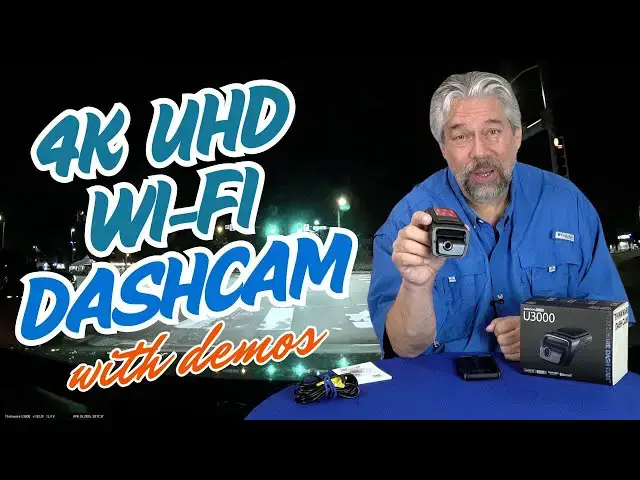
There's a lot to love about the Thinkware U3000 4K UHD Dashcam, starting with its beautiful, crystal-clear image. You can even enjoy it on your big screen TV, it's so clear. But the U3000 has an enormous number of other features and capabilities too, and one glaring problem that you'll want to know how to avoid before you even open the box. Tech expert and car reviewer Dave Taylor explores the features of the Thinkware U3000 4K Dashcam and explains where there's a lurking problem and how to avoid it raising your frustration level. Includes lots of demo footage too, both day and nighttime driving, plus the app.
Check it out at: https://amzn.to/3EJqmnl
Visit Dave's Q&A Web site at: https://www.AskDaveTaylor.com/
0:00 Introduction
1:44 The Thinkware U3000
3:00 Close-up Pics of the Device
4:30 Power Cable (12V)
5:39 No Fuss Device Design
6:22 Demos! Three Different Demos
7:15 Footage Zoom for Status Info
7:65 The Thinkware Smartphone Apps
8:50 Demo of Thinkware DashCam App
9:54 Just Pop the MicroSD Card
11:50 More About the App Confusion
13:06 Device Use Case Commentary
14:55 Pricing Information
Show More Show Less View Video Transcript
0:00
this dash cam captures crystalclear
0:02
video let's check it
0:04
[Music]
0:10
out dave Taylor here and I have to say I
0:14
drive a lot i read about cars so I even
0:16
drive a lot of different vehicles all
0:19
that time on the road I just see
0:21
interesting things sometimes it's really
0:23
cool stuff like I might be by an airport
0:25
and see a plane land right in front of
0:27
me other times it's accidents or almost
0:30
accidents worst case scenario is I get
0:33
involved in an accident in those
0:35
situations it's really great to have
0:38
video footage to see what actually went
0:42
on so if the person in front stopped
0:44
randomly and you hit them you can see
0:48
why did you stop on the highway with no
0:50
warning or anything or why didn't your
0:52
brake lights work or whatever this
0:54
situation maybe you're both stopped and
0:56
suddenly they back up into you you'd
0:58
catch that with a dash cam and the idea
1:01
of a dash cam super easy it's literally
1:04
just a video capture device that you
1:06
just stick to your windshield and it
1:08
just sits there recording so every time
1:11
your car is running it is recording and
1:14
you think well doesn't it eventually run
1:16
out of space and of course it does so
1:18
the idea is you have a memory card and
1:21
it just keeps writing in a circle so you
1:23
know once the card is full the oldest
1:26
video segment is overwritten by the
1:28
newest and so on and so forth so that
1:32
means if you get into an accident you
1:34
need to stop the unit and actually
1:37
capture that video on another device so
1:40
what I'm looking at today is something
1:42
that I think is really slick this is the
1:45
Thinkware U 3000 4K dash cam so this has
1:50
4K UHD resolution of 3840 by 2160 and a
1:56
very generous 156 degree field of view
2:00
let's just jump in and give let me give
2:01
you just a couple of seconds of what
2:03
this captures when I'm
2:06
driving you can see it's really clean
2:09
and crisp at night it uses something
2:12
called Super Nightvision 4.0 using
2:15
what's known as a starvis 2 sensor so
2:18
this is all about the capture sensors in
2:21
the actual dash cam but this has a lot
2:24
of other features too including a
2:27
radarbased parking mode so if something
2:30
happens to your car while it's parked
2:33
this will capture it now there are some
2:35
disclaimers that you need to have an
2:37
external battery if you want it to be
2:39
running all the time while you're parked
2:41
because you don't want to be tapping and
2:43
draining your battery but it does have
2:45
that feature and it includes a 64 gig
2:49
micro SD card which I have tucked away
2:52
on this side of the unit in fact let's
2:55
have a quick video tour visual tour of
2:58
the unit on the front you can see
3:00
there's the video camera and that is
3:03
adjustable so you can get it to be at
3:05
just the right position for your
3:07
windshield cuz different windshields
3:08
have different angles and on the back
3:11
you can see there's a couple of
3:13
different inputs of various types that
3:16
you can use for different features
3:18
including that external battery and
3:21
really all the interesting stuff is on
3:23
the bottom and the top portion of the
3:26
bottom shows you indicator lights for
3:29
Bluetooth or Wi-Fi and yes it supports
3:32
both whether it's recording and whether
3:34
it's getting GPS data and then the lower
3:38
set of buttons let you manually record
3:41
let you turn the unit on and off let you
3:45
actually go and get into Bluetooth or
3:47
pairing mode and finally that little
3:50
microphone button if you push it let you
3:52
actually do a voice recording so really
3:55
helpful and so the idea is that you
3:59
stick this on your windshield and you'll
4:01
notice on the top here I have some of
4:03
the sticker but not all of the sticker
4:05
on here this is a very strong adhesive
4:08
and because I'm a reviewer I take it on
4:11
and pull it off a lot so normally you'd
4:14
take the whole thing off you'd position
4:16
it carefully you'd go into the app and
4:18
you'd go into view mode to make sure you
4:21
had it all right you can adjust this
4:23
camera just a little bit you can adjust
4:26
that angle and then it's just going to
4:27
sit on your windshield probably forever
4:30
you really should never have to fiddle
4:31
with it and then on the back the power
4:34
is supplied by this 12volt plug now I
4:39
will say that it is a little
4:42
disappointing that their 12vt plug
4:44
doesn't have any additional USBA or USBC
4:48
ports so if you only have this and you
4:50
have an older car that doesn't have
4:52
other USB ports then you're going to
4:55
need some sort of adapter or something
4:57
to be able to charge your phone while
4:59
this is in use but you'll notice it has
5:02
a lot of wire and the intent of that is
5:05
that you can actually install it by
5:08
tucking it under the edge of your window
5:11
so that it runs all the way along and
5:13
then maybe under your dashboard to get
5:16
to that 12vt plug i don't do that
5:19
because obviously I'm still reviewing
5:21
different units but for many people
5:24
that's the sort of preferred
5:25
installation and it does include a
5:27
little tool that helps you get the wire
5:29
in there that's a tricky job to do that
5:32
without damaging your car so you might
5:35
consider having a professional install
5:37
if that's how you want to do it but once
5:40
you have that done or you can just not
5:42
care about it and just have a wire
5:44
hanging down not a big deal it really is
5:47
completely without any other effort so
5:50
you start your car you get this little
5:53
cheery message every time that tells you
5:55
that it's working please have a safe
5:57
drive today and you just drive and you
6:00
don't think about it ever again so at
6:03
some point you might say "Oo I'd like to
6:06
actually check out that footage." So it
6:08
does have like I said parking protection
6:11
and it does have an app and here's where
6:14
this gets a little tricky so I'm going
6:17
to tell you about the app because what
6:19
they do isn't great but I want to give
6:22
you demos first so I'm going to give you
6:24
three different demos so let's start
6:26
with this first one which I have sped up
6:28
to make it a little more interesting but
6:30
this is right by my local airport and
6:32
I'm going to just be driving down that
6:35
little side road next to the airport and
6:36
you can see everything's really really
6:39
clear in this second footage I'm
6:42
actually on a back road it's a dirt road
6:44
and it's pretty bumpy so I thought it'd
6:46
be interesting to see how it handled
6:48
those bumps
6:51
finally the third demo is nighttime
6:54
driving and nighttime is extremely
6:57
challenging for dash cams and one of the
6:59
reasons is because there are reflections
7:02
on the windshield and those reflections
7:04
can cause it to focus on the wrong thing
7:07
and you kind of see that in this footage
7:09
at moments but again it's pretty darn
7:12
good it's certainly good enough for you
7:14
to be able to see what happened and
7:16
let's zoom right into that lower corner
7:18
because you can also see that it shows
7:21
things like current speed and I find
7:24
that really helpful so if you loan your
7:27
car to your teenager then you can come
7:29
back the next day and look on the dash
7:31
cam and say "So I saw you were on the
7:34
highway which is fine but you were going
7:37
90 in a 55 zone so we really need to
7:40
have a conversation about that." You
7:41
know it captures that data it also has a
7:45
red light camera alerts and speed camera
7:47
alerts um all of that is part of what
7:50
they call their advanced driver
7:51
assistance system so all that very cool
7:54
but let's talk about the app and it
7:57
turns out that Thinkware has two
7:59
different apps so I started by using
8:02
their recommended app called Thinkware
8:05
Connected but it never agreed that the
8:08
registration code or serial number of
8:10
this unit was valid and then it said
8:13
"Well you can enter your MAC address,"
8:15
which is to do with how Wi-Fi works and
8:18
I tried to enter my MAC address exactly
8:20
like they showed and it wouldn't let me
8:22
enter all the characters so that input
8:24
field was too short so I literally
8:27
couldn't get this to work with the
8:29
connected app so I used an older
8:32
ThinkWare program instead called Dash
8:35
Cam and that one worked great it saw
8:39
this i didn't have to enter anything it
8:42
just scanned Bluetooth and paired and
8:44
figured it all out all by itself and so
8:47
let me give you a demo of some of the
8:50
features so now we're in that app and
8:54
you can see that it gives me a live view
8:57
which is great for adjusting that camera
9:00
angle to be just perfect for your car
9:02
and your
9:03
install and then you can go and you can
9:06
actually look at footage that you've
9:09
captured so I can preview all of the
9:13
different segments and the way that dash
9:15
cams work is they record I think it's
9:17
about 2 minute segments and then it goes
9:19
to the next block and the next block and
9:21
the next block and it's completely
9:23
seamless so I already had multiple
9:26
blocks in the demo and you never saw
9:28
where that came so nothing to worry
9:31
about there but this lets you preview
9:34
them save them to memory and then save
9:37
them to your camera roll on your Android
9:40
or iPhone so two steps where it really
9:42
should only be one but still pretty easy
9:45
to do there are lots of different
9:48
settings you can see here there's a lot
9:50
of different things you can adjust and
9:52
tweak which makes it really helpful but
9:55
true confession so it works with the app
9:58
the app I find really helpful for
10:00
settings and adjustments and tweaking
10:02
things just for my preferences and then
10:04
I'm never going to touch it again
10:06
because it's really easy to pop out the
10:09
card so I will pop it out of this right
10:12
now and of course here it's just sitting
10:15
in front of me so it makes it easy to
10:17
pull out this micro SD card and it's
10:20
pretty darn tiny for 64 gig but you can
10:24
pop it out just as easily when it's on
10:26
your windshield and then put it in this
10:29
adapter if you need to and the adapter
10:31
is included so I'm just going to go
10:33
ahead and slide this in and
10:36
now this is an SD card and my computer
10:40
has an SD card reader so basically when
10:44
I'm done with a road trip or a drive or
10:47
something happens and I want to go and
10:48
grab that video then I just take the
10:51
micro SD card out put it in the adapter
10:53
put it in my computer and then I have
10:56
easy and super fast access to everything
11:00
that's on the card so this is honestly
11:04
the way I recommend that you actually
11:06
work with the video footage on your dash
11:09
cam super easy it is Mac and PC and
11:14
Linux and Chromebook friendly and when
11:17
you're done all you have to do is to
11:19
remember to put it back into your dash
11:23
cam and it has an orientation it's not a
11:26
very welldesigned little card but either
11:29
it fits and it or it doesn't and if it
11:31
fits you just have to make sure that
11:34
it's flush as it is here and I'm good to
11:38
go it's that easy and that's how I got
11:40
all that demo footage and honestly the
11:42
time it takes to click and drag onto the
11:44
desktop it was super easy to work with
11:47
much easier than their app so we should
11:49
talk about this app because they're
11:51
recommending that you use an app that
11:54
generally everyone finds really
11:55
frustrating because you can't register
11:58
your device the app in the app actually
12:01
says it works with the U3000 but when I
12:05
actually tried to register this device
12:07
it said it wasn't a valid registration
12:09
code so that is pretty enormously
12:13
frustrating so the tip here is to use
12:18
that other app from Thinkware the one
12:20
that seems to actually work way better
12:23
and way more smoothly now the new one
12:26
might just get an update at some point
12:27
and suddenly it'll all work and be super
12:29
easy but I don't understand why I have
12:32
to scan a barcode or anything like that
12:35
when it can just do a Bluetooth pairing
12:37
and then get data through that so that
12:40
it can figure out your device and
12:42
actually start working with it obviously
12:44
that's not super hard because their
12:46
other app does just that
12:49
so I really like this camera i really
12:52
think it's easy to work with it's a bit
12:55
big but I appreciate all of the controls
12:57
that are on board and of course having
13:00
GPS and having that radar system and
13:02
having the um Star 2 sensor for
13:05
nighttime all of that's a big win if you
13:08
just use your app and your smartphone
13:10
for setup and configuration and then
13:12
don't think about it again that's
13:14
exactly how I think these are designed
13:16
to use where you just it's sort of a an
13:18
install and forget until there's a
13:21
reason you're like "Oh I wish I had
13:22
video." I do oh my gosh I've had this
13:25
dash cam running all along and I'll also
13:28
add that there's actually a rear view
13:30
camera you can get and that's why one of
13:33
the things on the back actually says let
13:35
me just double check it says that it
13:38
says external right and that external is
13:42
another camera so they sell a 2K rear
13:46
view camera that's paired with the U3000
13:49
4K dash cam front unit and then you can
13:52
install it now you have two wires cuz
13:54
you have one for power and then one that
13:56
connects the front to the rear but put
13:58
the rear one on your back windshield or
14:00
your back window make sure that's
14:03
positioned correctly and now you're
14:05
recording it's actually going to record
14:07
both cameras simultaneously and now when
14:10
you pull out that card you have twice as
14:12
much data and if someone rearends you
14:16
then you have that on radio too so it is
14:19
a really smart upgrade but for a lot of
14:22
people they just want that front camera
14:24
and this is again I will say sort of a
14:26
plugandplay it's an install and forget
14:29
and it's really there's a lot going for
14:31
it here so dimensions wise it is one of
14:35
the larger dash cams I've seen at
14:37
5.5x
14:39
7.5x 3.9 that's sort of that maximum
14:42
depth there and it's pretty light the
14:45
adhesive's plenty strong enough to hold
14:48
it on your windshield and it should be
14:50
perfectly fine even in super hot days or
14:52
super cold days they usually have quite
14:55
a range that they can work in with
14:57
temperature and that's everything I got
15:00
i think that they have some issues with
15:03
the software but it's so easy to
15:05
sidestep the software and just work with
15:08
the unit that I really find this a
15:10
really great solution and that video
15:12
that it captures is so crisp it's really
15:16
nice i mean it looks nice on a big TV if
15:19
you send it from your computer up so you
15:22
know there's a lot of benefit there
15:24
because that also then gives you the
15:26
ability to like verify license plates
15:28
and stuff so hopefully you don't get
15:30
into an accident but if you do then this
15:33
Thinkware U3000 4K dash cam is a pretty
15:36
solid option now I am going to ask you
15:40
to subscribe to my channel click or tap
15:42
on that subscribe button hit that bell
15:44
icon so that you get notifications of my
15:47
new content give me a thumbs up if you
15:49
found this to be of value and helpful
15:52
and I certainly hope you did and I think
15:53
it's pretty clear that I am very candid
15:56
companies send me their gear but I'm not
15:59
a shill for their marketing department i
16:01
am an independent reviewer and I'm going
16:03
to tell you the good and the bad so
16:05
please go ahead and subscribe sweet this
16:08
is the Thinkware
16:11
U3,4K dash cam it is
16:16
$429.99 currently discounted down to
16:19
$379.99 at
16:21
amazon.com if you want to pick up that
16:24
2K rear view camera in addition that
16:28
rear view camera is an additional
16:30
$129.99 but you can pick up both as a
16:33
package on Amazon for a slightly
16:36
discounted price instead of buying them
16:38
separately whatever it is a dash cam
16:41
like this can be the difference between
16:43
you being innocent and you being guilty
16:46
of a crime that occurs or an accident
16:49
that happens so really really helpful
16:52
and of course on the more positive side
16:54
it also lets you capture all of the
16:56
beautiful things that you see when
16:57
you're on a road trip or you're just
17:00
going up to the local national park or
17:02
something so great fun it's everything I
17:04
got i'm going to go ahead and put this
17:06
back in my car so I'll hope to catch you
17:09
in my next video
17:14
[Music]
#Vehicle Parts & Services
#Camera & Photo Equipment
#Car Electronics