Up next in 10



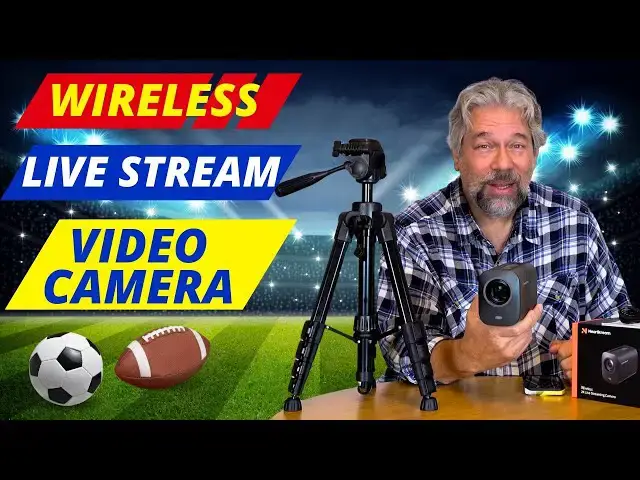
You can livestream on Facebook, YouTube, or Twitch with just a tap or two if you're using the NearStream VM33 Wireless Live Streaming 2K Camera. It's all controlled from your mobile device and with a crazy 40x zoom and crystal clear imagery, it'll help you level up your video work. Don't live stream? It can record to your phone (wirelessly!) or record hours of video to its MicroSD card too. Tech expert and YouTuber Dave Taylor offers a detailed demo and explains the pros and a few of the quirks too.
Check the camera out at: https://amzn.to/3AmC9Wz
and the tripod too: https://amzn.to/48wvCp0
Or go directly to the NearStream site with this link:
https://nearstream.us/all-in-one-streaming-camera-vm33?sca_ref=5964626.f4epg8XSGp
Visit Dave's Q&A Web site at: https://www.AskDaveTaylor.com/
0:00 Introduction
2:05 Livestream Specs
4:14 Camera & Phone Demo
7:00 Microphone Inputs
9:06 More Specs
10:45 Back Port Tour
12:00 Conclusions
#nearstream #livestream #streaming #2kvideo #askdavetaylor
Show More Show Less View Video Transcript
0:00
a remote access 2K camera that's ready
0:02
to live stream or record any event you
0:06
want let's check it
0:07
[Music]
0:14
out Dave Taylor here and I'm checking
0:16
out this this is the near stream VM 33
0:20
Wireless live streaming 2K camera and as
0:24
you can see it is a self-contained unit
0:27
it's pretty big and chunky because it
0:29
has a lot of batteries so it is a really
0:32
great little camera marred by some less
0:36
than great software but we'll get to
0:38
that I have a great demo to show you
0:40
that will be something where you'll be
0:42
like wow that is pretty slick but let me
0:44
tell you a little bit about it so it's a
0:47
4X digital and 10x optical zoom so you
0:50
can have this pretty far away and zoom
0:54
way in so if you have multiple of these
0:56
and it's really designed for you to have
0:58
more than one and then you can be in
1:00
control and switch from camera to camera
1:03
all while live streaming so that's
1:06
really slick um and you can zoom in so
1:09
you can have this safely in the back of
1:11
the bleachers and still have it be
1:13
pretty tightly cropped on the basket at
1:16
one end of the basketball court or the
1:19
center of the volleyball net or pulled
1:22
way out so you can see both teams and
1:24
everything going on in the game
1:26
meanwhile a second one of these might be
1:29
pretty tight cropped on a commentator
1:32
who's actually saying what's going on
1:34
and that's really pretty slick for such
1:37
a basic device so has a great amount of
1:40
Zoom it has on the top an eight
1:43
microphone array and just as importantly
1:46
on the back you can plug in an external
1:49
microphone and I'll be demonstrating
1:51
that and you'll hear the dramatic
1:54
difference between having a wireless mic
1:56
right by your face or right by your
1:58
mouth and having the remote microphones
2:01
trying to pick you up from 15 or 20 ft
2:03
away so the battery itself gives you 6
2:07
hours of record or live streaming time
2:10
and in terms of that live streaming
2:12
capabilities it's full 1080p HD and it
2:16
supports both realtime messaging
2:18
protocol or rtmp which you'll find in
2:21
things like OBS and it can live stream
2:24
directly to YouTube or Facebook or
2:27
twitch because it also uses the ND I or
2:30
network device interface so it is very
2:34
slick for recording you can record
2:37
wirelessly onto your control smartphone
2:40
because you will need a phone to
2:42
actually manage this one of the things
2:44
to notice is there's no screen on this
2:47
device so when you're setting it up you
2:50
have to pair it with your phone and you
2:52
have to use your phone to figure out how
2:55
to get it positioned just so a really
2:58
cool upgrade would be to have even just
3:00
a tiny little screen but that would be a
3:02
big step from what they have here which
3:05
is just a really straightforward
3:08
wireless remote controlled video camera
3:11
so I actually put in a Micro SD card it
3:15
doesn't come with one but what did I put
3:17
in I put in a pretty decent size one
3:20
this is a 128 GB and that gives me a lot
3:24
of storage and the thing that's crazy
3:26
about things like micro SD cards is they
3:29
are super inexpensive nowadays something
3:32
like this can set you back less than a
3:34
cup of coffee at
3:36
Starbucks but that's a whole Starbucks
3:38
issue too we're not going to go there so
3:40
um in the app and this app they have is
3:43
the near Stream app it gives you access
3:46
to multi camera controls it gives you
3:48
the ability to do graphic overlays
3:51
there's a lot you can do in fact enough
3:54
of me talking let's jump into that demo
3:57
and what I'm going to have is I'm going
3:58
to have the record recorded video from
4:01
the near stream VM 33 on one side and
4:05
then you'll be able to see what I was
4:06
doing on my phone on the other side and
4:09
don't be disconcerted they are slightly
4:11
out of sync because of latency but
4:14
you'll see it's a pretty remarkable
4:16
demonstration now what you're seeing is
4:18
the video as recorded by the VM 33 I'm
4:22
using a wireless microphone that's
4:24
plugged into the 3.5 mm Jack in the back
4:28
in fact here in the app you can see that
4:30
on the side I'm also sort of managing
4:33
the camera remotely with the app so
4:36
first off on the bottom there are the
4:38
ability to do graphic overlays and I can
4:41
for example drop my name onto this or
4:45
turn it off you can do your own graphics
4:47
and have them be transparent for the
4:50
most part and then have much more
4:52
sophisticated overlays it's a pretty
4:54
basic feature there and then I can go
4:56
into audio and you can see that it's
4:59
getting the audio and if I tap on that
5:02
input gear then you can see I'm using
5:05
the 3.5 mm line in in a moment I'll
5:09
actually switch to using the built-in
5:12
microphone but before we get there I
5:14
just want to show you I'm going to go
5:17
into the camera controls image
5:19
adjustment and I'm zoomed in to level
5:22
seven so now let's go all the way back
5:24
and you do that by using that slider on
5:27
the top and suddenly you can see my
5:31
camera is pretty far away from me at
5:33
this point and it's still pretty clean
5:36
and it's doing a really nice job with
5:38
this and there's various adjustments I
5:40
can make I can do things like mirror the
5:43
image so that it is consistent when I'm
5:47
looking at the screen my light is here
5:50
and it's there on the screen too um
5:53
generally you probably don't do
5:55
something like that um so we'll choose
5:57
done actually let's zoom in again again
6:00
and I can zoom in even further you can
6:03
zoom into a ridiculous level this is
6:05
going to be too much darn Zoom we'll see
6:08
what happens but let's see that's a lot
6:12
of Zoom why don't we go back to where we
6:14
at seven let's go to six and I'll Zoom
6:20
back there and as you can see it's
6:23
pretty straightforward to do this if I
6:25
had an additional camera I'd tap on the
6:28
plus symbol on the right and then I can
6:30
add a camera I can go into multi view if
6:33
I have multiple cameras I can show them
6:36
simultaneously either onto the recording
6:39
which is what I'm doing now or on my
6:41
live stream for graphics you can see
6:44
here I have various options for
6:47
overlays um for picture and picture
6:50
again this works a whole lot better if
6:52
you have multiple cameras you can have
6:54
one as an inset for the other and for
6:57
audio there are some features you have
7:00
there I can actually drop in an audio
7:02
track for background or to add drama but
7:06
I also want to demonstrate going to the
7:09
actual microphone on the camera now that
7:13
camera is probably a good 15 feet away
7:16
from me so we're going to switch so now
7:19
you're hearing the audio is recorded
7:22
from the built-in 8 microphone array on
7:25
the top of the VM 33 and I'm pretty far
7:29
away so you could hear the audio quality
7:32
changed quite significantly let's go
7:34
back here and you can see it's still
7:37
getting audio it's you're still hearing
7:39
me talking but it's obviously not as
7:42
clean or not as listenable as me using
7:46
an actual wireless microphone so let's
7:48
switch back and it's that easy to
7:52
actually manage all the controls on this
7:55
and if I wanted to instead of recording
7:58
and I'm recording to the SD card sorry
8:01
the micro SD card on the VM 33 and
8:05
that's giving me the best possible of
8:07
results it's giving me better than HD
8:10
that's why that image looks so clean and
8:12
crisp but I could also live stream too
8:16
and I can't record and live stream so
8:18
I'll have to demo that separately and
8:20
just show you the basics of how that
8:22
works but as you can see here if I had
8:25
multiple near stream cameras I could
8:27
have them along the bottom and I could
8:30
switch between cameras as easy as just
8:32
tapping so you can imagine that like I
8:34
might be here being a commentator and
8:37
then there are two cameras pointing at
8:39
the actual game if we're at a sporting
8:41
event and I could be like well let me be
8:44
an inset where I'm talking even as we're
8:47
watching the game live so it's very cool
8:51
I think this software could do with a
8:53
little Improvement it's really kind of
8:55
difficult to work with but the camera
8:58
and that image quality is really
9:00
remarkable now let me switch back to my
9:02
regular setup to show you what's on the
9:04
back of the camera I think the video
9:07
quality is pretty remarkable but the
9:09
software it takes a while to get used to
9:12
I would highly recommend you hook
9:14
everything up and just experiment with
9:16
it and try different setups and
9:18
configurations for at least a half an
9:21
hour before anything that's critical and
9:24
when you get it recorded I will say that
9:27
it was not easy to get the data off of
9:29
the micro SD card I could not find the
9:33
windows software which the company says
9:35
is available to let you talk to the
9:37
device and it definitely does not work
9:39
if you just plug it directly into a
9:41
Windows or Mac computer I'm not sure why
9:44
they didn't have that as one of its
9:45
features that would be so easy to have
9:47
it show up as an external device but it
9:50
doesn't so you can also just pop that
9:53
micro SD card and put it into a card
9:56
reader I would recommend that as the
9:58
easiest and by far fastest way or of
10:01
course you can experiment with having
10:03
the camera record directly onto your
10:06
mobile phone the downside with that is
10:09
you are then somewhat um stuck with
10:12
whatever bandwidth your phone and Camera
10:15
can figure out whereas recording
10:17
directly on the camera gives you the
10:18
highest bandwidth and therefore the
10:20
highest resolution um if you're live
10:23
streaming then obviously those bets are
10:25
off and you're probably wondering why do
10:28
I have this tripod next to me so near
10:30
stream also sent me this little tripod
10:33
this is a really great little tripod it
10:35
extends all the way up to 51 in so it's
10:39
basically chest level this is a really
10:41
nice addition to your kit um you might
10:44
even want to get multiple of these
10:45
cameras but as I said let me show you
10:48
what's on the back cuz that's really all
10:50
of the controls and
10:52
capabilities and the say controls is
10:54
probably a little bit optimistic there's
10:56
the power button there's USBC for
10:59
charging and perhaps connectivity I was
11:02
not successful with that there's that
11:04
micro SD slot there's a 3.5 mm audio
11:08
jack for microphone and then there are
11:11
some LEDs along the top that show you
11:14
battery status which is critically
11:16
important if you're recording something
11:18
like a sporting event where you can't
11:21
say hang on can everyone just stop for
11:23
10 minutes while I switch batteries and
11:25
you can't even switch batteries so you'd
11:27
really be saying can everyone just give
11:28
me an hour while I recharge my camera no
11:32
one is going to appreciate that so make
11:35
sure you're fully charged beforehand it
11:37
takes good 3 4 hours to do a full charge
11:39
from zero but then you get 6 hours of
11:42
battery life so that should be enough
11:43
for really even the longest game and
11:46
like sudden death and you know all sorts
11:49
of extensions and everything even a
11:51
soccer game that against two perfectly
11:54
matched teams is going to take less than
11:56
six hours one hopes so live streaming
12:00
you can live stream Sports and meetings
12:02
and lectures you can even use it as a
12:04
webcam if you want it actually includes
12:06
a USBC to usba Cable pretty heavy duty
12:11
one so this plus this plus this lets you
12:15
make it actually a really cool webcam
12:17
and in a lot of video streaming apps
12:20
like Zoom you can switch between cameras
12:22
so you could have this set up to give
12:24
you a longer shot and maybe have a
12:27
whiteboard behind you that you're doing
12:28
um figures or doing mathematical
12:31
equations on or something and then you
12:33
switch back to a closer camera or use
12:36
the app to actually zoom in and then
12:39
you're back on camera talking about what
12:41
you were just doing so lots of options
12:44
lots of interesting capabilities and as
12:47
I said I think that the camera
12:50
technology here is really good it could
12:53
do with a slightly faster autofocus but
12:55
I'm going to give it slack for that
12:57
because the image itself is so crisp and
13:00
clean it's really impressive I was
13:02
experimenting with this where it was 30
13:05
or 40 feet away from me and when I
13:07
zoomed in significantly it was crisp and
13:10
clean to the point that you didn't even
13:13
believe that it was like Well it can't
13:15
possibly be that far away I can barely
13:17
see the thing it's just that good a zoom
13:20
on it and that's really impressive so
13:23
the software they could probably do with
13:25
a Rev on the interface and it would be
13:28
great to have it maybe work with a
13:30
tablet instead of a phone cuz that gives
13:32
you a lot more screen real estate to
13:34
work with but it is definitely one worth
13:37
checking out and if you're someone who's
13:39
live streaming on Twitch or Facebook or
13:41
YouTube this makes that process
13:43
literally a single tap in the app that
13:46
then gives you access to that stream and
13:49
that's about as easy as it's going to
13:51
get I'm going to ask you to subscribe to
13:53
my channel click or tap on that
13:54
subscribe button hit that Bell icon for
13:57
notifications and check out my new video
13:59
when you get those notifications please
14:01
and give me a thumbs up if you found
14:03
this to be a valuable review and I
14:05
certainly hope you did if you didn't
14:08
leave a comment and tell me what you
14:09
wish I would have demonstrated great
14:12
this this unit is the near stream VM 33
14:17
Wireless live streaming 2K camera and it
14:20
is
14:22
$399 currently minus $40 dropping it
14:26
down to
14:27
$359 at
14:29
amazon.com and the tripod this little
14:33
guy it's a really nice little guy comes
14:35
with a bag too so you can fold this up
14:38
and throw it over your shoulder and then
14:40
you're ready to be in the field this
14:42
51-in tripod is$
14:45
29.99 tripods are very affordable
14:48
nowadays and it also I should point out
14:51
has a quick release so you can just
14:53
screw this into the bottom of the near
14:55
stream camera and then with the flip of
14:58
a lever you can put it on the tripod or
15:01
you can take it off the tripod because
15:03
you want to put it in a different
15:04
position or charge it or get the data
15:07
off of the card or whatever so it's
15:09
everything I got I hope this was a value
15:11
and I'll hope to catch you in my next
15:14
video
15:19
[Music]
15:31
he
#Consumer Electronics
#Camera & Photo Equipment
#Multimedia Software
#Voice & Video Chat
#Media Streaming Devices
#Virtual Reality Devices
#Video Sharing