Up next in 10



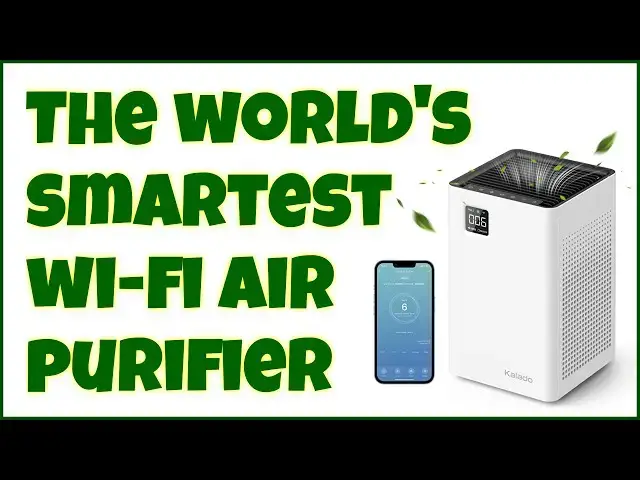
[discount code below!] There's little doubt that the Kalado Smart Air Purifier - model KCA01 - is the smartest air filtration system in the world. A big, bright LCD screen on the front, an app that lets you control it from a thousand miles away, even compatibility with Amazon Alexa and Google Home. But it's the smart H13 HEPA filtration that's the heart of this must-have air purifier for your home, bedroom, the baby's room. Tech expert Dave Taylor demonstrates all the key features in this demo and review...
Check it out at: https://amzn.to/3EKR0tJ
Don't forget to use claim code "DaveTaylor" for a sweet 5% discount
Start Date:10/26/202 End Date:11/30/2022
Then visit Dave's Q&A Web site at: https://www.AskDaveTaylor.com/
#kalado #airpurifier #hepa #h13 #smarthome #askdavetaylor
Show More Show Less View Video Transcript
0:00
Is this the world's smartest air purifier
0:02
Let's find out. Dave Taylor here, and I'm checking out this
0:13
This is so cool. This is the Colado Smart Air Purifier, and it's actually pretty slick
0:19
Now, first thing you'll notice is it has this big LCD screen on the front
0:24
and that number is showing me the measure of how dirty my air is in parts per million
0:30
So it's really low. I have really good air quality, and I have other air purifiers running
0:36
So we're going to light a candle to test it. But before we get there, let me tell you, you can use this on up to 1,300 square feet of space
0:45
and it'll take about an hour to circulate through all that air
0:49
If you have a smaller place, if you have it in just your bedroom
0:52
obviously it's going to be cycling air much more frequently. So if you have like a 250 square foot bedroom, which is a pretty decent size for a bedroom
1:01
then this could be cycling through and filtering that air like every 10 minutes, which is great
1:07
Now, it also is Wi-Fi controlled. There's an app, I'll show you that, and you can use it with Alexa or with Google Home
1:15
And I assume it will just have a software update, and it'll work with Matter
1:19
when that becomes something really relevant. And it is a Particulate Matter 2.5 monitor
1:27
And as I said, you see that on the display screen. So I'm at 003, which is almost completely clear of dust and pollen
1:37
and all of that junk that you can get in the air, which is not good for your lungs
1:41
And it's also not good for your sleep patterns. So it has an automatic mode or manual mode
1:48
There are five speeds of fan. In fact, there are controls on the top
1:52
So yes, there's an app and everything, but you can just do everything directly
1:56
I can turn it off or back on, put it in automatic mode, turn the fan up
2:05
And it's super quiet. Let's see, I think if I put it... Oh, there we go
2:09
So it slowly brings up the fan, which is really great. There's a nighttime mode, which turns off lights
2:16
There's also a light at the bottom. See that? And you can actually set that to different brightnesses
2:22
So there's it at its brightest. That's a lot for a nightlight
2:26
So in sleep mode, it turns all that off. It turns off the display
2:30
It does something that a lot of people appreciate, which it goes completely dark
2:35
which is really important if you're one of those people who likes a really dark sleep space
2:40
Let me turn this even to its highest setting. There we go
2:45
Now it's back down to its lowest. So five speeds and it pushes out some pretty solid amount of air at the highest speed
2:53
Let's see, in night mode, it's 25 decibels. So you're basically not going to hear it at all
2:59
And all the lights turn off and it uses HEPA filters. So let me unplug it
3:04
I'll show you that it has a plug, a wall plug. It's not a super long wire, but you could always use an extension cord
3:12
And then it does come with filters. And of course, every so often you're going to want to vacuum the filters
3:18
And you also will occasionally want to replace them. So here's what the bottom looks like when you unlock it
3:25
And it's super easy to work with. Some of these air filters and purification systems, it's pretty tricky to get the filters out
3:32
This one makes it a breeze. You pull out the filter. There's one on each side
3:37
And this is a full H13 HEPA filter. So one on that side, one on this side
3:45
And that's it. You know, you take them out. You give them a vacuum. You replace them with different ones
3:50
You lock it. And you're back and ready to go. And I'm going to plug it back in
3:55
Let's see, here's my plug. And there we go. Now, let me bring up that app
4:04
This app is actually pretty slick. But let me tell you that before we get there
4:07
that this, with its dual HEPA filter system, removes 99.97% of particles, allergens, smoke, and dust down to 0.3 microns
4:20
That's pretty small. So let me bring up the app. And we'll actually, while we're running the app, I will actually light the candle
4:29
We'll see how that goes. So let's see. Let's get that recording
4:34
And so here's the app. The app actually lets you control a variety of smart home products
4:40
So it's not just this air purifier. But we'll go into the air purifier
4:45
And let's turn it on. Oh, there it is. Switches at the bottom, not in the front
4:54
And I will note, there is one tiny bug that I noticed
4:57
Is if we go back to the previous screen, it shows me the temperature in Fahrenheit
5:02
But the Collado shows me the temperature in centigrade. Oh, well. Probably not a big deal
5:07
But now I have this turned on, I can go to different modes
5:11
So I'm going to just leave it in auto mode. Actually, no, let's turn it to manual
5:16
And then there are, as I said, five different speeds. So I can just jump to the highest speed
5:24
And that's going to filter the air as quickly as possible throughout the room
5:29
It is a little noisy for me talking. So let's go back down to number three
5:35
And then in settings, I can reset the filter. And perhaps most importantly of these three
5:41
I can actually change that light at the bottom. So I can turn the atmosphere lamp on or off
5:47
And the countdown is really helpful. I'm not sure why it's off to the side like this
5:51
But you can set it up so it'll run for an hour or two
5:55
And then it'll turn itself off, which is really great. I'm going to just leave it running
5:59
And now you can see I'm down to two parts per million
6:04
Now let's light this candle. And you don't realize it, but you light a candle
6:08
and there's all that smoke and all that on the top. Well, that is all impurities going into the air
6:19
So even just lighting a match, even the smoke from the match
6:27
is going to change that particles per million. So as it detects that, it's going
6:32
to go up just a little bit. But let's light this candle to sort of maximize
6:38
the impurities brought into the air. And maybe put this here and put this here
6:44
and just let this run. Oh, there we go. That's OK, though
6:48
So it should raise the number, but not a lot. I could have a whole range of candles
6:54
and then look like I'm in some Netflix horror series. But this is adding impurities to the air
7:01
And you're like, what? Why would a candle add impurities? And the answer is that's literally
7:06
where the smell comes from. When you have a fragrant candle, it's
7:10
adding particulate matter to the air. So what I'm doing is I'm making this
7:15
work to remove these particles. So it's actually gotten better air quality
7:21
because I think it's just really kicked in and is starting to work, which is great
7:24
Now, there we go. Five, so six. So it's starting to say, hey, something's
7:30
going on with your air quality there. But all it's going to do is since it's an automatic mode
7:36
it will just put a little more work into it. And it'll make sure that it's going
7:39
to run as needed to get that number back down. Now, I am not being its best friend right now
7:46
by having that candle sitting literally right next to it. But hey, that's what a test is for, right
7:52
Cool. So let me tell you just a tiny bit more. And then the only thing left to talk about
7:58
is the price because you've seen all the features. I've shown you here
8:02
It's the buttons. I'll give you a close-up and a tour. So left to right, we have power
8:08
We have mode. We have fan speed. You can push this button and immediately go
8:13
into nighttime mode. You have that timer if you want it to turn off after a certain amount of time
8:20
You have that nightlight at the bottom. And the very last one is to reset
8:24
when it lights up because you need to replace your filters, which it keeps track of
8:28
And it actually shows it in the front. Let me give you a close-up of that front LCD, too
8:33
Because one of the things it shows you is it shows you the health of your filters, which is great
8:39
Now, let's keep this just keep it getting all that in-particle matter there
8:46
So that's really everything. In terms of dimensions, it's 8.6 by 8.6 by, what is it
8:53
14 and 1 1 inches tall. And it's 9.4 pounds. So it's kind of heavy
8:59
It's not really designed to move from room to room as you move around
9:03
So I would say get it in the best possible place you can
9:06
And then just let it run. And from experience, don't have it immediately against a wall
9:12
Give it at least 6 to 12 inches in all directions. And it'll do a lot better job of pulling air in and filtering it
9:19
So really, so much to like about this. This is indeed the smartest air purifier I've ever seen
9:27
I really like having the app. I think that's a really cool feature
9:31
And as they say, one of the things you can do is you're on your way home from work
9:35
You can turn it on and have it start purifying your air so when you walk in the house, it's nice and clear
9:41
But generally, what I do is I just leave these running all the time
9:45
That's why my particulate matter is so incredibly low. But you can imagine if there was a fire near me or something
9:52
then when you see it's like a smoky day or something and there's smoke in the air
9:57
that's again particulate matter. And something like this can be a huge difference
10:02
to give you better air quality. So really a good idea. Now, I need to talk about the price
10:08
But before we get to the price, I'm going to ask if you could subscribe to my channel. A click or a tap on that subscribe button
10:14
and then go ahead and turn on notifications, that little bell icon
10:18
and you'll know about my new content as I post it. I post straightforward, honest, candid reviews
10:24
So hopefully you'll subscribe and we'll stay connected. Cool. This is the Colado Smart Air Purifier
10:32
and it's $119.99. But when I checked Amazon this morning, there was a $30 coupon
10:38
making this $89.99 at Amazon.com. That is a steal for a product that can filter this much air
10:46
and has this many smarts and is this incredibly easy to work with
10:50
Highly recommended. Definitely one to check out. I'm really glad to put this in my bedroom
10:55
because I want the cleanest possible air while I sleep and so do you
10:59
So that's all I got. Hope to catch you in my next video. Transcribed by https://otter.ai
#Consumer Electronics
#HVAC & Climate Control
#Home Automation
#Vacuums & Floor Care
#Air Filters & Purifiers
#Household Fans