Up next in 10



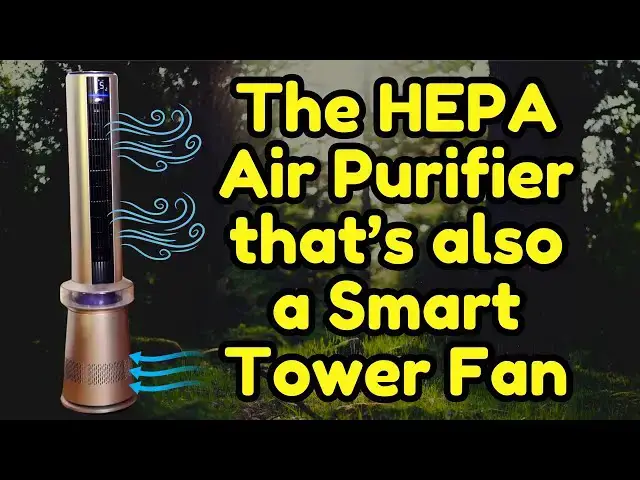
Whether you live in the city or on a farm, air quality in our living spaces vary quite a bit, sometimes becoming downright unhealthy. That's why Dreo created the 2-in-1 45" Air Purifier Tower Fan. It combines a powerful HEPA air purifier with a flexible tower fan and adds an air quality sensor and smartphone app. In fact, you can turn on your Dreo fan from 50 miles away if you want it working by the time you get to the office or back home. Tech expert Dave Taylor explores all the features and capabilities of the Dreo 45" 2-in-1 Air Purifier Tower Fan, including pairing it with the Dreo app.
0:00 Introduction
1:36 Oscillation
5:16 Display & Top Panel Tour
6:33 App Pairing
7:45 App Demo
10:00 Conclusions
Check it out at: https://amzn.to/3BBYBva
Visit Dave's Q&A Web site at: https://www.AskDaveTaylor.com/
#dreo #hepa #airpurifier #airfilter #towerfan #smartfan #smartfilter #askdavetaylor
Show More Show Less View Video Transcript
0:00
a tower fan that also purifies your air
0:02
let's check it
0:04
[Music]
0:10
out Dave Taylor here and I'm checking
0:12
out this this is the doo 45 in air
0:17
purifier tower fan so the top portion is
0:22
an oscillating tower fan and then the
0:25
bottom portion is actually a HEPA air
0:28
purifier so it's a really slick design
0:31
when you have it all going it puts out
0:33
an enormous amount of air and all of it
0:36
coming in through the bottom and going
0:38
through the filtration system so not
0:41
only will this cool down your space but
0:44
it will also clean the air and that's
0:47
really slick now you see this blue on
0:49
the front here that blue indicates I
0:52
have very good air quality so one of the
0:55
things Doo's done really well is they've
0:57
really engineered that user experience
1:00
and they have a ton of fans I've looked
1:02
at a ton of their fans I really like the
1:04
brand they are one of the bestselling
1:07
fans in the world actually and these
1:10
demonstrate why or this one demonstrates
1:13
why so I'm going to jump in with some
1:15
close-ups in a minute but for now let me
1:17
just show you that there's a touch
1:19
sensitive panel on the top that give you
1:22
controls and it also includes a remote
1:25
control that you can use and there's
1:28
also an app and we'll plug in that app
1:30
and check that out in a minute too but
1:32
let me give you some basic specs so
1:34
there's 120° oscillation which I'm going
1:36
to turn
1:38
on and there we go so now it's starting
1:41
to oscillate and 120 degrees is really
1:44
nice I've looked at fans that have like
1:45
80 or 90° and The Wider it can oscillate
1:50
the more you can put it into a corner
1:52
and have it really work and clear a
1:55
space for you now you want to have it at
1:58
least a foot from the wall you can see
2:00
I'm demonstrating here cuz you want to
2:02
have nice air flow around it but the
2:05
idea that you don't need this in the
2:07
middle of the room but you can have it
2:08
in a corner or something that's really
2:11
terrific so 120° oscillation it's a dual
2:14
motor system with five different speeds
2:17
and at maximum speed and let's do that
2:20
so there's a Plus on the
2:22
top and
2:30
that should be speeding it up quite a
2:34
bit and I can see all the things around
2:37
the camera are now blowing away so it
2:40
puts out a maximum of
2:43
1558 cubic feet of air per minute so
2:47
that's pretty powerful you're going to
2:49
be able to feel that 25 30 ft away and
2:53
still notice
2:55
that it's still pretty darn quiet so in
2:59
sleep mode mod with just the fan it's
3:01
down to 25 DB which means you're not
3:03
going to hear it at all you will have
3:05
environmental noise that'll be at least
3:07
that loud does have a 24-hour timer so
3:11
this works out really well for people
3:12
that want to be able to like set it when
3:15
they go to bed and have it automatically
3:17
turn off at say 9:00 a.m. because you've
3:20
left for work and you don't want to
3:21
worry about having to remember it but
3:24
since it does have internet connectivity
3:27
it also means you could do that from the
3:29
app at work work you can say oh let me
3:31
check oh still on turn it off boom easy
3:34
as that so it's a bladeless fan system
3:37
which means it's completely safe for
3:39
little people which I really appreciate
3:42
and the way it's designed it's really
3:44
easy to pop the filter out here so it
3:48
has this round HEPA filter and it's easy
3:51
to pop that out and then the back you
3:53
can take the entire back off and you can
3:56
just rinse the system out because it is
3:59
going to collect dust my experience with
4:01
fans in Dusty environments is the dust
4:04
ends up in the fan which I guess is the
4:06
point of an air purifier so that's
4:08
totally logical um the display will Auto
4:12
dim based on the illumination level
4:14
which is super important for people that
4:16
want to have a really dark room when
4:18
they sleep it will detect your that it's
4:20
in a dark room and it'll turn the
4:21
display off so that's really perfect
4:24
behavior in terms of the HEPA filter at
4:26
the bottom and I don't know if it's just
4:28
me but I look at this and I think that
4:30
it's like one of those propane space
4:32
heaters that restaurants use so it's
4:35
that similar sort of design with that
4:37
lower base but the lower base is that
4:40
air purifier and that air purifier gets
4:44
99.97% of particulate matter down to 0.3
4:50
micrometers so it's going to pick up
4:52
pollen and dander and dust and you know
4:55
even if there's like smoke from a fire
4:57
in the area it'll be able to pick that
4:59
up and it'll be able to avoid you having
5:02
to breathe it which is the entire
5:03
purpose so drio app gives you Alexa
5:07
compatibility let me jump to some
5:09
closeups so you can see the front
5:11
display and you can see the top and how
5:15
those controls work the display offers a
5:17
lot of information and here you can see
5:19
that I am connected to Wi-Fi and that I
5:22
have muted the system so I don't get
5:24
beeps that one represents air quality
5:27
that is remarkably low and you can see
5:30
that that is true cuz you can see
5:32
microgram per cubic meter and then that
5:36
a means I'm in auto mode and then the
5:39
auto with the leaf on the right is the
5:41
purification mode notice in particular
5:44
that blue bar which indicates I have
5:47
excellent air quality if it was green it
5:49
would be good air quality orange for
5:52
moderate and red for poor air quality
5:55
now let's jump and look at the top too
5:58
the buttons on the control panel our
6:01
power mode button to switch between
6:04
normal Auto sleep and
6:07
Breeze purification
6:09
mode increase speed decrease speed an
6:13
information button that will make sure
6:15
you can see your air quality a timer and
6:19
of course the oscillation button now
6:22
let's pair the fan with the drio app so
6:26
I launched the drio app and because I
6:28
have other fans you already see them in
6:30
the app but I'm going to press
6:32
plus and then it should find the device
6:35
there it is purifier tower fan doesn't
6:38
get much easier than that and let's see
6:41
press and hold the button indicated for
6:43
5 seconds so that is the oscillation
6:48
button so 1 2 3 4 5 it actually has a
6:54
countdown
6:55
timer
6:57
and so now Wi-Fi that looks like it's
7:01
good and I'm going to connect to the
7:05
device and this seems like it's going
7:08
slow but my experience is that all of a
7:11
sudden it leaps forward significant
7:12
amounts so I don't think it's going to
7:14
take long as you can see here it's going
7:16
pretty quickly actually even though that
7:18
first couple of TAPS were slow so we're
7:20
done that's all I needed to do we'll put
7:23
it in the default room and I guess there
7:25
are two different colors and I think
7:27
that refers to the blade in here this is
7:30
a transparent portion and then there's a
7:32
blade in there and when I say blade I
7:36
think it's actually rubber but it's
7:38
completely sealed anyway and you can
7:40
have that be blue or orange pretty sure
7:42
mine's blue so we'll do blue and now
7:46
here it is so now I have a huge number
7:49
of controls so I can go here and I can
7:52
change the purification level again this
7:55
is still blue and you can see in the app
7:58
it's showing me blue so my air quality
8:00
is already really good and that's
8:03
partially because I have other air
8:04
purifiers also running but I can go into
8:07
the fan and I can go into sleep mode and
8:11
drop it down let's drop it down to
8:15
four and now it's super quiet so now
8:19
it's oscillating at 90° but I can change
8:22
that you can actually find tune it which
8:24
I think is really cool and you can do it
8:26
asymmetrically where I can just say just
8:29
have it work in that portion of the room
8:32
or I can just say boom let's do the full
8:33
120 super easy and then the display I
8:38
can um turn the display off if I want if
8:42
I really never want to see any
8:44
illumination from this portion I don't
8:46
want to see any data I'll use the app
8:48
thank you very much I can turn the
8:50
display off from the app there's panel
8:53
sounds that are already turned off child
8:56
lock as you can see there's just so much
9:00
you can do here and I really like it
9:02
tracks filter life I can go into
9:05
settings and I can change a bunch of
9:07
this stuff including we can check let's
9:09
see if there's a firmware version that's
9:12
updatable and we already have the latest
9:15
firmware you wouldn't think that's a big
9:17
deal but it's useful and notice it also
9:20
gives me the ability to hook it up to
9:21
both Alexa and Google assistant so if I
9:24
give it a memorable name I can then say
9:27
something like you know turn on purifier
9:31
fan and then it would just turn it on
9:33
without me having to touch anything
9:35
which is ideal but this is also this app
9:38
is running through WiFi and this is
9:40
talking to my Wi-Fi network which means
9:44
I could turn this on on my way home and
9:47
by the time I get home it will have
9:49
moved all the air and cleaned it up a
9:51
little bit and it'll just make it a more
9:53
pleasant environment for me to walk into
9:55
so that's what I wanted to show you with
9:57
the app and like I said it's just
10:01
delightfully easy to work with and I
10:03
have all of my drio fans in that app
10:05
which just gives me power I can set
10:08
things up it's actually really great so
10:11
that's pretty much everything it's 46.5
10:15
in tall and at the base at the widest
10:18
it's 11 in across and it is a little bit
10:22
heavy because there's a lot going on
10:24
here so it's about 18 lb 17.8 lb so it's
10:29
not the most convenient to pick up and
10:30
move around but the whole point is you
10:32
don't need to do that you can just set
10:34
it up as I have here in a corner and
10:38
it's going to be good to go so really if
10:41
you're looking for an air purifier and
10:43
you want a fan there's no reason in the
10:45
world not to have them paired and have
10:47
them in one unit makes life so much
10:49
easier and it's a nice elegant looking
10:52
unit that's comparable to another brand
10:54
that starts with d but charges a whole
10:56
heck of a lot more for products that
10:58
might not be is good we're just going to
11:00
go that far with that so this is one
11:03
definitely worth checking out I think
11:05
it's worth you know adding to your home
11:07
or office there's no space that it's not
11:09
going to make more pleasant so really
11:12
nice I am going to ask you to subscribe
11:14
to my channel click or tap on that
11:16
subscribe button hit that Bell icon for
11:18
notifications give me a thumbs up if you
11:20
found this of value and I hope you did
11:23
great this is the doo 45in air purifier
11:28
Tower fan and it is
11:33
$299.99 currently with a $30 coupon
11:37
discount dropping it down to
11:40
$269.99 at
11:42
amazon.com and just so you know
11:44
replacement HEPA air filters are $39.99
11:48
each so I would recommend ordering an
11:52
extra because they last 6 to 12 months
11:55
you can probably push it further than
11:56
that what I do is I'll take them out and
11:58
I'll vacuum them um but eventually
12:01
that's not going to really be working
12:03
really well so it's nice to know that
12:04
there are Replacements and that they're
12:06
actually considerably less expensive
12:08
than you might think so that's
12:10
everything I'm going to actually go put
12:12
this in my bedroom so I'll hope to catch
12:15
you in my next video
12:21
[Music]
12:32
he
#HVAC & Climate Control
#Air Filters & Purifiers
#Household Fans