Up next in 10



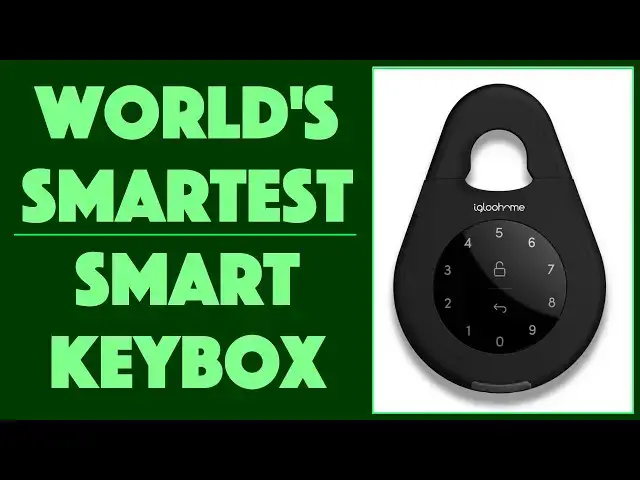
Need to leave a key for guests, a realtor or someone who requires access to your home, boat, cabin or RV? Lockboxes tend to be too small and poorly designed, and in the 21st Century you want something smart and customizable too, right? Enter the terrific Igloohome Smart Keybox 3. It's big, yes, it's bulky, but it's smart and has plenty of space for access keys, car key fobs and more. One time custom PIN codes, recurring access, permanent randomly generated PIN codes, and it's all logged and accessible via the convenient Igloohome app.
Tech expert Dave Taylor of https://www.AskDaveTaylor.com/ got his hands on an Igloohome Smart Keybox 3 and put it through its paces. From space for exotic car key fobs to programmability for AirBNB property owners, there's really a lot to like with this modern lockbox. And the price? Well, he talks about that too...
Check it on Amazon: https://amzn.to/2v56Vky
Show More Show Less View Video Transcript
0:00
A smart lock box? Let's have a look
0:09
Dave Taylor here and I'm looking at this. This rather beastly thing is the Igloo Home Smart Key
0:16
Box 3 and it's pretty cool. So Igloo Home makes these touch panel lock systems. They have dead
0:24
bolts, they have padlocks, and now they have a key box. And let me go ahead and open it
0:30
And there it is. Now, why do I have one so big? Because I put car keys in this thing
0:38
And here's the thing is this is pretty spendy. We'll get back to it. But I went and bought a
0:44
$12 lock box off of Amazon and you'd think, well, you know, this is going to be functional, right
0:50
But it's too small to put a car key in. That is pretty useless unless you just have a key
0:57
It's really not very functional. So this one is going back and I'm using the Igloo Home instead
1:05
Now, again, let me open it. Oh, it automatically locked. How about that? So I'll show you how you
1:10
unlock it. You palm it and then I have a demo code. Then you push the lock button and you wait
1:16
and that beep means it is unlocked. And as you saw, there is plenty of space inside for car keys
1:24
a house key, a pool key, an access card, whatever it is. If you're an Airbnb person
1:31
something like this is super helpful. Now, close it and there it's locked again
1:38
Really easy to work with. But what makes this really cool is it actually has a lot of smarts
1:44
Now, it's powered by four AAA batteries. And yes, if the batteries run low, the lock will notify
1:51
you. But much more importantly, the app will tell you. And we'll get to the app in a second
1:55
So it offers a bunch of different access, including simple Bluetooth access. You can
2:01
authorize someone's phone or your own phone and simply come near the lock and I will get to the
2:08
Igloo Home app. And I will go to here where it just shows the lock and I will push the button
2:16
to unlock it and it is voila, unlocked from the phone. Now, it is a Bluetooth device, so it doesn't
2:28
need Wi-Fi, but that also means that it doesn't matter if your Wi-Fi or internet goes down
2:33
this thing's going to work just fine. So let's get back to those access types
2:37
There are permanent codes and you can specify your own or you can let it specify a random
2:44
six digit number, I think they are. So you can do permanent, you can do one time and someone
2:50
unlocks it once and as soon as they close it, it locks and that's it, they can't unlock it again
2:55
You can do duration, which means that like for the week someone is staying at your Airbnb
3:01
then they actually have access to this. But as soon as that next morning rolls around
3:05
boom, their code's gone. Or you can do recurring. If you have someone who comes to your house every
3:11
Thursday, then this could be open and available for them to unlock on Thursdays, but every other
3:17
day of the week the code doesn't work. Super cool. Again, works offline. It has two shackle sizes
3:23
I use this one because I just like the heavy-duty-ness of it, but you can replace it
3:27
with a somewhat more modest one that's going to do a whole lot better around most door handles
3:34
Let's see, there is a lockout, so if I tried a bunch of codes, eventually it would just say
3:39
you don't know the code, so I'm going to just go ahead and disable myself for a while
3:43
It does auto-relock. I already demonstrated that. So when you open it and then you close it
3:48
you don't have to do anything at all. It'll just automatically relock itself. Really nice
3:54
And battery died because you ignored your winter cabin for the entire summer? No problem. There's
4:00
actually a USB-C emergency plug. I'm not sure where it is. Oh, here it is. There's a USB-C
4:07
emergency plug you can use with a little portable hand battery, and that will give it enough juice
4:12
that you can unlock it and then obviously replace your AAA batteries. Now, perhaps bigger challenge
4:20
is to get this rubber piece back on properly. We'll get back to that. There we go. Okay
4:28
so that's good. It is not only Airbnb-friendly from a design perspective, but the software
4:34
integrates with Airbnb. So if you have a unit and you have this on your door handle
4:39
then you can actually have it automatically sync with the calendar and send people a one-time
4:45
code or a duration code that's just for the duration of their stay. That's pretty cool
4:50
right? But all of that's well and good, but it's the app that's really fun. So first off
4:56
it's locked. I can tap and it's unlocked. Easy enough, right? Now, in the unlocked state
5:04
if I want to lock it again, I can either just wait or I can tap the button and it will go ahead
5:08
and unlock. Actually, it'll go ahead and lock, right? But let's go ahead and add some access
5:14
So first off, you can see I have my own master lock. I have demo, which is a permanent pin
5:21
which is 1, 2, 3, 4, 5. Pretty easy to remember. And then I have a demonstration of a duration
5:28
lock, which is a realtor. And you can see it's from February 4th to February 25th. So that's
5:34
pretty straightforward. So let's add another one. Let's do a one-time access for my daughter. So
5:41
we get to here and we're selecting access type. We'll do a one-time pin and we're going to give
5:46
it a name. I'll give it daughter, as if she doesn't actually have a name. And then when
5:52
you get down to the bottom, you can let it generate a pin or you can enter your own customized pin
5:59
Now, if you do a customized one, it obviously has to be close because this is a Bluetooth device
6:04
This is not a Wi-Fi or internet device. So you can't be a thousand miles away and upload a new
6:10
code. If you can live with that limitation, and it doesn't feel like much of a limitation
6:14
then it's no big deal. So we're going to generate a pin and it looks like we're ready to go. So I
6:20
tap create pin and there we go. So now we have this new pin. It's a one-time use. So I can share
6:28
it with my daughter, but let's go ahead. And instead let's go and look at the log files
6:33
And you can see here is the log. I'm going to tap sync. So it will actually get the very latest
6:39
data from the padlock. I'm sorry, from the smart key box three and only takes a couple of seconds
6:46
And so now you can see where it's locked and unlocked. I've created a one-time pin
6:52
Go down a little bit. Permanent pin demo was used to unlock it. And then somewhere down here
6:58
there's one where the cleaner demo was used. Oh, and it even logs. Notice an invalid pin code
7:07
was attempted. So it really gives you a lot of data, which is really great. If you're thinking
7:11
that maybe one of your neighbors in your condo complex is trying to hack into your device
7:16
you could actually see on your log that this is occurring once you've done the sync. So I think
7:22
that's good for the demo. Let me go ahead and turn off the recording. And I just want to say
7:28
this is a really cool device. It is big. It is rather clunky. It's 2.2 pounds. This is a lot more
7:35
than this very inexpensive guy, but this guy doesn't serve the bill. So this is actually
7:41
rather spendy, but a really solid and smart solution. And honestly, it's going to sound
7:46
like a lot of money when we get to the price. But if you think about how much it would cost to have
7:50
someone break into your house, well, you know, this price might not suddenly seem so bad. So
7:56
before we get to the price, let me ask if you can subscribe to my channel
8:00
really appreciate when you do that. Cool. This is the igloo home smart key box three
8:06
and it is 149 98 at amazon.com. So 150 bucks. But if you need it, as I do for car keys
8:16
then this is a solid solution. And it's going to be mighty hard for someone to go and break
8:21
through this and break into this and get what's inside without having a code. So that's really
8:27
all you want from a key box. And that's all I want. So that means that I will catch you in my
8:33
next video
#Autos & Vehicles
#Computers & Electronics
#Home Improvement
#Home Automation
#Locks & Locksmiths
#Home Alarm & Security Systems